4  Plots and skills (part 2)

4.1 Add fit curve to raw data points (i.e. dot plot)

library(tidyplots)

# View top 10 rows of the columns used
time_course |> 
  dplyr::select(score, day) |> 
  dplyr::slice_head(n = 10)
# A tibble: 10 × 2
   score   day
   <dbl> <dbl>
 1     0     0
 2     0     0
 3     0     0
 4     0     0
 5     0     0
 6     0     0
 7     0     0
 8     0     0
 9     0     0
10     0     0
# Plot
p1 <- time_course |> 
  tidyplot(
    x = score, 
    y = day) |> 
  add_title(title = "p1") |> 
  add_data_points(alpha = 0.2, color = "#dddddd")

p2 <- p1 |> 
  adjust_title(title = "p2: orientation = y") |> 
  add_curve_fit(
    orientation = "y", color = "#bb5566", fill = "#bb5566")

p3 <- p1 |> 
  adjust_title(title = "p3: orientation = x") |> 
  add_curve_fit(
    orientation = "x", color = "#bb5566", fill = "#bb5566")

p4 <- p1 |> 
  adjust_title(title = paste("p4: orientation = x", "sem ribbon", sep = "\n")) |> 
  add_curve_fit(
    orientation = "x", color = "#bb5566", fill = "#bb5566") |> 
  add_sem_ribbon(fill = "#000000")

p5 <- p1 |> 
  adjust_title(title = paste("p5: orientation = x", "method: 'lm'", sep = "\n")) |> 
  add_curve_fit(
    method = "lm", orientation = "x", color = "#bb5566", fill = "#bb5566")

p6 <- p1 |> 
  adjust_title(title = paste("p6: orientation = x", "method: 'gam'", sep = "\n")) |> 
  add_curve_fit(
    method = "gam", orientation = "x", color = "#bb5566", fill = "#bb5566")

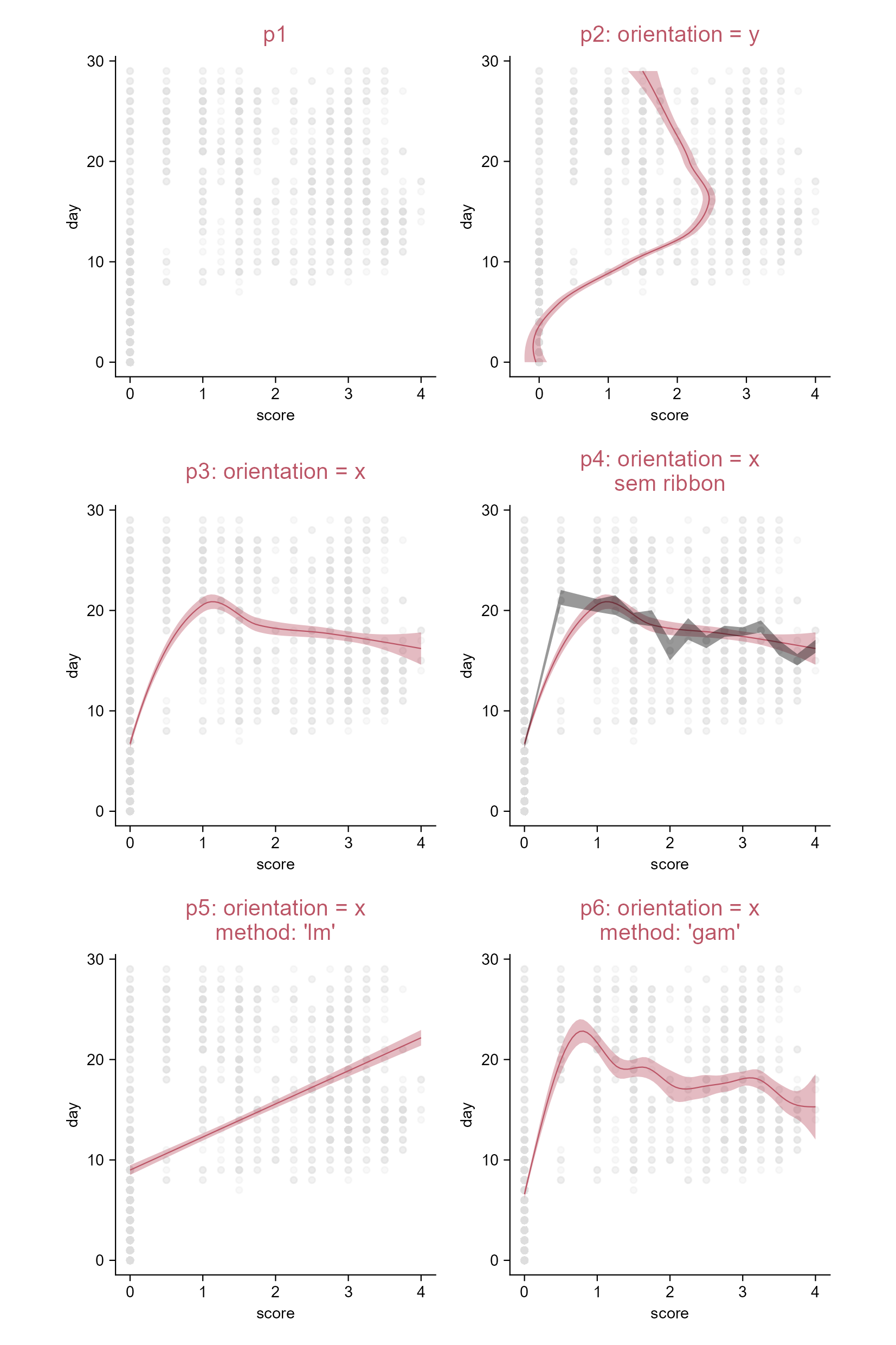
Add fit curve.

4.2 Plotmath expressions in title (e.g. bar plot)

# A tibble: 10 × 2
   treatment score
   <chr>     <dbl>
 1 A             2
 2 A             4
 3 A             5
 4 A             4
 5 A             6
 6 B             9
 7 B             8
 8 B            12
 9 B            15
10 B            16
# eval: false
# Plot
p1 <- study |> 
  tidyplot(
    x = treatment, 
    y = score, 
    color = treatment) |> 
  add_data_points() |> 
  add_mean_bar(alpha = 0.4) |> 
  adjust_title(title = "p1") |> 
  add_sem_errorbar()

p2 <- p1 |>  
  adjust_title(
    title = 
      "$p2:~italic(M)==frac(1,italic(c)(italic(c)-1))*sum(AUC[italic(list(k,l))])$",  
    family = "sans") |> 
  add_caption(caption = "family = 'sans'")

p3 <- p1 |> 
  adjust_title(
    title = 
      "$p3:~italic(M)==frac(1,italic(c)(italic(c)-1))*sum(AUC[italic(list(k,l))])$",  
    family = "serif") |> 
  add_caption(caption = "family = 'serif'")

p4 <- p1 |> 
  adjust_title(
    title = 
      "$p4:~italic(M)==frac(1,italic(c)(italic(c)-1))*sum(AUC[italic(list(k,l))])$",  
    family = "mono") |> 
  add_caption(caption = "family = 'mono'")
Tip

Just surrond your string by “$” characters.

Plotmath expressions work with plot titles, legend titles, axis titles, axis labels, caption, and more.

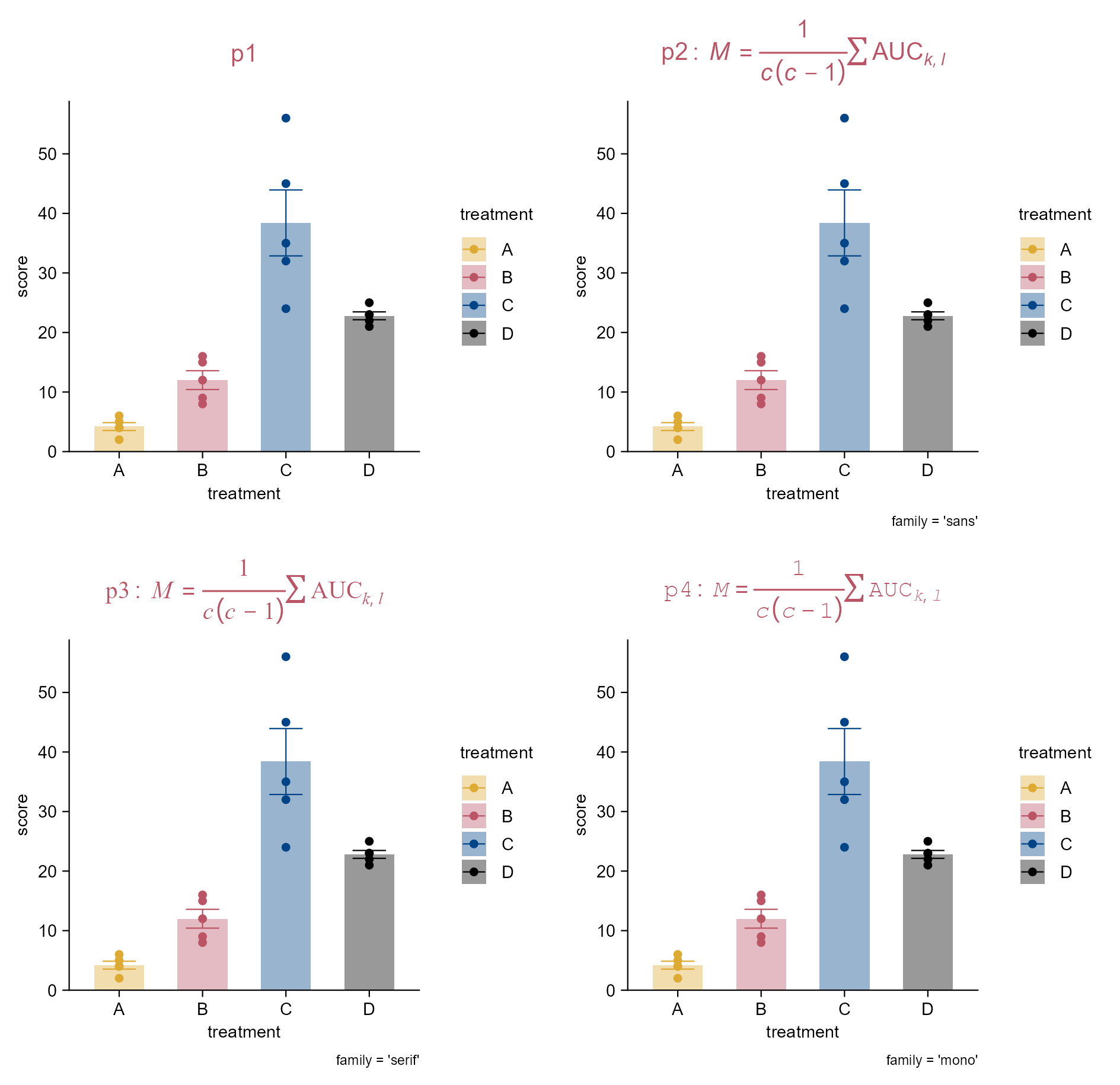
Plotmath expression in title.

4.3 Plotmath expressions in more positions (e.g. bar plot)

library(tidyplots)

# View top 10 rows of the columns used
study |> 
  dplyr::select(x = treatment, y = score) |> 
  dplyr::slice_head(n = 10)
# A tibble: 10 × 2
   x         y
   <chr> <dbl>
 1 A         2
 2 A         4
 3 A         5
 4 A         4
 5 A         6
 6 B         9
 7 B         8
 8 B        12
 9 B        15
10 B        16
# Plot
p1 <- study |> 
  tidyplot(
    x = treatment, 
    y = score, 
    color = treatment) |> 
  add_data_points() |> 
  add_mean_bar(alpha = 0.4) |> 
  add_sem_errorbar() |> 
  add_title(title = "p1")

p2 <- p1 |> 
  rename_x_axis_levels(
    new_names = c(
      "A" = "$IFN*gamma$",
      "B" = "$TNF*alpha$",
      "C" = "$H[2]*O$",
      "D" = "$C[8]*H[10]*N[4]*0[2]$")) |> 
  adjust_title(
    title = "$p2:~italic(E)==italic(m)*italic(c^{2})$") |> 
  add_caption(
    caption = "$Caption:~H[2]*O~level$") |> 
  add_annotation_text(
    text = "$H[2]*O$", x = 2, y = 45) |> 
  adjust_x_axis_title(
    title = "$italic(Mycobacterium~tuberculosis)$") |> 
  adjust_y_axis_title(
    title = "$A==pi*italic(r)^{2}$") |> 
  adjust_legend_title(
    title = "$italic(M.tb)$")
Tip

Just surrond your string by “$” characters.

Plotmath expressions work with plot titles, legend titles, axis titles, axis labels, caption, and more.

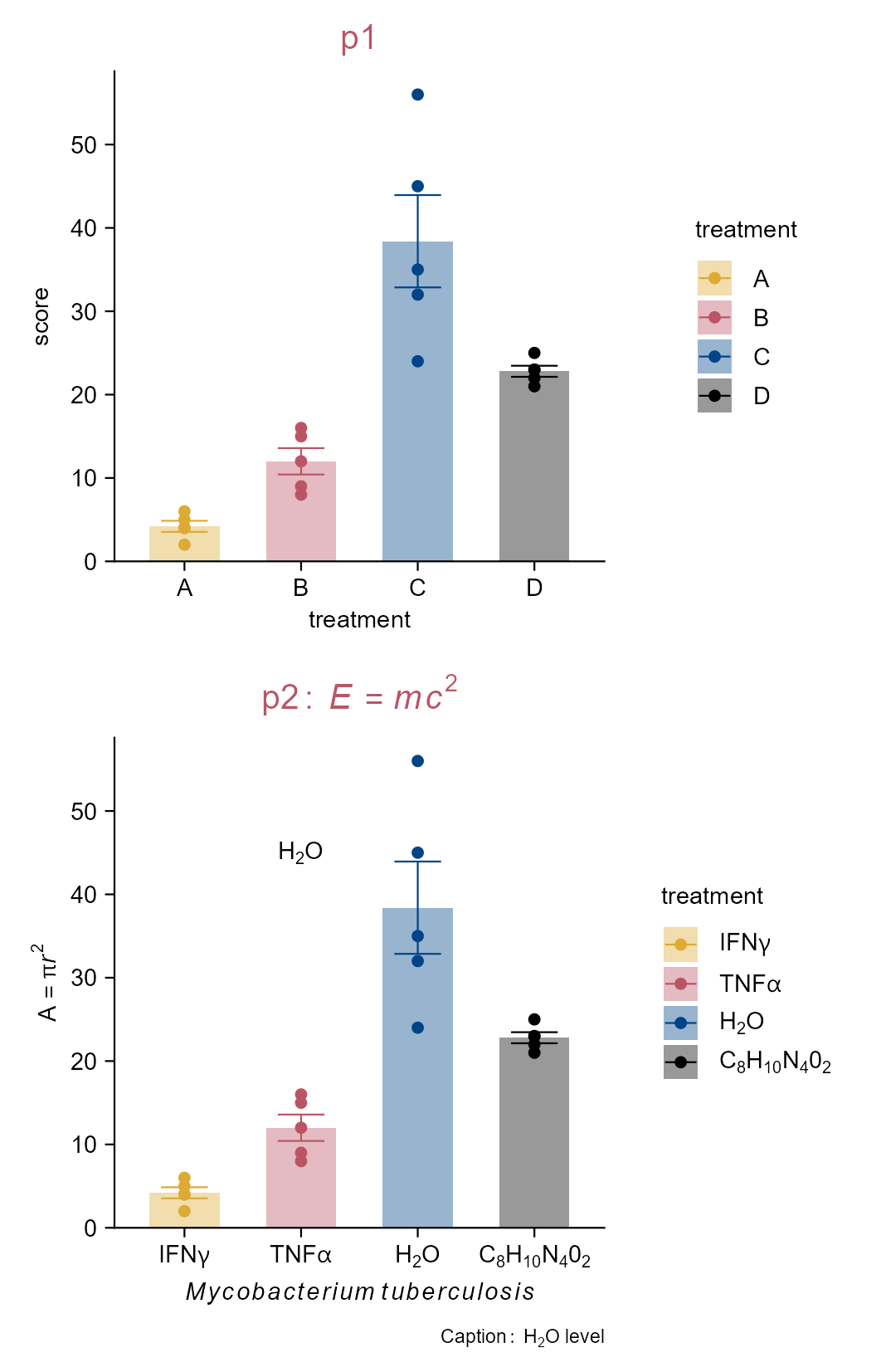
Plotmath expression in more poistions.

4.4 Group comparisons (e.g. bar plot)

library(tidyplots)

# View top 10 rows of the columns used
study |> dplyr::select(treatment, score) |> 
  dplyr::slice_head(n = 10)
# A tibble: 10 × 2
   treatment score
   <chr>     <dbl>
 1 A             2
 2 A             4
 3 A             5
 4 A             4
 5 A             6
 6 B             9
 7 B             8
 8 B            12
 9 B            15
10 B            16
# Plot
p1 <- study |> 
  tidyplot(
    x = treatment, 
    y = score, 
    color = treatment) |> 
  add_mean_bar(alpha = 0.3) |> 
  add_sem_errorbar() |> 
  add_data_points() |> 
  add_title(title = "p1") |> 
  sort_x_axis_levels()

p2 <- p1 |> 
  adjust_title(title = "p2: among groups") |> 
  add_test_pvalue()

p3 <- p1 |> 
  adjust_title(title = "p3: hide statistical info") |> 
  add_test_pvalue(hide_info = TRUE)

p4 <- p1 |> 
  adjust_title(title = "p4: test_pvalue at fixed y position") |> 
  add_test_pvalue(hide_info = TRUE, y = 90)

p5 <- p1 |> 
  adjust_title(
    title = paste(
      "p5: test_pvalue at fixed y position",
      "minimize overlap", sep = "\n")) |> 
  add_test_pvalue(hide_info = TRUE, y = 90, step.increase = 0.3)

p6 <- p1 |> 
  adjust_title(title = "p6: to group A") |> 
  add_test_pvalue(ref.group = "A", hide_info = TRUE)

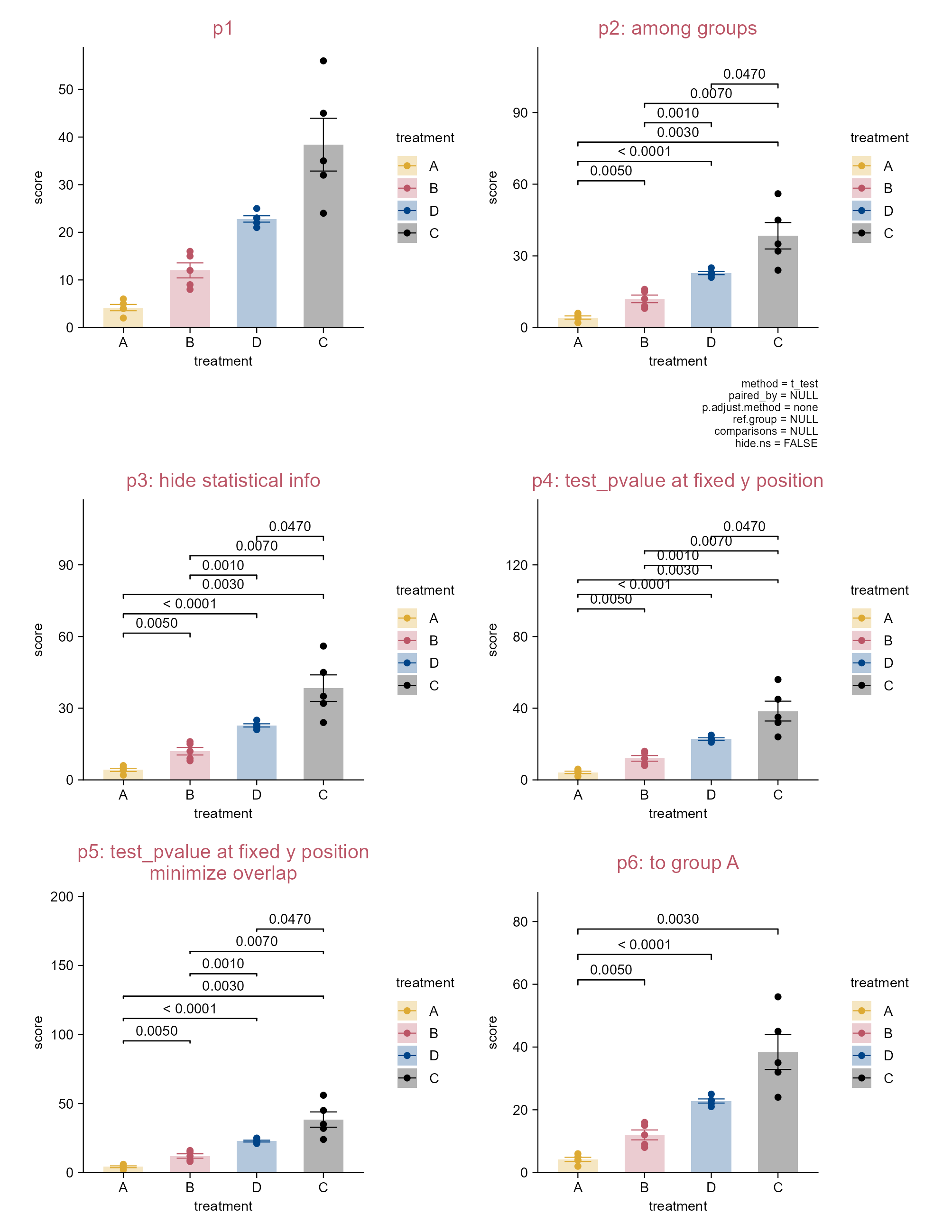
Group comparisons.

4.5 Test selected comparisons (e.g. dot plot)

library(tidyplots)

# View top 10 rows of the columns used
study |> 
  dplyr::select(treatment, score) |> 
  dplyr::slice_head(n = 10)
# A tibble: 10 × 2
   treatment score
   <chr>     <dbl>
 1 A             2
 2 A             4
 3 A             5
 4 A             4
 5 A             6
 6 B             9
 7 B             8
 8 B            12
 9 B            15
10 B            16
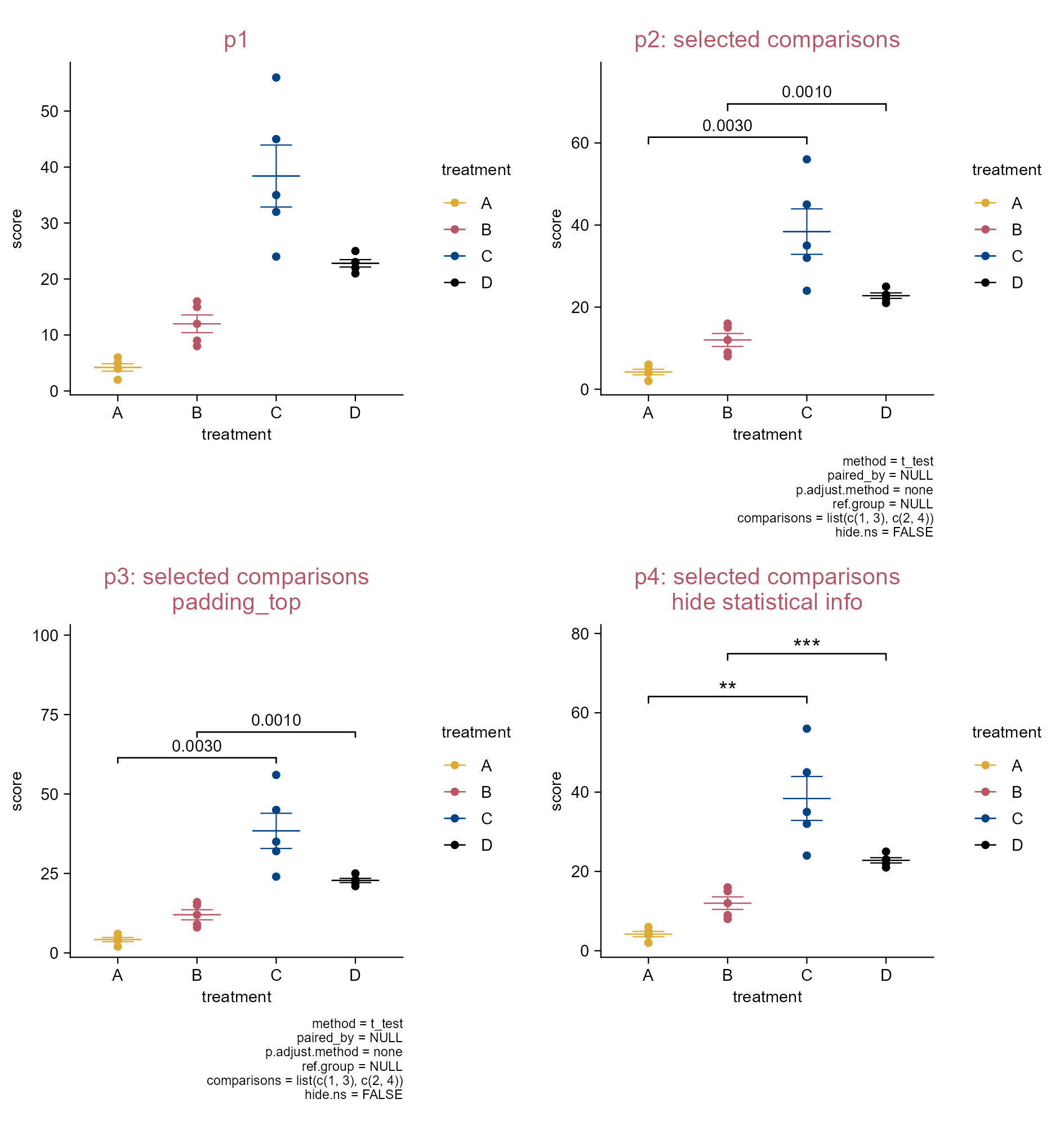
# Plot
p1 <- study |> 
  tidyplot(x = treatment, y = score, color = treatment) |> 
  add_mean_dash() |> 
  add_sem_errorbar() |> 
  add_data_points() |> 
  add_title(title = "p1")

p2 <- p1 |> 
  adjust_title(title = "p2: selected comparisons") |> 
  add_test_pvalue(
    comparisons = list(c(1, 3), c(2, 4)))

p3 <- p1 |> 
  adjust_title(
    title = paste(
      "p3: selected comparisons", 
      "padding_top",
      "adjusted p", 
      sep = "\n")) |> 
  add_test_pvalue(
    comparisons = list(c(1, 3), c(2, 4)), 
    padding_top = 0.5,
    p.adjust.method = "bonferroni")

p4 <- p1 |> 
  adjust_title(
    title = paste(
      "p4: selected comparisons", 
      "wilcox_test", 
      "hide statistical info", 
      sep = "\n")) |> 
  add_test_pvalue(
    comparisons = list(c(1, 3), c(2, 4)), 
    method = "wilcox_test", 
    label = "wilcox test: italic(p) = {p}",
    hide_info = TRUE)

Test selected comparisons.

4.6 Add pre-computed group comparisons (e.g. dot plot)

library(tidyplots)

# View top 5 rows of the columns used
study |> dplyr::select(treatment, score) |> dplyr::slice_head(n = 5)
# A tibble: 5 × 2
  treatment score
  <chr>     <dbl>
1 A             2
2 A             4
3 A             5
4 A             4
5 A             6
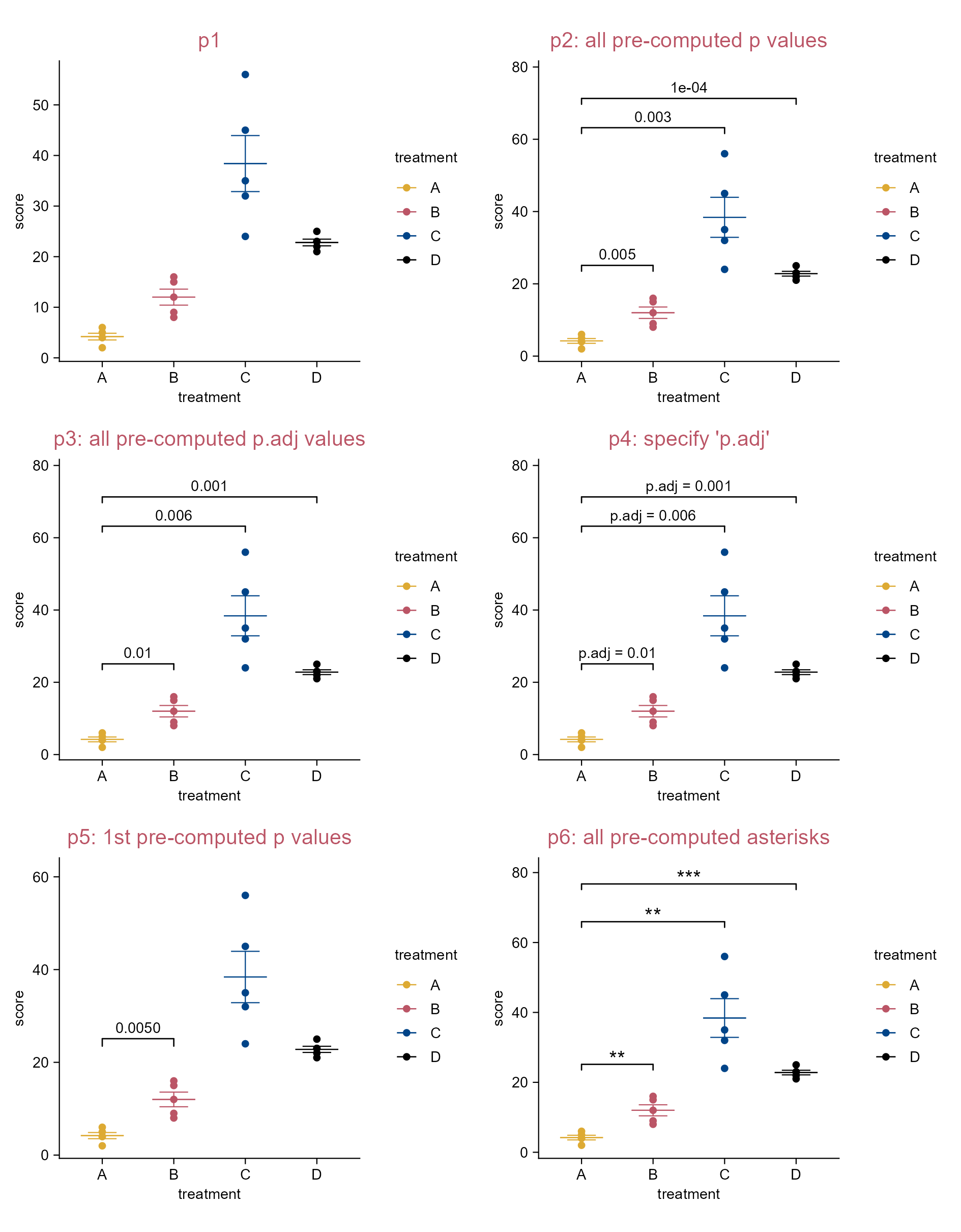
# Pre-computed statistical test results.
stat_df <- tibble::tibble(
  group1 = c("A"), group2 = c("B", "C", "D"),
  p = c(0.005, 0.003, 0.0001), p.adj = c(0.01, 0.006, 0.001),
  p.signif = c("**", "**", "***"), y.position = c(25, 55, 55))
stat_df
# A tibble: 3 × 6
  group1 group2      p p.adj p.signif y.position
  <chr>  <chr>   <dbl> <dbl> <chr>         <dbl>
1 A      B      0.005  0.01  **               25
2 A      C      0.003  0.006 **               55
3 A      D      0.0001 0.001 ***              55
# Plot
p1 <- study |> 
  tidyplot(x = treatment, y = score, color = treatment) |> 
  add_mean_dash() |> 
  add_sem_errorbar() |> 
  add_data_points() |> 
  add_title(title = "p1")

p2 <- p1 |> 
  adjust_title(title = "p2: all pre-computed p values") |> 
  add_test_pvalue_manual(data = stat_df, label = "p")

p3 <- p1 |> 
  adjust_title(title = "p3: all pre-computed p.adj values") |> 
  add_test_pvalue_manual(data = stat_df, label = "p.adj")

p4 <- p1 |> 
  adjust_title(title = "p4: specify 'p.adj'") |> 
  add_test_pvalue_manual(data = stat_df, label = "p.adj = {p.adj}")

stat_df_sub <- stat_df |> dplyr::slice_head(n = 1)
p5 <- p1 |> 
  adjust_title(title = "p5: 1st pre-computed p values") |> 
  add_test_pvalue_manual(data = stat_df_sub)

p6 <- p1 |> 
  adjust_title(title = "p6: all pre-computed asterisks") |> 
  add_test_asterisks_manual(data = stat_df)

Add pre-computed group comparisons.
Note

add_test_pvalue_manual() and add_test_asterisks_manual() expect a discrete variable on the x-axis and a continuous variable on the y-axis. To produce horizontal plots, use flip_plot().

4.7 Compare groups (e.g. boxplot)

library(tidyplots)

# View top 10 rows of the columns used
study |> 
  dplyr::select(group, score, dose, treatment) |> 
  dplyr::slice_head(n = 10)
# A tibble: 10 × 4
   group   score dose  treatment
   <chr>   <dbl> <chr> <chr>    
 1 placebo     2 high  A        
 2 placebo     4 high  A        
 3 placebo     5 high  A        
 4 placebo     4 high  A        
 5 placebo     6 high  A        
 6 placebo     9 low   B        
 7 placebo     8 low   B        
 8 placebo    12 low   B        
 9 placebo    15 low   B        
10 placebo    16 low   B        
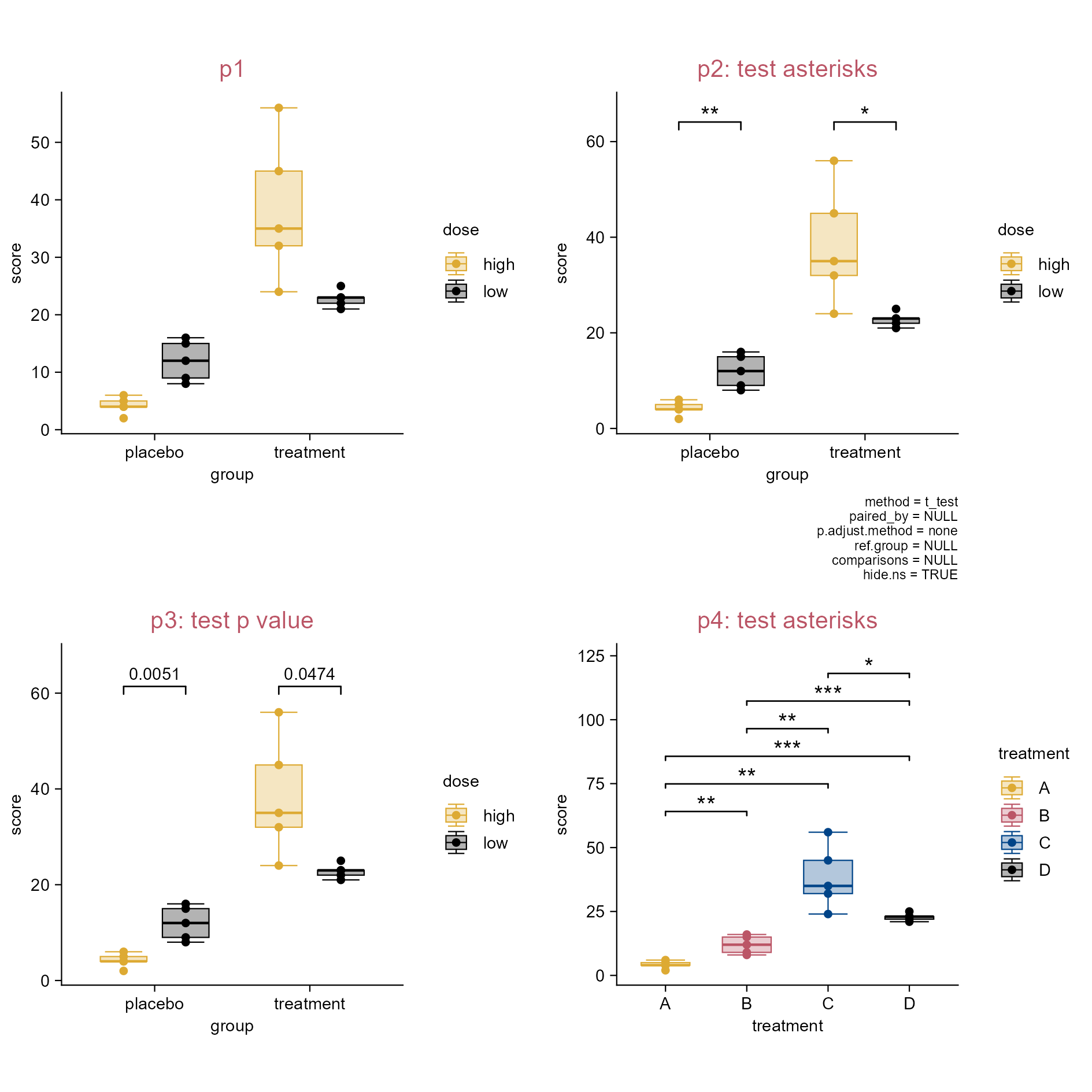
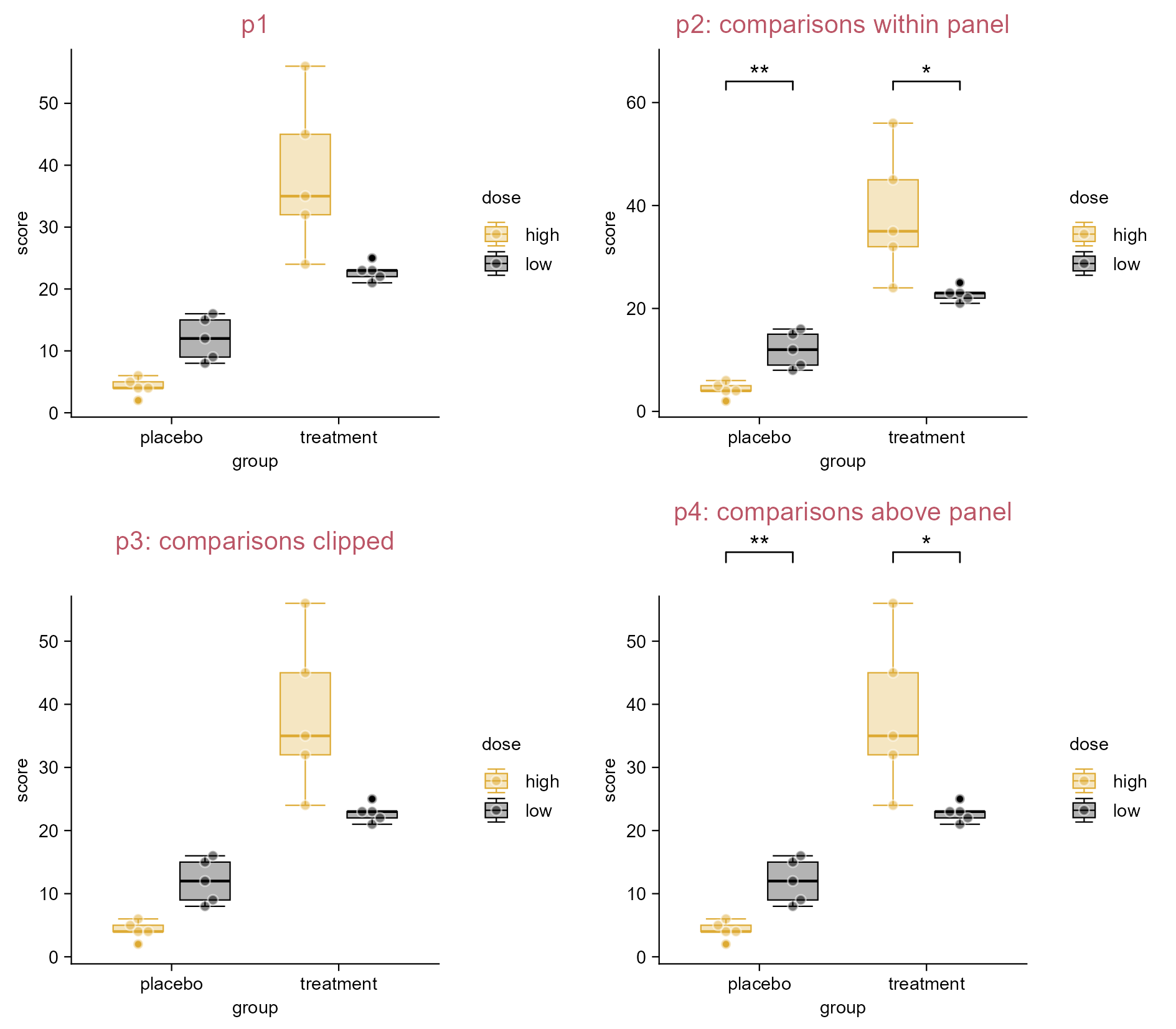
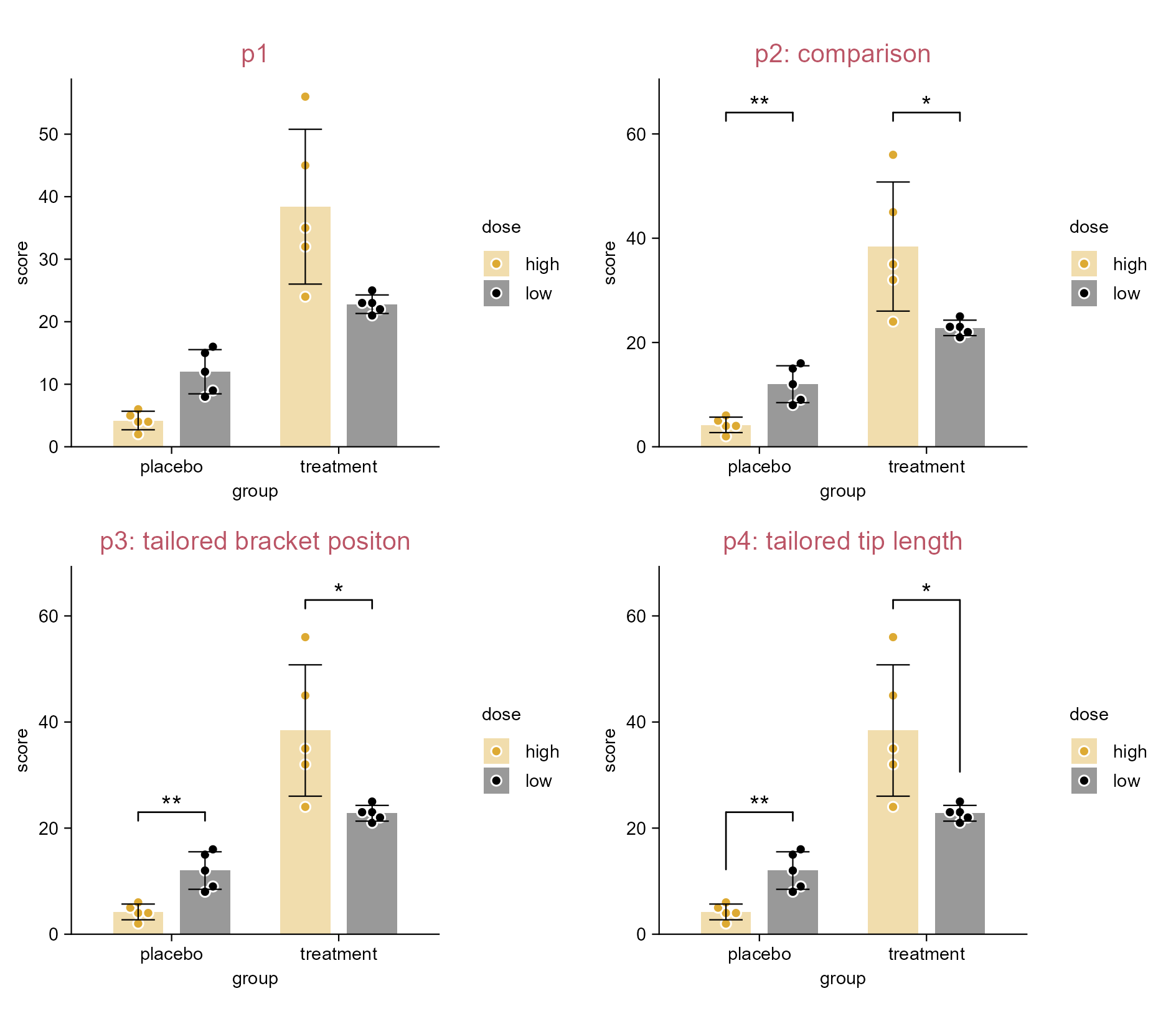
p1 <- study |> 
  tidyplot(
    x = group, 
    y = score, 
    color = dose) |> 
  add_boxplot() |> 
  add_data_points() |> 
  add_title(title = "p1")

p2 <- p1 |> 
  adjust_title(title = "p2: test asterisks") |> 
  add_test_asterisks()

p3 <- p1 |> 
  adjust_title(title = "p3: test p value") |> 
  add_test_pvalue(hide_info = TRUE)

p4 <- study |> 
  tidyplot(
    x = treatment, 
    y = score, 
    color = treatment) |> 
  add_boxplot() |> 
  add_data_points() |> 
  add_test_asterisks(hide_info = TRUE) |> 
  add_title(title = "p4: test asterisks")

Compare groups.

4.8 Paired testing (e.g. boxplot)

library(tidyplots)

y <- c(2.3, 4.5, 6.3, 3.4, 7.8, 6.7)
df <- data.frame(
  y = c(y, y + c(0.8, 0.75)),
  group = paste0("g", rep(c(1, 2), each = 6)),
  batch = paste0("b", c(1:6, 1:6)))

# View df
df |> tibble::tibble()
# A tibble: 12 × 3
       y group batch
   <dbl> <chr> <chr>
 1  2.3  g1    b1   
 2  4.5  g1    b2   
 3  6.3  g1    b3   
 4  3.4  g1    b4   
 5  7.8  g1    b5   
 6  6.7  g1    b6   
 7  3.1  g2    b1   
 8  5.25 g2    b2   
 9  7.1  g2    b3   
10  4.15 g2    b4   
11  8.6  g2    b5   
12  7.45 g2    b6   
# Plot
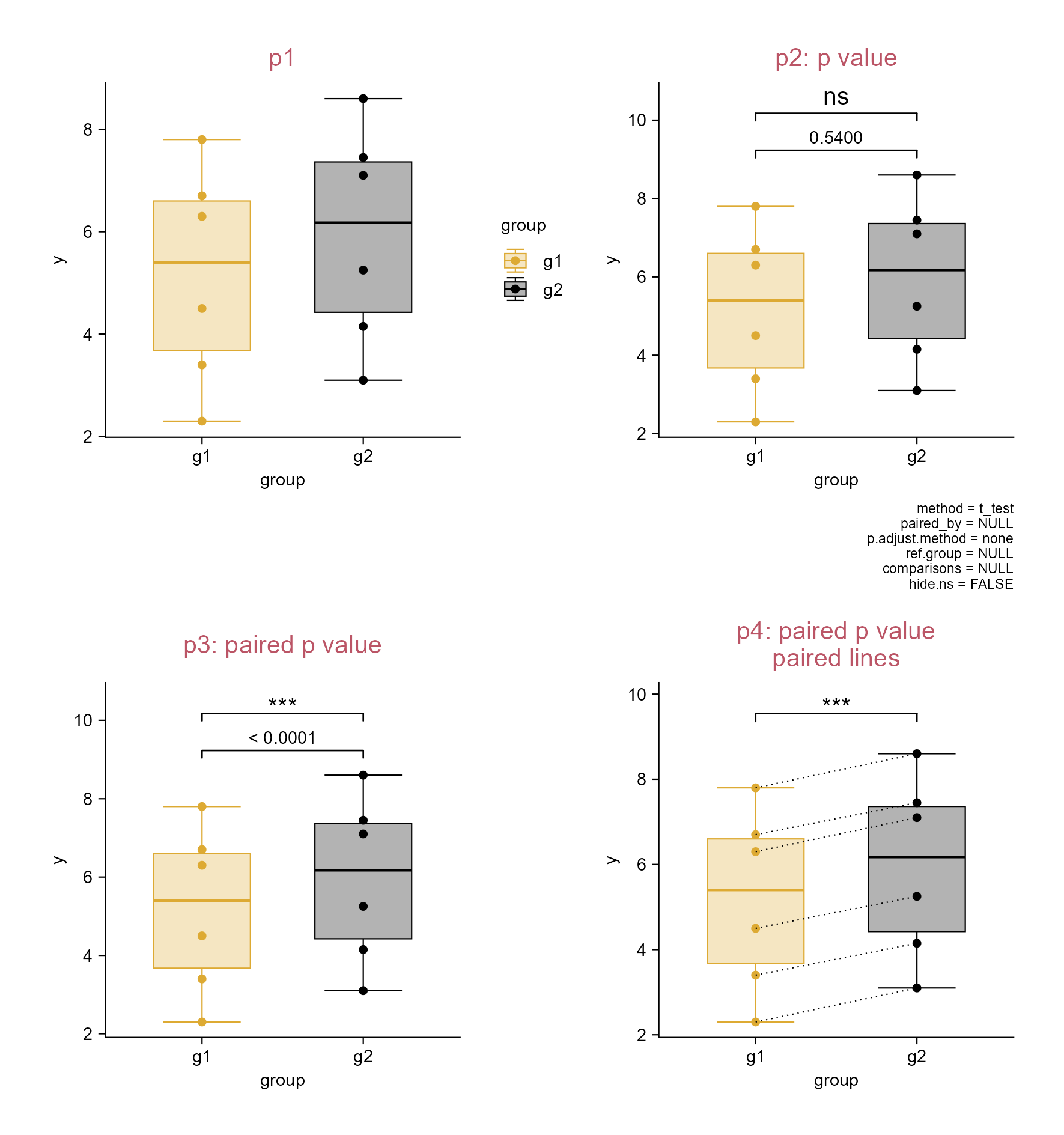
p1 <- df |> 
  tidyplot(
    x = group, 
    y = y, 
    color = group) |> 
  add_boxplot() |> 
  add_data_points() |> 
  add_title(title = "p1")

p2 <- p1 |> 
  remove_legend() |> 
  adjust_title(title = "p2: p value") |> 
  add_test_pvalue() |> 
  add_test_asterisks(bracket.nudge.y = 0.25, hide.ns = FALSE, 
    hide_info = TRUE, vjust = -0.3)

p3 <- p1 |> 
  remove_legend() |> 
  adjust_title(title = "p3: paired p value") |> 
  add_test_pvalue(paired_by = batch, hide_info = TRUE) |> 
  add_test_asterisks(paired_by = batch, bracket.nudge.y = 0.25, hide_info = TRUE)

p4 <- p1 |> 
  remove_legend() |> 
  adjust_title(title = paste("p4: paired p value", "paired lines", sep = "\n")) |> 
  add_test_asterisks(paired_by = batch, hide_info = TRUE) |> 
  add_line(group = batch, color = "#000000", linetype = "dotted")

Paired testing.

4.9 Add ggplot2 (extension) code (e.g. dot plot)

Tip

Because tidyplots is based on ggplot2 … thereby, tidyplots provides access to a wide range of features that are implemented within ggplot2 or ggplot2 extension packages … add() helper function.

library(tidyplots)

# View top 10 rows of the columns used
study |> 
  dplyr::select(treatment, score) |> 
  dplyr::slice_head(n = 10)
# A tibble: 10 × 2
   treatment score
   <chr>     <dbl>
 1 A             2
 2 A             4
 3 A             5
 4 A             4
 5 A             6
 6 B             9
 7 B             8
 8 B            12
 9 B            15
10 B            16
# Plot
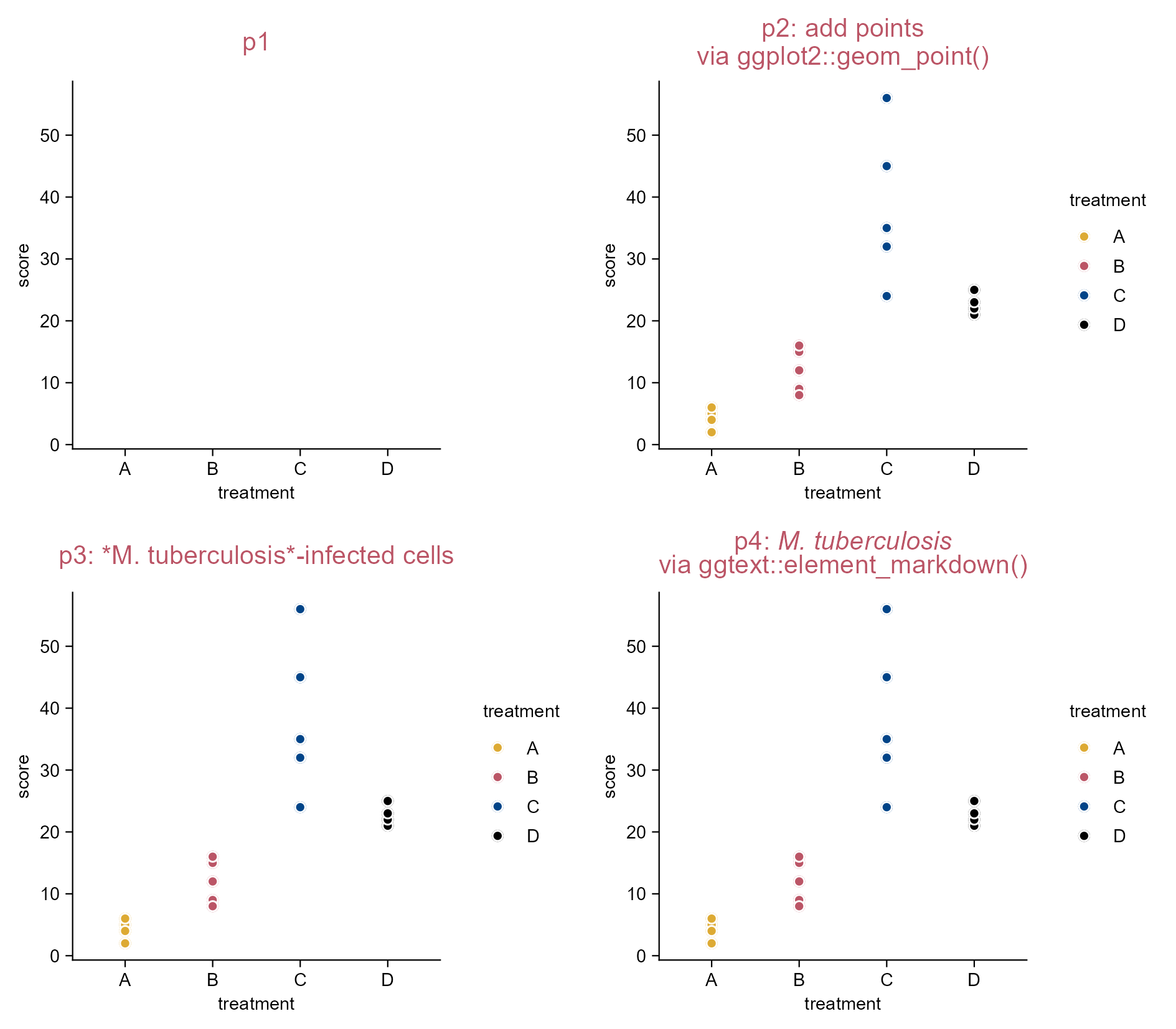
p1 <- study |> 
  tidyplot(x = treatment, y = score, color = treatment) |> 
  add_title(title = "p1")

p2 <- p1 |> 
  adjust_title(title = paste(
    "p2: add points", 
    "via ggplot2::geom_point()", 
    sep = "\n")) |> 
  add(ggplot2::geom_point()) |> 
  add_data_points(shape = 1, white_border = TRUE)

p3 <- p2 |> 
  adjust_title(title = "p3: *M. tuberculosis*-infected cells")

p4 <- p2 |> 
  adjust_title(title = 
    "p4: *M. tuberculosis*  
    via ggtext::element_markdown()") |> 
  add(ggplot2::theme(plot.title = ggtext::element_markdown()))
Note

For the title of p4: “p4: M. tuberculosis” is followed by clicking Space bar twice and Enter button once, then followed with “via ggtext::element-markdown()”.

Add ggplot2 (extensions) code.

4.10 Add ggplot2 (extention) code (three more plots)

library(tidyplots)

# View top 10 rows of the columns used
climate |> dplyr::select(max_temperature, month) |> dplyr::slice_head(n = 10)
# A tibble: 10 × 2
   max_temperature month
             <dbl> <chr>
 1           -1.49 01   
 2            3.37 02   
 3            5.05 03   
 4            8.34 04   
 5           16.2  05   
 6           18.2  06   
 7           20.5  07   
 8           18.2  08   
 9           18.3  09   
10           14.2  10   
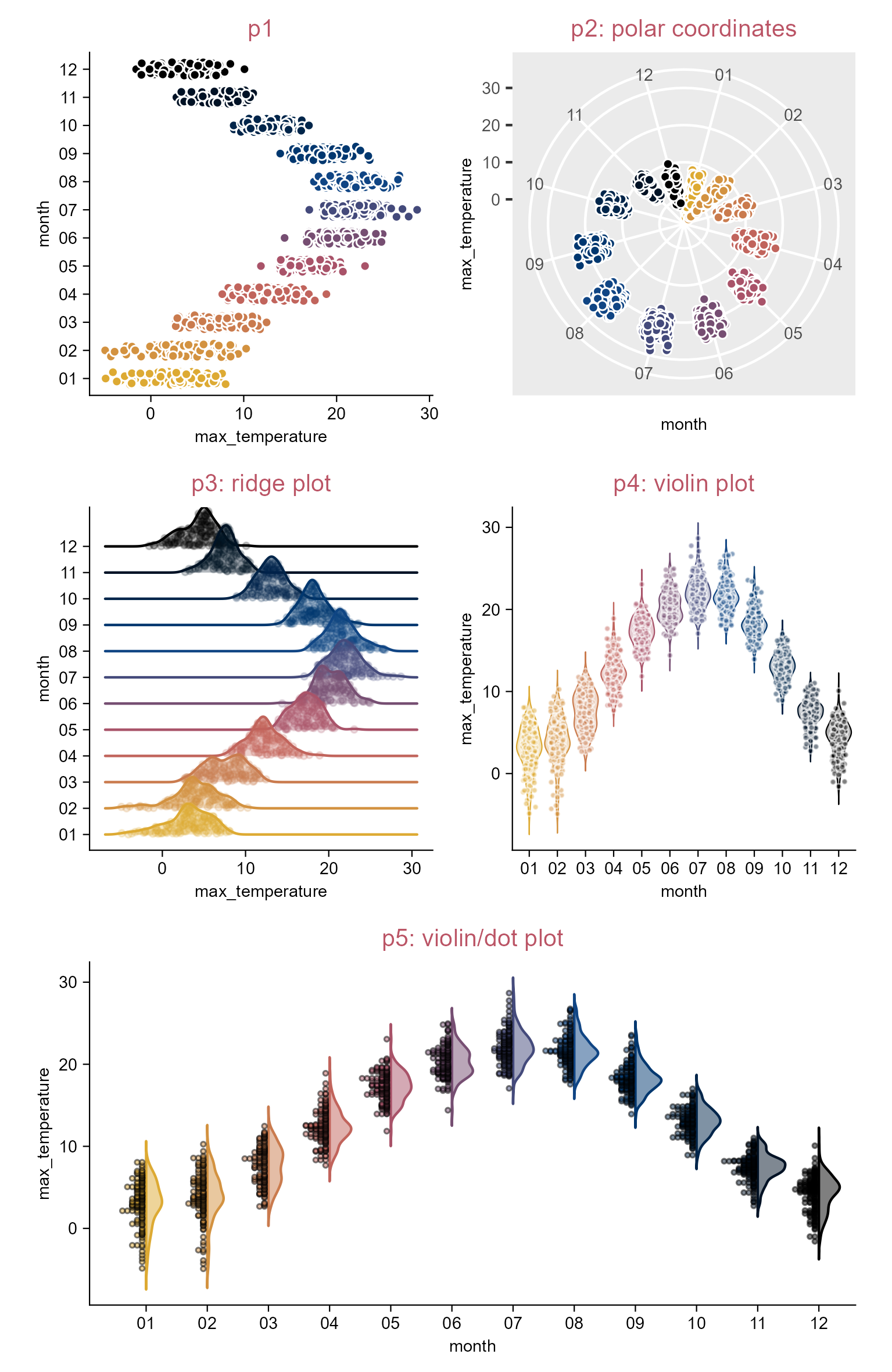
p1 <- climate |> 
  tidyplot(x = max_temperature, y = month, color = month) |> 
  add_title(title = "p1") |> remove_legend() |> 
  add_data_points_beeswarm(white_border = TRUE)

p2 <- p1 |> 
  add(ggplot2::coord_polar(theta = "y")) |> 
  theme_ggplot2() |> 
  adjust_title(
    title = "p2: polar coordinates", fontsize = 10, color = "#bb5566") |> 
  remove_legend()

p3 <- climate |> 
  tidyplot(x = max_temperature, y = month, color = month) |> 
  add_title(title = "p3: ridge plot") |> remove_legend() |> 
  add(
    ggridges::geom_density_ridges(alpha = 0.3, point_alpha = 0.2, 
      jittered_points = TRUE, point_size = 1))

p4 <- climate |> 
  tidyplot(x = month, y = max_temperature, color = month) |> 
  add_title(title = "p4: violin plot") |> 
  remove_legend() |> add_violin(trim = FALSE) |> 
  add_data_points_beeswarm(alpha = 0.5, size = 0.5, white_border = TRUE)

p5 <- climate |> 
  tidyplot(x = month, y = max_temperature, color = month) |> 
  add_title(title = "p5: violin/dot plot") |> remove_legend() |> 
  add(
    see::geom_violindot(dots_size = 12, trim = FALSE, 
      alpha = 0.5, color_dots = "#00000033"))
Note

Tidyplots is easier for many common plotting tasks.

For more complex plots, you can either augment tidyplots with custom ggplot2 code using the add() function or switch to ggplot2 for full flexibility.

Add ggplot2 (extensions) code.

4.11 Save multiple formats by piping through (e.g. dot plot)

library(tidyplots)

# View
study
# A tibble: 20 × 7
   treatment group     dose  participant   age sex    score
   <chr>     <chr>     <chr> <chr>       <dbl> <chr>  <dbl>
 1 A         placebo   high  p01            23 female     2
 2 A         placebo   high  p02            45 male       4
 3 A         placebo   high  p03            32 female     5
 4 A         placebo   high  p04            37 male       4
 5 A         placebo   high  p05            24 female     6
 6 B         placebo   low   p06            23 female     9
 7 B         placebo   low   p07            45 male       8
 8 B         placebo   low   p08            32 female    12
 9 B         placebo   low   p09            37 male      15
10 B         placebo   low   p10            24 female    16
11 C         treatment high  p01            23 female    32
12 C         treatment high  p02            45 male      35
13 C         treatment high  p03            32 female    24
14 C         treatment high  p04            37 male      45
15 C         treatment high  p05            24 female    56
16 D         treatment low   p06            23 female    23
17 D         treatment low   p07            45 male      25
18 D         treatment low   p08            32 female    21
19 D         treatment low   p09            37 male      22
20 D         treatment low   p10            24 female    23
# Plot and save
study |> 
  tidyplot(
    x = group, 
    y = score, 
    color = dose) |> 
  add_data_points_beeswarm() |> 
  add_sem_errorbar() |> 
  save_plot(
    "images/multiple-formats-via-pipe.pdf", 
    view_plot = FALSE) |> 
  save_plot(
    "images/multiple-formats-via-pipe.png", 
    view_plot = FALSE) |> 
  save_plot(
    "images/multiple-formats-via-pipe.svg", 
    view_plot = FALSE)

List the figures saved:

images/
├── multiple-formats-via-pipe.pdf
├── multiple-formats-via-pipe.png
└── multiple-formats-via-pipe.svg

Save a plot in multiple formats by piping through.

4.12 Save multiple PDFs by piping through (e.g. violin plot)

library(tidyplots)

# View top 10 rows of the columns used
gene_expression |> 
  dplyr::select(
    group, expression, condition, 
    sample_type, is_immune_gene) |> 
  dplyr::slice_head(n = 10)
# A tibble: 10 × 5
   group expression condition sample_type is_immune_gene
   <chr>      <dbl> <chr>     <chr>       <chr>         
 1 Hin         2.20 healthy   input       no            
 2 Hin         2.20 healthy   input       no            
 3 Hin         2.66 healthy   input       no            
 4 Hin         2.65 healthy   input       no            
 5 Hin         3.44 healthy   input       no            
 6 Ein         5.03 disease   input       no            
 7 Ein         5.31 disease   input       no            
 8 Ein         5.37 disease   input       no            
 9 Ein         5.54 disease   input       no            
10 Ein         5.65 disease   input       no            
# Plot and save
gene_expression |> 
  tidyplot(
    x = group, 
    y = expression, 
    color = group) |> 
  add_violin(trim = FALSE) |> 
  add_data_points_beeswarm(white_border = TRUE) |> 
  save_plot(
    "images/multiple-pdf-by-piping-1.pdf", 
    view_plot = FALSE) |> 
  split_plot(
    by = condition, 
    axis.titles = "margins") |> 
  save_plot(
    "images/multiple-pdf-by-piping-2.pdf", 
    view_plot = FALSE) |> 
  split_plot(
    by = sample_type) |> 
  save_plot(
    "images/multiple-pdf-by-piping-3.pdf", 
    view_plot = FALSE) |> 
  split_plot(
    rows = condition, 
    cols = is_immune_gene,
    axis.titles = "margins") |> 
  save_plot(
    "images/multiple-pdf-by-piping-4.pdf", 
    view_plot = FALSE)

List the figures saved:

images
├── multiple-pdf-by-piping-1.pdf
├── multiple-pdf-by-piping-2.pdf
├── multiple-pdf-by-piping-3.pdf
└── multiple-pdf-by-piping-4.pdf

The 4th PDF figure.

4.13 Save multiple PDFs at once (e.g. violin plot)

library(tidyplots)

# View 10 rows of the columns used
gene_expression |> 
  dplyr::select(
    group, 
    expression, 
    external_gene_name) |> 
  dplyr::slice(c(1:2, 101:102, 201:202, 301:302, 401:402))
# A tibble: 10 × 3
   group expression external_gene_name
   <chr>      <dbl> <chr>             
 1 Hin         2.20 Apol6             
 2 Hin         2.20 Apol6             
 3 Hin         7.39 Vgf               
 4 Hin         6.86 Vgf               
 5 Hin         8.21 Dpf2              
 6 Hin         8.29 Dpf2              
 7 Hin         5.87 Ankrd54           
 8 Hin         5.62 Ankrd54           
 9 Hin         7.84 Fam96b            
10 Hin         7.52 Fam96b            
# Plot and save
gene_expression |> 
  tidyplot(
    x = group, 
    y = expression, 
    color = group) |> 
  add_violin(trim = FALSE) |> 
  add_data_points_beeswarm(white_border = TRUE) |>   
  adjust_size(overall_width = 100) |> # see the note of next page
  adjust_theme_details(
    strip.text.x.top = ggplot2::element_text(face = "italic")) |> # gene names in italic
  split_plot(
    by = external_gene_name, 
    ncol = 2, 
    nrow = 2) |> 
  save_plot(
    "images/multiple-pdf-at-once.pdf", 
    multiple_files = TRUE, 
    view_plot = FALSE)

List the figure names saved:

images/
├── multiple-pdf-at-once_01.pdf
├── multiple-pdf-at-once_02.pdf
├── multiple-pdf-at-once_03.pdf
├── multiple-pdf-at-once_04.pdf
├── multiple-pdf-at-once_05.pdf
├── multiple-pdf-at-once_06.pdf
├── multiple-pdf-at-once_07.pdf
├── multiple-pdf-at-once_08.pdf
├── multiple-pdf-at-once_09.pdf
└── multiple-pdf-at-once_10.pdf

The 10th PDF figure.
Note

The overall_width and overall_height parameters of the adjust_size() function control the overall dimensions of a multiplot layout generated with split_plot().

The function adjust_theme_details() is a wrapper around ggplot2::theme().

4.14 Save intermediate stages (e.g. bar plot)

library(tidyplots)

# View top 10 rows of the columns used
study |> dplyr::select(treatment, score) |> 
  dplyr::slice_head(n = 10)
# A tibble: 10 × 2
   treatment score
   <chr>     <dbl>
 1 A             2
 2 A             4
 3 A             5
 4 A             4
 5 A             6
 6 B             9
 7 B             8
 8 B            12
 9 B            15
10 B            16
# Plot and save
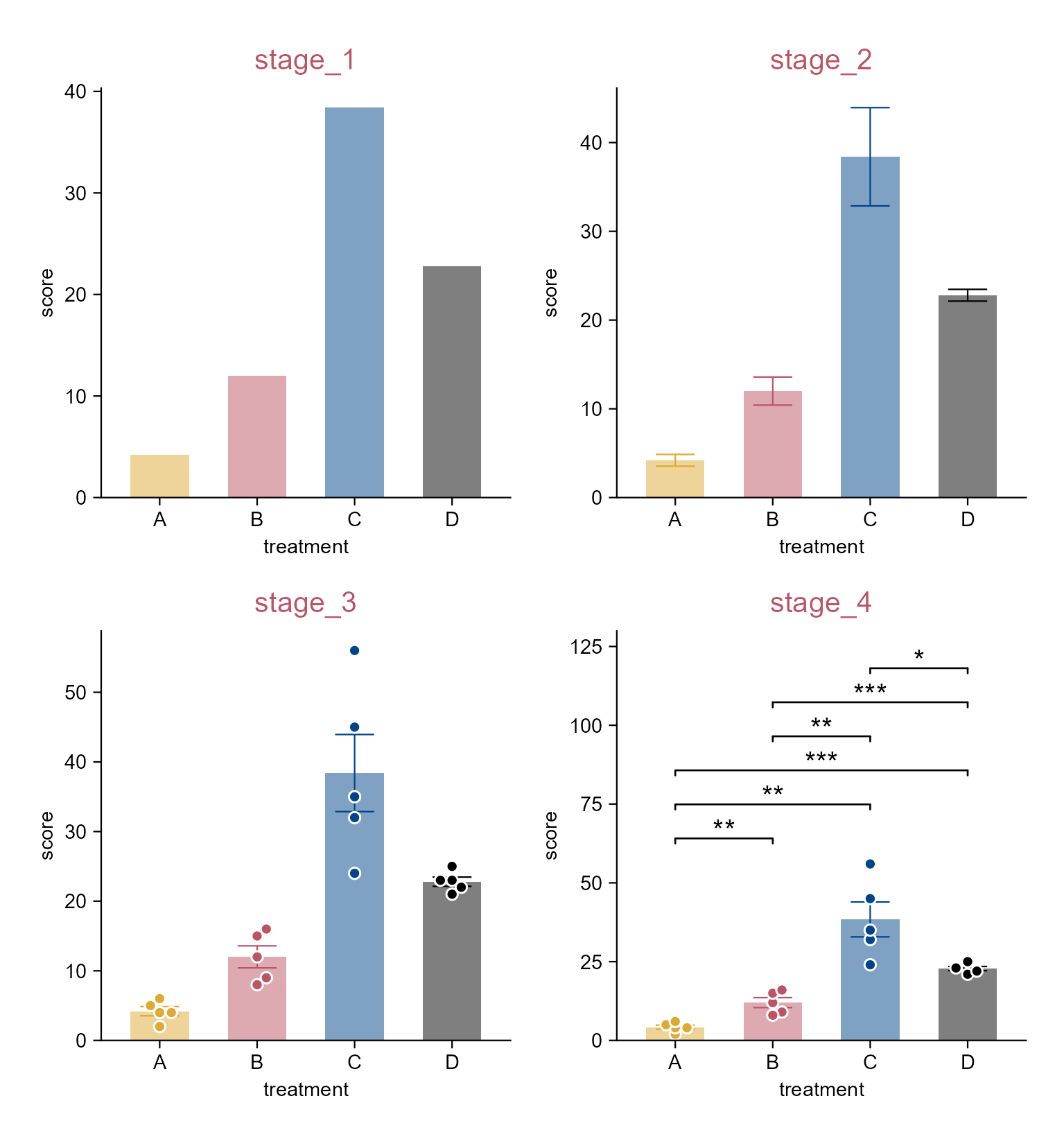
study |> 
  tidyplot(
    x = treatment, 
    y = score, 
    color = treatment) |> 
  add_mean_bar(alpha = 0.5) |> 
  adjust_legend_position(position = "none") |> 
  add_title("stage_1") |> 
  save_plot(
    "images/stage_1.png", 
    view_plot = FALSE) |> 
  adjust_title("stage_2") |> 
  add_sem_errorbar() |> 
  save_plot(
    "images/stage_2.png", 
    view_plot = FALSE) |> 
  adjust_title("stage_3") |> 
  add_data_points_beeswarm(white_border = TRUE) |> 
  save_plot(
    "images/stage_3.png", 
    view_plot = FALSE) |> 
  adjust_title("stage_4") |> 
  add_test_asterisks(hide_info = TRUE) |> 
  save_plot(
    "images/stage_4.png", 
    view_plot = FALSE)

List the figures saved:

images/
├── stage_1.png
├── stage_2.png
├── stage_3.png
└── stage_4.png

Save intermediate stages.

4.15 Panel and plot padding

library(tidyplots)

# View top 10 rows of the columns used
animals |> dplyr::select(weight, size) |> 
  dplyr::slice_head(n = 10)
# A tibble: 10 × 2
      weight  size
       <dbl> <dbl>
 1 0.00012     1.5
 2 0.00045    10  
 3 0.0002     10  
 4 0.00002     2.5
 5 0.003      17  
 6 0.0000025   1  
 7 0.000005    4  
 8 0.00001     0.8
 9 0.0002      7.5
10 0.0004      9  
# Plot
p1 <- animals |> 
  tidyplot(x = weight, y = size, color = size, paper = "#dddddd") |> 
  add_data_points(white_border = TRUE, size = 3) |> 
  add_title(title = "p1") |> 
  remove_legend()

p2 <- p1 |> 
  adjust_title(title = "p2: different padding in four panel sides") |> 
  adjust_padding(
    top = 0.2, 
    right = 0.3, 
    bottom = 0.4, 
    left = 0.5)

p3 <- p1 |> 
  adjust_title(title = "p3: same padding in four panel sides") |> 
  adjust_padding(
    all = 0.2)

p4 <- p1 |> 
  adjust_title(title = "p4: remove panel padding") |> 
  remove_padding()

p5 <- p1 |> 
  adjust_title(title = "p5: different padding in four plot sides") |> 
  adjust_theme_details(
    plot.margin = ggplot2::margin(t = 0.5, r = 0.5, b = 1, l = 1, unit = "cm"))

p6 <- p1 |> 
  adjust_title(title = "p6: same plot padding via saving") |> 
  save_plot(
    "images/plot_panel_padding_p6.png", 
    padding = 0.3) # defaults to 0.1 meaning 10%

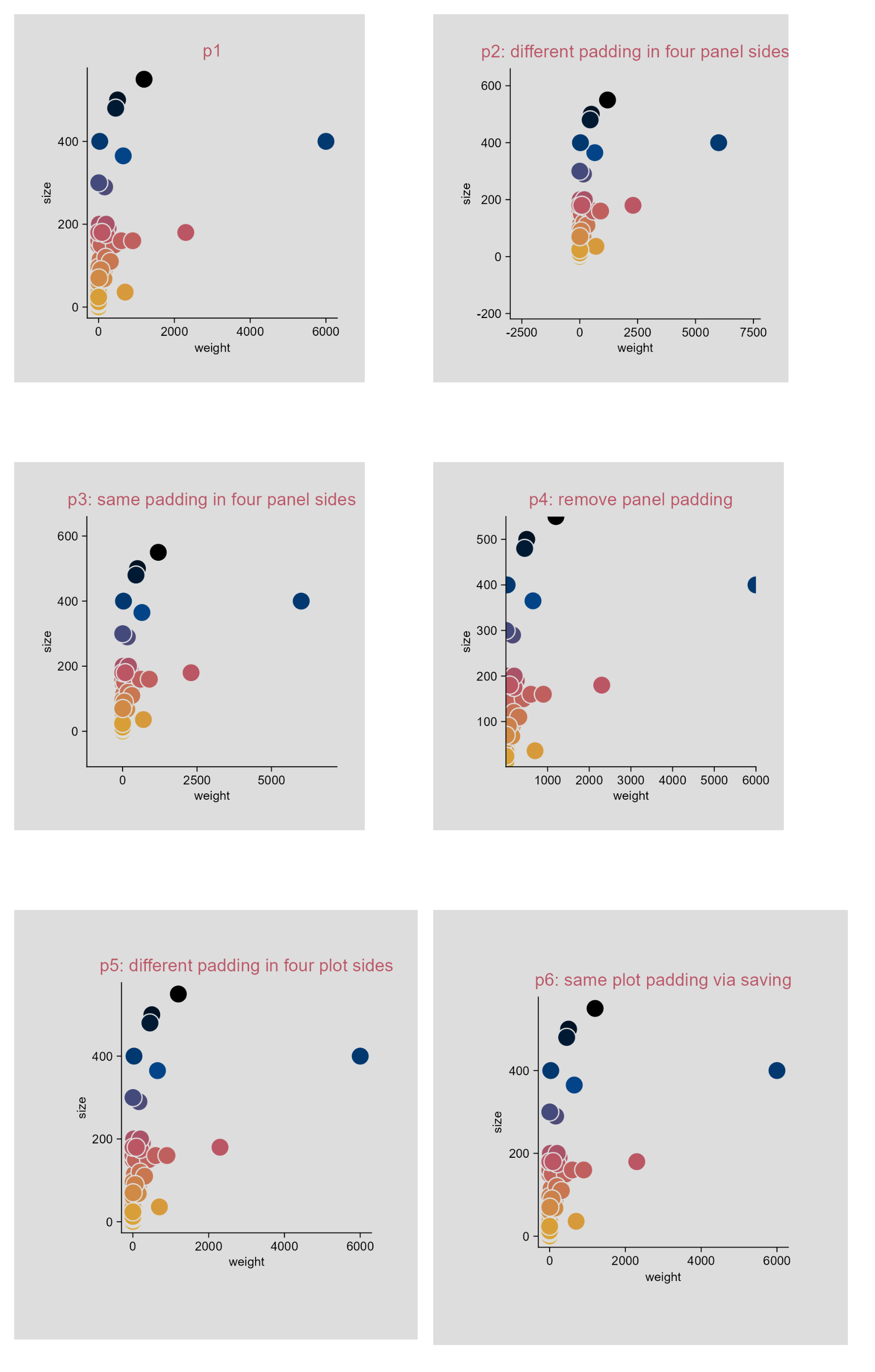
Panel and plot padding.

4.16 Use a log10 axis for data containing zero and negative values (e.g. dot plot)

library(tidyplots)

set.seed(42)

y <- runif(n = 500, min = 0, max = 100)

# change 30 values to zero
y[sample(NROW(y), size = 30)] <- 0

df <- tibble::tibble(x = "test", y = c(y, y * -1))

# View rows 496 - 505
df |> 
  dplyr::slice(496:505)
# A tibble: 10 × 2
   x          y
   <chr>  <dbl>
 1 test   18.3 
 2 test    0   
 3 test   30.5 
 4 test   16.6 
 5 test    3.28
 6 test  -91.5 
 7 test  -93.7 
 8 test  -28.6 
 9 test  -83.0 
10 test  -64.2 
# Plot
p1 <- df |> 
  tidyplot(
    x = x, 
    y = y) |> 
  add_data_points_beeswarm(white_border = TRUE) |>  
  add_title(title = "p1")

p2 <- p1 |> 
  adjust_title(title = "p2: zero points in red") |> 
  add_data_points_beeswarm(
    data = filter_rows(y == 0), 
    white_border = TRUE, 
    color = "#bb5566")

p3 <- p2 |> 
  adjust_title(title = "p3: log") |> 
  adjust_y_axis(
    transform = "pseudo_log", 
    breaks = c(-100, -10, -1, 0, 1, 10, 100))

p4 <- p3 |> 
  adjust_title(title = "p4: log + axis_logticks") |> 
  add(ggplot2::guides(y = "axis_logticks"))

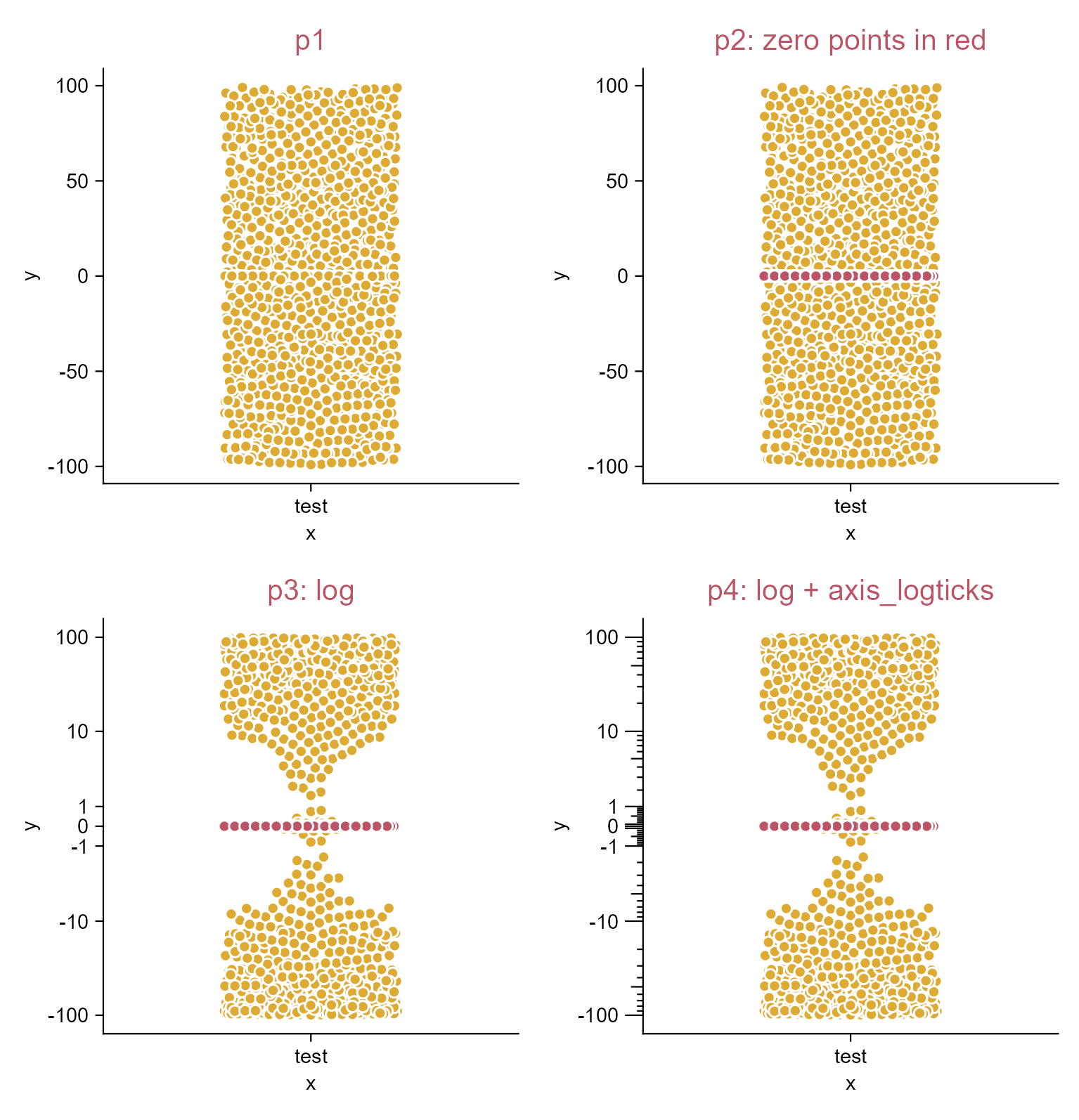
Log10 axis for data containing zero and negative values.

4.17 Change plot themes (e.g. dot plot)

library(tidyplots)

# View top 10 rows of the columns used
study |> 
  dplyr::select(treatment, score) |> 
  dplyr::slice_head(n = 10)
# A tibble: 10 × 2
   treatment score
   <chr>     <dbl>
 1 A             2
 2 A             4
 3 A             5
 4 A             4
 5 A             6
 6 B             9
 7 B             8
 8 B            12
 9 B            15
10 B            16
# Plot
p0 <- study |> 
  tidyplot(x = treatment, y = score, color = treatment) |> 
  add_data_points() |> 
  add_median_dash() |> 
  add_sem_errorbar()

p1 <- p0 |>
  add_title(title = "p1: theme_tidyplot (default)")

p2 <- p0 |>
  add_title(title = "p2: theme_ggplot2") |> 
  theme_ggplot2() |> 
  adjust_title(fontsize = 10, color = "#bb5566")

p3 <- p0 |>
  add_title(title = "p3: theme_minimal_x") |> 
  theme_minimal_x() |> 
  adjust_title(fontsize = 10, color = "#bb5566")

p4 <- p0 |>
  add_title(title = "p4: theme_minimal_y") |> 
  theme_minimal_y() |> 
  adjust_title(fontsize = 10, color = "#bb5566")

p5 <- p0 |>
  add_title(title = "p5: theme_minimal_xy") |> 
  theme_minimal_xy() |> 
  adjust_title(fontsize = 10, color = "#bb5566")

p6 <- p0 |>
  add_title(title = "p6: ggplot2::theme_void") |>
  add(ggplot2::theme_void()) |> 
  adjust_title(fontsize = 10, color = "#bb5566")

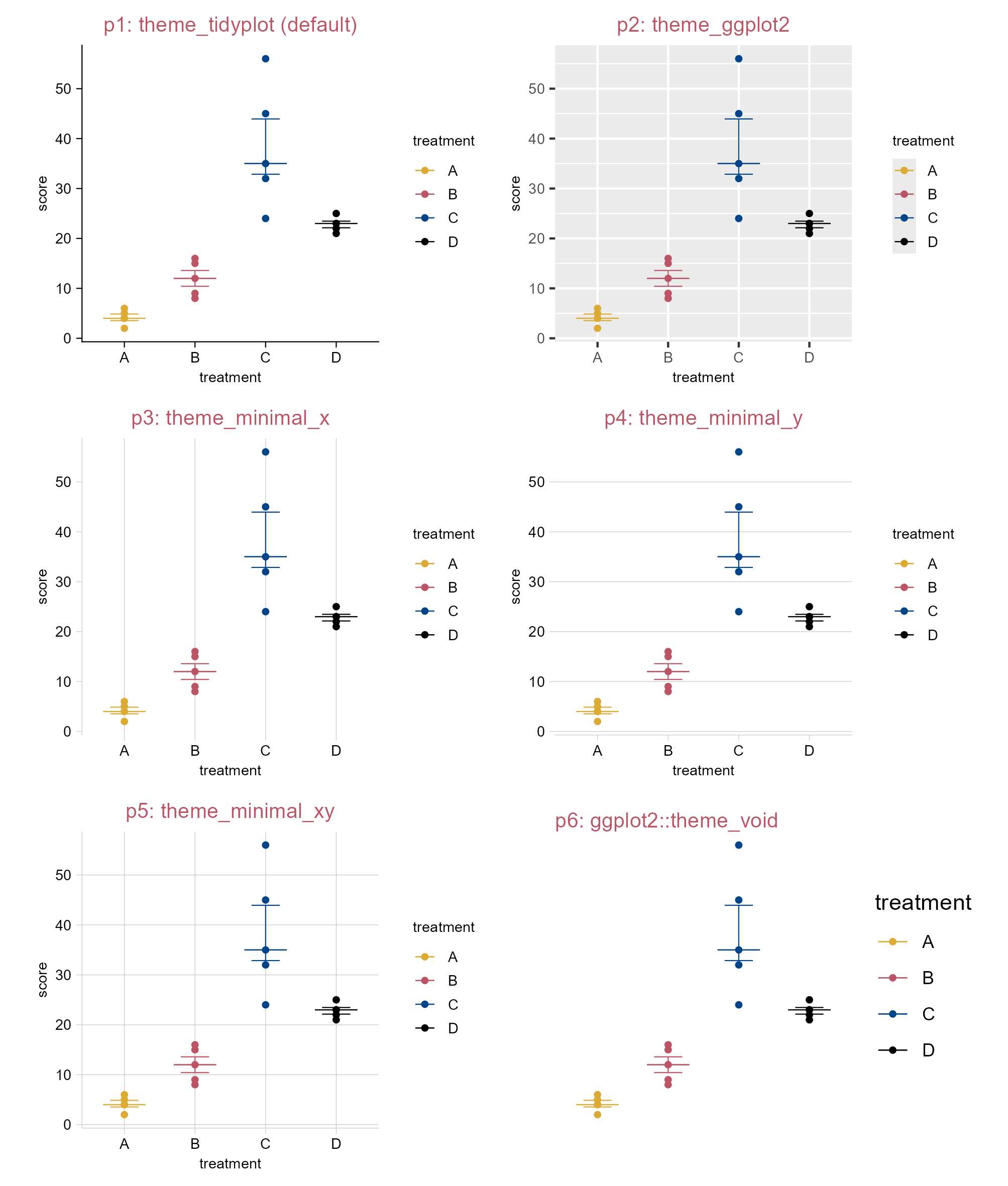
Change plot themes.

4.18 Rasterize data points (e.g. dot plot) selectively

Tip

Too many vector shapes can or might slow down software performance. This is how you can selectively rasterize data points.

library(tidyplots)
library(svglite)

# View top 10 rows of the columns used
climate |> 
  dplyr::select(month, max_temperature) |> 
  dplyr::slice_head(n = 10)
# A tibble: 10 × 2
   month max_temperature
   <chr>           <dbl>
 1 01              -1.49
 2 02               3.37
 3 03               5.05
 4 04               8.34
 5 05              16.2 
 6 06              18.2 
 7 07              20.5 
 8 08              18.2 
 9 09              18.3 
10 10              14.2 
# Save vector images without rasterization
climate |> 
  tidyplot(x = month, y = max_temperature, color = month) |> 
  add_data_points_beeswarm(white_border = TRUE) |> 
  adjust_legend_position(position = "none") |> 
  save_plot("images/rasterize_data-points_no.pdf", view_plot = FALSE) |> 
  save_plot("images/rasterize_data-points_no.svg", view_plot = FALSE)

# Save vector images with rasterization (dpi = 100)
climate |> 
  tidyplot(x = month, y = max_temperature, color = month) |> 
  add_data_points_beeswarm(
    white_border = TRUE, 
    rasterize = TRUE, 
    rasterize_dpi = 100) |> 
  adjust_legend_position(position = "none") |> 
  save_plot("images/rasterize_data-points_yes_dpi100.pdf", view_plot = FALSE) |> 
  save_plot("images/rasterize_data-points_yes_dpi100.svg", view_plot = FALSE)

# Save vector images with rasterization (dpi = 300)
climate |> 
  tidyplot(x = month, y = max_temperature, color = month) |> 
  add_data_points_beeswarm(
    white_border = TRUE, 
    rasterize = TRUE, 
    rasterize_dpi = 300) |> 
  adjust_legend_position(position = "none") |> 
  save_plot("images/rasterize_data-points_yes_dpi300.pdf", view_plot = FALSE) |> 
  save_plot("images/rasterize_data-points_yes_dpi300.svg", view_plot = FALSE)

List the figures saved:

images
├── rasterize_data-points_no.pdf
├── rasterize_data-points_no.svg
├── rasterize_data-points_yes_dpi100.pdf
├── rasterize_data-points_yes_dpi100.svg
├── rasterize_data-points_yes_dpi300.pdf
└── rasterize_data-points_yes_dpi300.svg

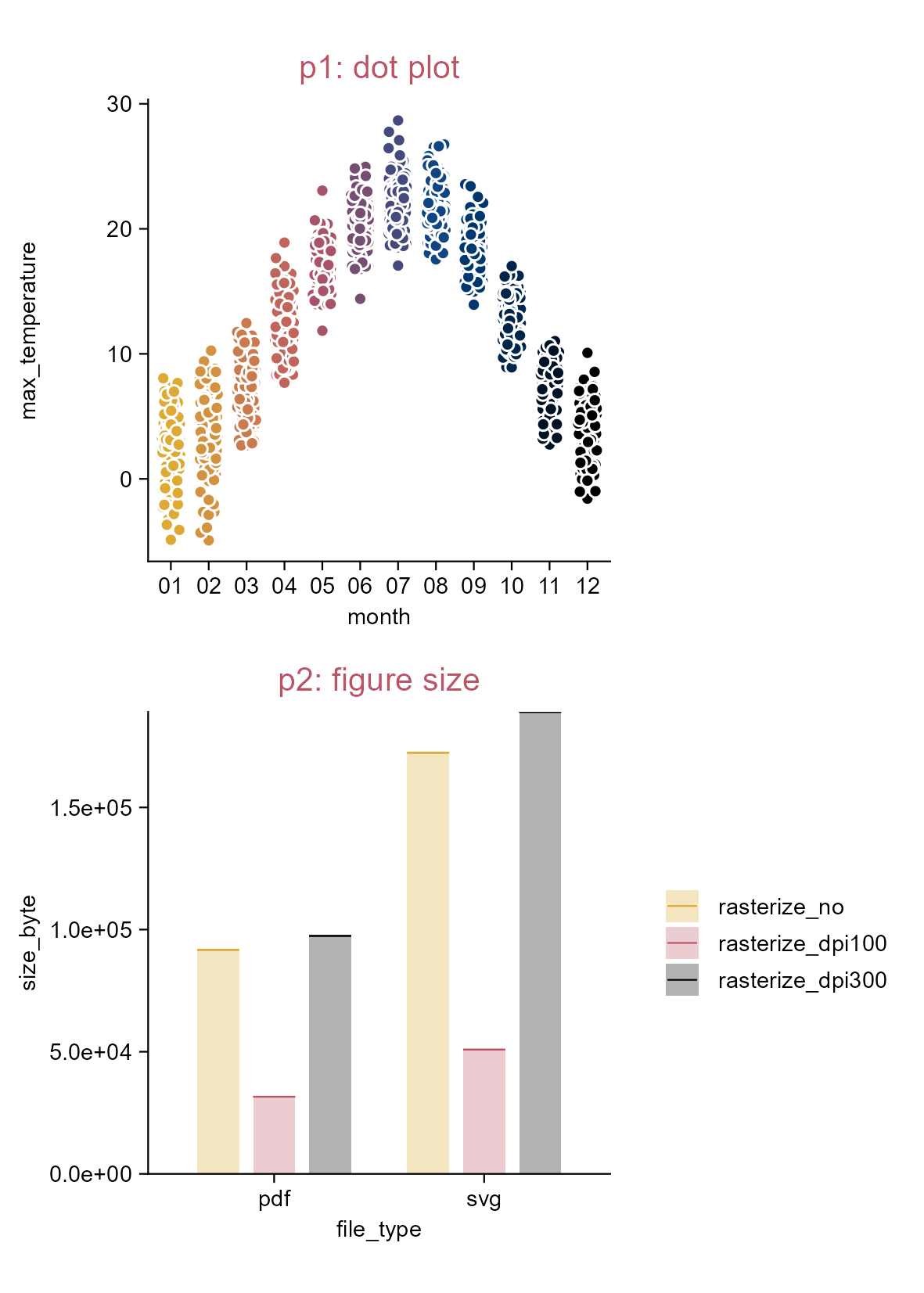
Rasterize data points selectively.