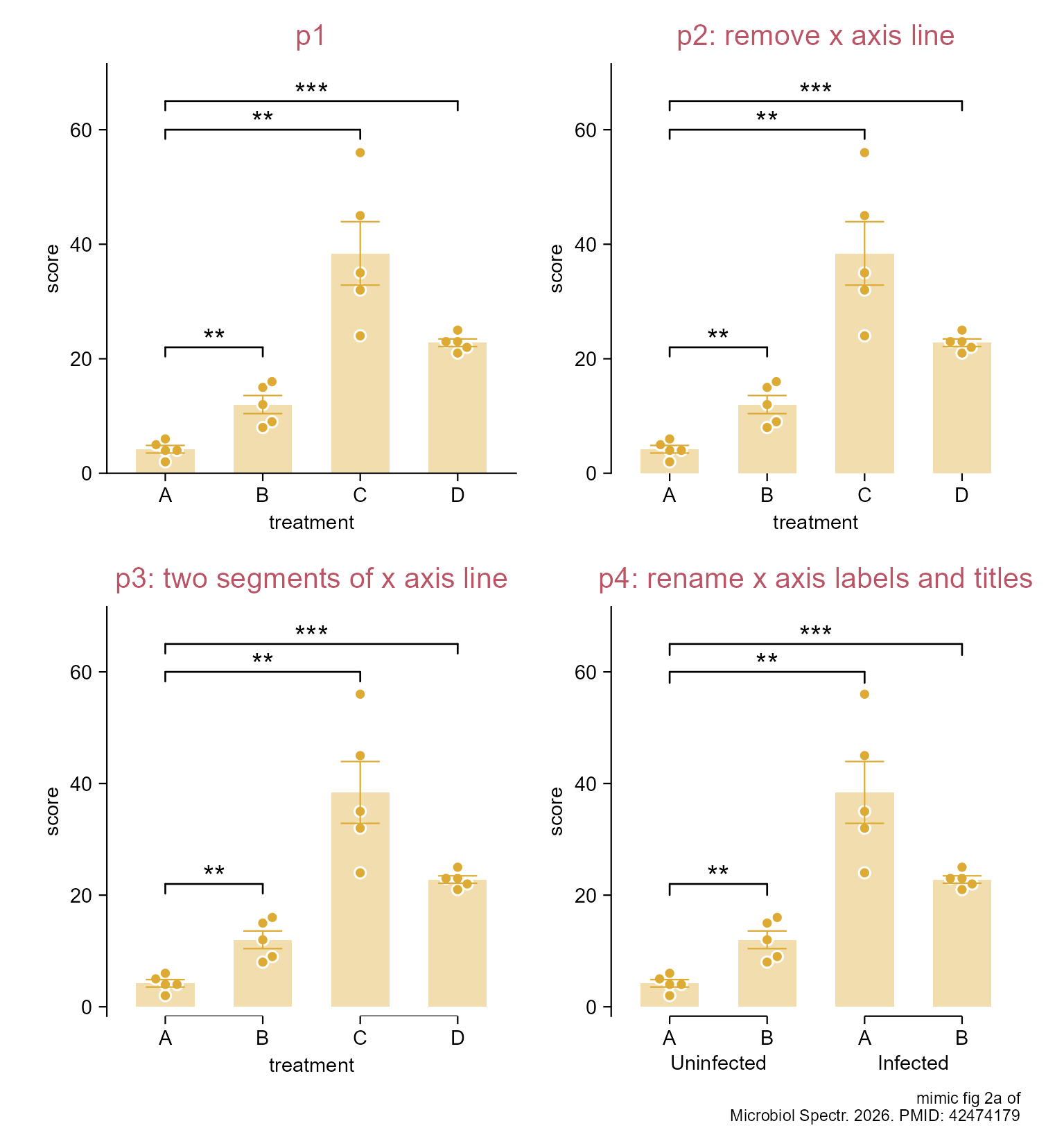
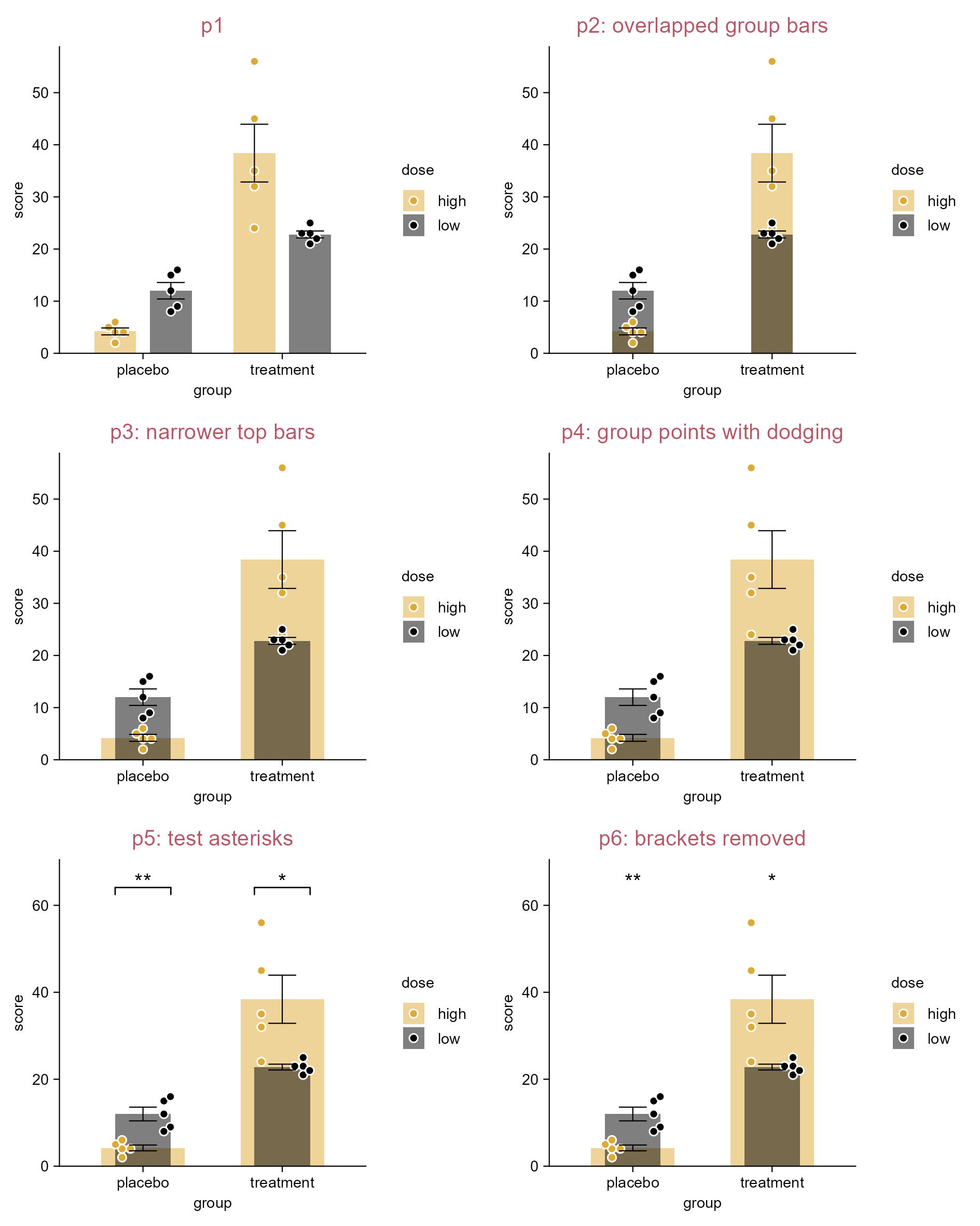
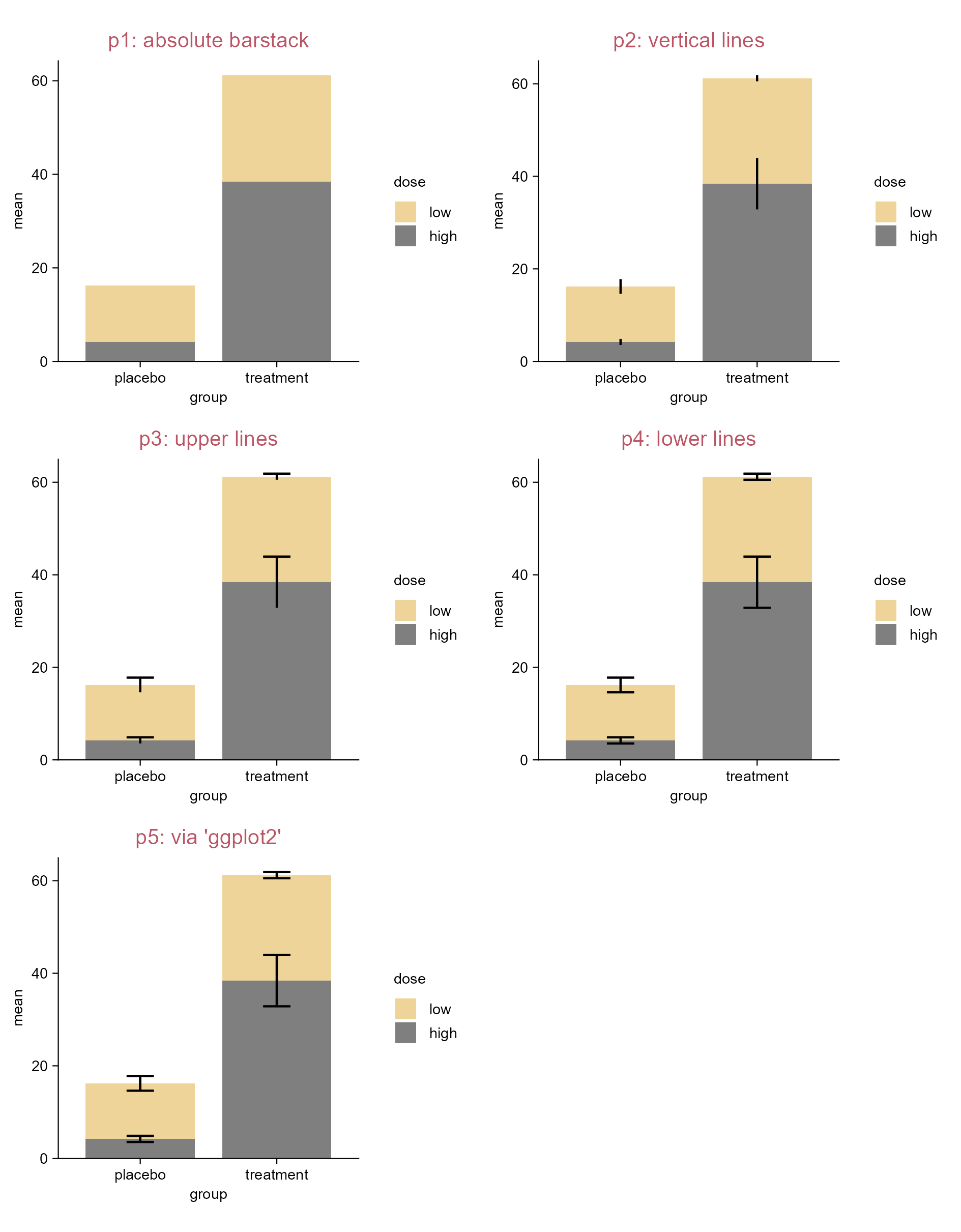
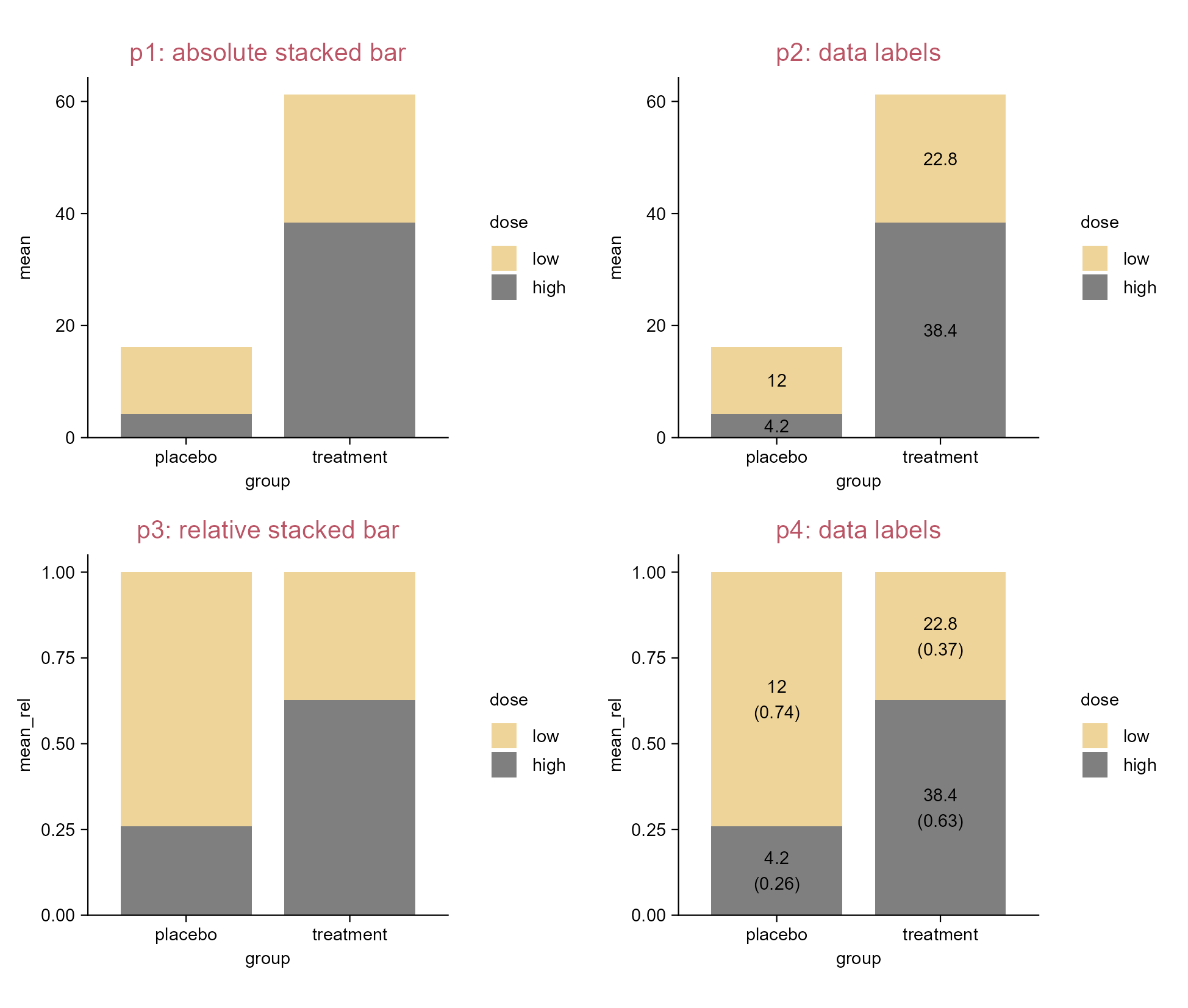
5  More custom plots

5.1 Schematic of experiment design

library(tidyplots)

df <- "data/experimental-design.csv" |> 
    readr::read_csv(show_col_types = FALSE)

# View df (the "63" of "days" column is just a placeholder for arrow head)
# type "?tidyplots::add_data_points()" in R consule for available shape values
df
# A tibble: 12 × 6
    days manipulation  groups shape manipulation_1 manipulation_2
   <dbl> <chr>          <dbl> <dbl> <chr>          <chr>         
 1     1 candidate 1st      2    19 candidate 1st  <NA>          
 2     7 candidate 2nd      2    19 candidate 2nd  <NA>          
 3    14 candidate 3rd      2    19 candidate 3rd  <NA>          
 4    28 challenge          2    17 <NA>           challenge     
 5    58 endpoint           2    13 <NA>           endpoint      
 6    63 <NA>               2    NA <NA>           <NA>          
 7     1 saline 1st         1    19 saline 1st     <NA>          
 8     7 saline 2nd         1    19 saline 2nd     <NA>          
 9    14 saline 3rd         1    19 saline 3rd     <NA>          
10    28 challenge          1    17 <NA>           <NA>          
11    58 endpoint           1    13 <NA>           <NA>          
12    63 <NA>               1    NA <NA>           <NA>          
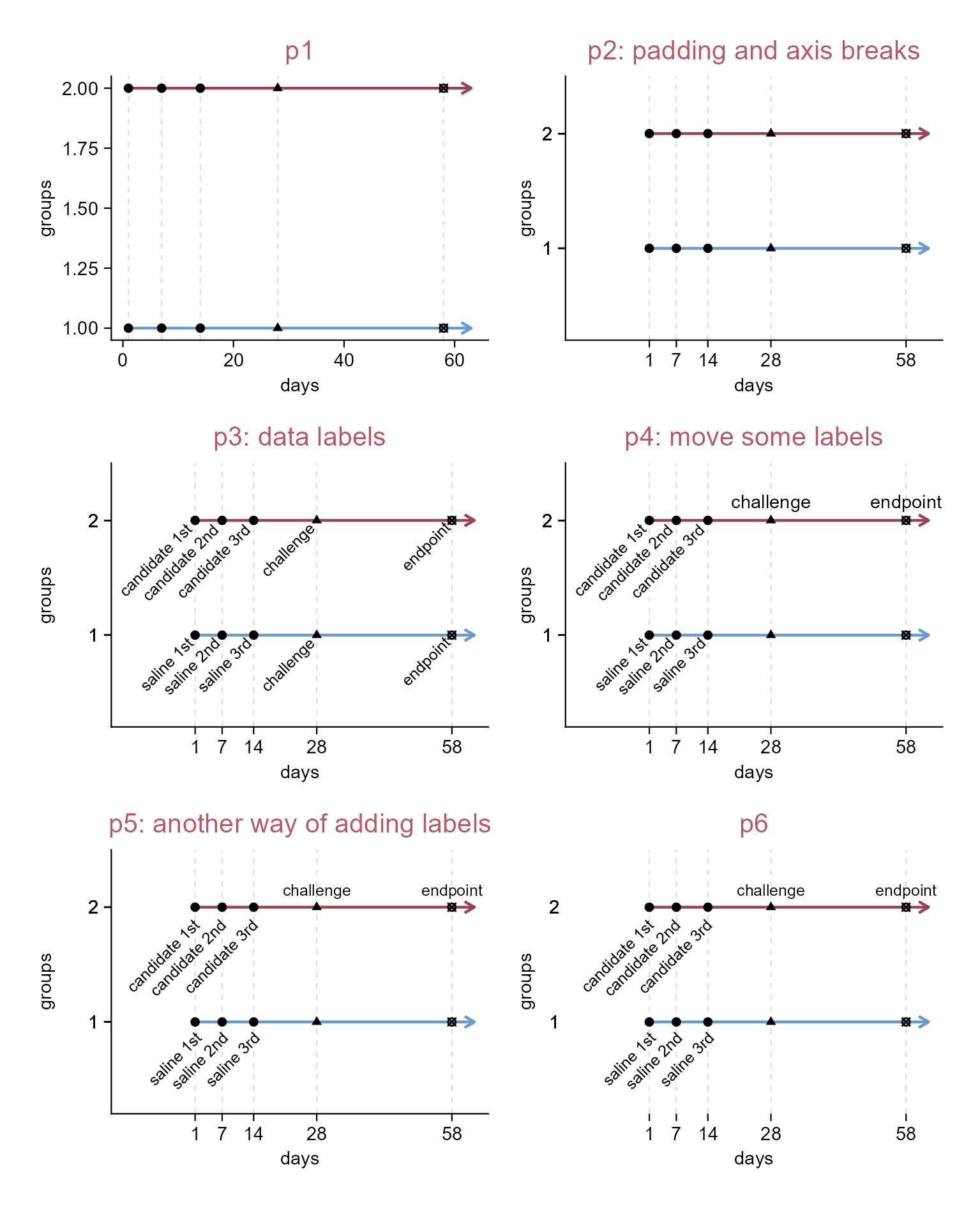
p1 <- df |> 
  tidyplot(x = days, y = groups, color = groups) |> 
  add_reference_lines(x = df$days[1:5], color = "#dddddd") |>   
  add_line(linewidth = 0.5, arrow = grid::arrow(length = grid::unit(0.15, "cm"))) |> 
  add_data_points(shape = df$shape, color = "#000000", na.rm = TRUE) |> 
  add_title(title = "p1") |> 
  adjust_size(height = 35) |> # adjust width and height as needed
  adjust_colors(new_colors = c("#6699cc", "#994455")) |> 
  remove_legend()

p2 <- p1 |> 
  adjust_title(title = "p2: padding and axis breaks") |>
  adjust_padding(left = 0.3, bottom = 0.8, top = 0.5) |> 
  adjust_x_axis(breaks = df$days[1:5]) |> 
  adjust_y_axis(breaks = df$groups)

p3 <- p2 |> 
  adjust_title(title = "p3: data labels") |> 
  add_data_labels(label = manipulation, label_position = "left", 
    angle = 45, color = "#000000", na.rm = TRUE, fontsize = 6)

p4 <- p2 |> 
  adjust_title(title = "p4: move some labels") |> 
  add_data_labels(label = manipulation_1, label_position = "left",
    angle = 45, color = "#000000", na.rm = TRUE, fontsize = 6) |> 
  add_data_labels(label = manipulation_2, label_position = "above",
    color = "#000000", na.rm = TRUE)

p5 <- p2 |> 
  adjust_title(title = "p5: another way of adding labels") |> 
  add_annotation_text(text = df$manipulation_1, x = df$days, y = df$groups, 
    angle = 45, hjust = 1.1, vjust = 1.5, na.rm = TRUE, fontsize = 6) |> 
  add_annotation_text(text = df$manipulation_2, x = df$days,
    y = df$groups, hjust = 0.5, vjust = -1, na.rm = TRUE, fontsize = 6)

p6 <- p5 |> 
  adjust_title(title = "p6") |> 
  remove_x_axis_line() |> 
  remove_y_axis_line() |> 
  remove_y_axis_ticks()

Schematic of experiment design.

5.2 Inset image to a figure

library(tidyplots)

df <- "data/experimental-design.csv" |> 
    readr::read_csv(show_col_types = FALSE)

# View df (the "63" of "days" column is just a placeholder for arrow head)
# type "?tidyplots::add_data_points()" in R consule for available shape values
df
# A tibble: 12 × 6
    days manipulation  groups shape manipulation_1 manipulation_2
   <dbl> <chr>          <dbl> <dbl> <chr>          <chr>         
 1     1 candidate 1st      2    19 candidate 1st  <NA>          
 2     7 candidate 2nd      2    19 candidate 2nd  <NA>          
 3    14 candidate 3rd      2    19 candidate 3rd  <NA>          
 4    28 challenge          2    17 <NA>           challenge     
 5    58 endpoint           2    13 <NA>           endpoint      
 6    63 <NA>               2    NA <NA>           <NA>          
 7     1 saline 1st         1    19 saline 1st     <NA>          
 8     7 saline 2nd         1    19 saline 2nd     <NA>          
 9    14 saline 3rd         1    19 saline 3rd     <NA>          
10    28 challenge          1    17 <NA>           <NA>          
11    58 endpoint           1    13 <NA>           <NA>          
12    63 <NA>               1    NA <NA>           <NA>          
# See the last section (i.e. Schemetic of experiment design) for the detail of p1
p1 <- df |> 
  tidyplot(x = days, y = groups, color = groups) |> 
  add_reference_lines(x = df$days[1:5], color = "#dddddd") |>   
  add_line(linewidth = 0.5, arrow = grid::arrow(length = grid::unit(0.15, "cm"))) |> 
  add_data_points(shape = df$shape, color = "#000000", na.rm = TRUE) |> 
  add_title(title = "p1: experiment design") |> 
  adjust_size(height = 35) |> # adjust width and height as needed
  adjust_colors(new_colors = c("#6699cc", "#994455")) |> 
  remove_legend() |> 
  adjust_padding(left = 0.3, bottom = 0.8, top = 0.5) |> 
  adjust_x_axis(breaks = df$days[1:5]) |> 
  adjust_y_axis(breaks = df$groups) |> 
  add_annotation_text(text = df$manipulation_1, x = df$days, y = df$groups, 
    angle = 45, hjust = 1.1, vjust = 1.5, na.rm = TRUE, fontsize = 6) |> 
  add_annotation_text(text = df$manipulation_2, x = df$days,
    y = df$groups, hjust = 0.5, vjust = -1, na.rm = TRUE, fontsize = 6)

# Read mouse image (from https://bioart.niaid.nih.gov/bioart/20)
mouse <- "images/ApodemusSilhouette0001-grey.svg" |> magick::image_read()

mouse_pattern <- mouse |> grid::rasterGrob(x = 0.7, y = 0.5,
  width = grid::unit(0.4, "snpc"), height = grid::unit(0.4, "snpc")) |> 
  grid::pattern() # snpc: Square Normalised Parent Coordinates

p2 <- p1 |> 
  adjust_title(title = "p2: via 'adjust_theme_details()'") |> 
  adjust_theme_details(panel.background = ggplot2::element_rect(fill = mouse_pattern))

mouse_grob <- mouse |> grid::rasterGrob()

p3 <- p1 |> 
  adjust_title(title = "p3: via 'add()'") |> 
  add(
    ggplot2::annotation_custom(mouse_grob,
    xmin = 30, xmax = 55, ymin = 1.1, ymax = 1.9)) # tailored

p4 <- p1 |> 
  adjust_title(title = "p4: via 'rphylopic' package") + 
  rphylopic::add_phylopic(
    uuid = "36dc0476-ae7d-49ed-85c4-220139930bfc",
    x = 44, y = 1.5, height = 0.4, alpha = 0.4)
# See https://rphylopic.palaeoverse.org/index.html for detail

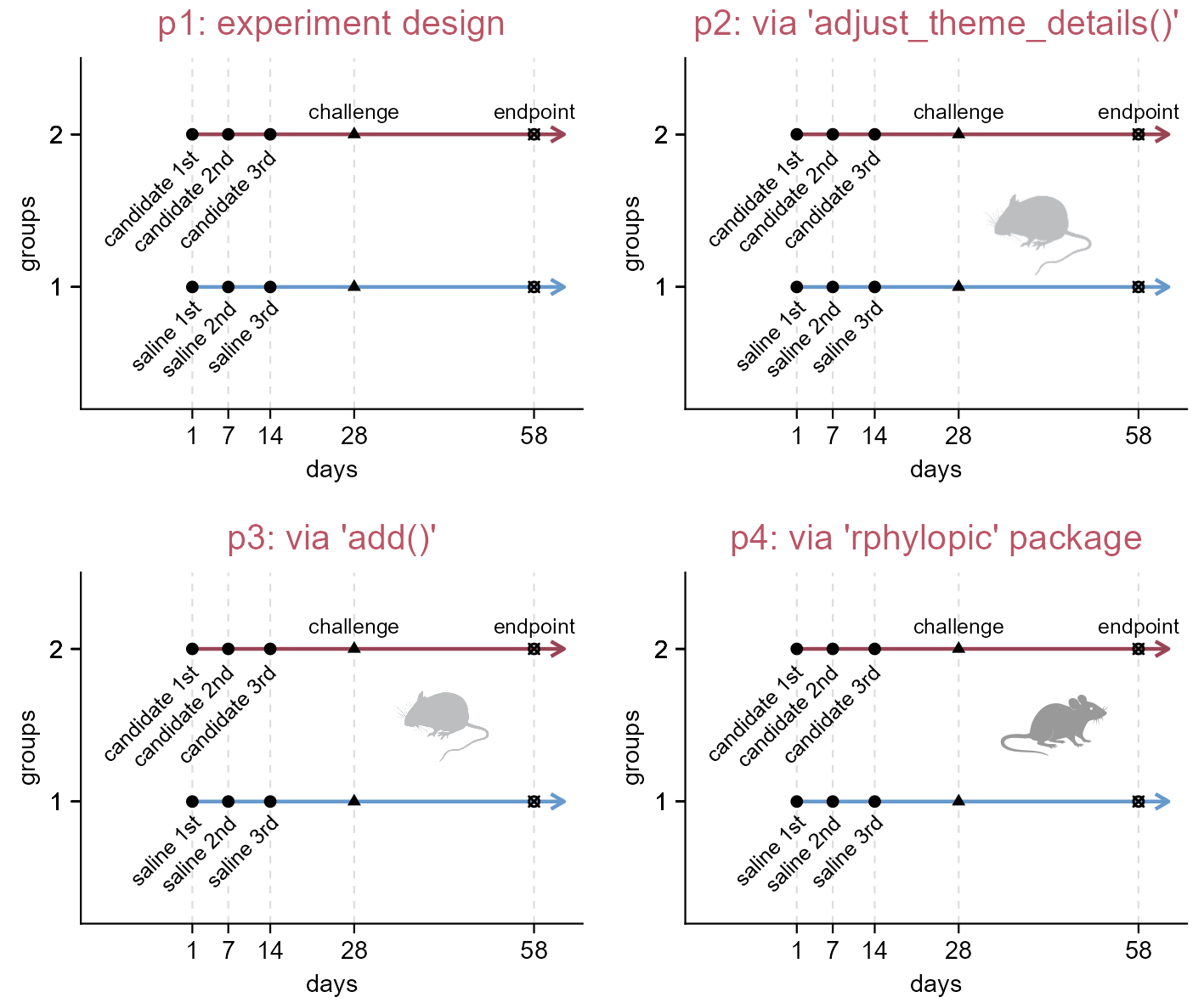
Inset an image. See reference (Gearty and Jones 2023) or the rphylopic documentation (https://rphylopic.palaeoverse.org/index.html) for details on p4.
Tip

Stephen D. Turner has compiled and reviewed a collection of resources under the title “Free and open-source images, icons, and tools for creating scientific illustrationshttps://blog.stephenturner.us/p/free-open-source-images-tools-scientific-illustrations (Turner 2026)

5.3 Annotate gel image

library(tidyplots)
img <- "images/20230515-10_cropped.tif" |> magick::image_read()

# View image information
img_info <- img |> magick::image_info()
img_width <- img_info$width; img_height <- img_info$height
img_info |> print()
# A tibble: 1 × 7
  format width height colorspace matte filesize density
  <chr>  <int>  <int> <chr>      <lgl>    <int> <chr>  
1 TIFF     180    237 Gray       FALSE    42970 600x600
# Change to graphical object
img_grob <- img |> grid::rasterGrob()
# Create a data frame relevant to img_grob
df <- tibble::tibble(x = seq(0, img_width, length.out = 100),
  y = seq(0, img_height, length.out = 100))
# View 1st row of df
df |> dplyr::slice_head(n = 1)
# A tibble: 1 × 2
      x     y
  <dbl> <dbl>
1     0     0
# The intended width of image in plot
img_intend_width = 50 # unit: mm
# Tailor relative extra spaces of plot (0 (0%) - 1 (100%))
top_extra = 0.12; right_extra = 0; bottom_extra = 0; left_extra = 0.16
# The width and height of plot
plot_width = img_intend_width * (1 + left_extra + right_extra) # unit: mm
plot_height = img_intend_width * (img_height/img_width) * (1 + top_extra + bottom_extra)

# Plot
p1 <- df |> tidyplot(x = x, y = y) |> 
  add_data_points(alpha = 0) |> 
  add(ggplot2::annotation_custom(img_grob, xmin = 0, xmax = img_width, 
    ymin = 0, ymax = img_height)) |> 
  add_title(title = "p1: add image") |> 
  adjust_size(width = plot_width, height = plot_height) |> 
  adjust_x_axis(limits = c(-img_width*left_extra, img_width*(1 + right_extra))) |> 
  adjust_y_axis(limits = c(-img_height * bottom_extra, img_height * (1 + top_extra)))
p2 <- p1 |> 
  adjust_title(title = "p2: annotate marker bands") |> 
  add_annotation_line(x = 0, xend = -5, 
    y = img_height - c(90, 113, 122, 134, 153, 170), # numbers are obtained via ImageJ
    yend = img_height - c(90, 113, 122, 134, 153, 170)) |> 
  add_annotation_text(text = c("2000", "1000", "750", "500", "250", "100", "bps"),
    x = -7, y = img_height - c(90, 113, 122, 134, 153, 170, 190), hjust = 1)    
p3 <- p2 |> 
  adjust_title(title = "p3: annotate lanes") |> 
  add_annotation_line(x = c(33, 108), xend = c(100, 175),
    y = img_height + 15, yend = img_height + 15) |> 
  add_annotation_text(text = c("A", "B"), x = c(65.3, 140.8), y = img_height + 25) |> 
  add_annotation_text(text = c("M", "-", "+", "+", "-", "+", "+"),
    x = seq(15, 166, length.out = 7), y = img_height + 7)
p4 <- p3 |>
  adjust_title(title = "p4: remove axis and margins") |> 
  remove_x_axis() |> remove_y_axis() |> 
  adjust_theme_details(plot.margin = ggplot2::margin(0, 0, 0, 0))
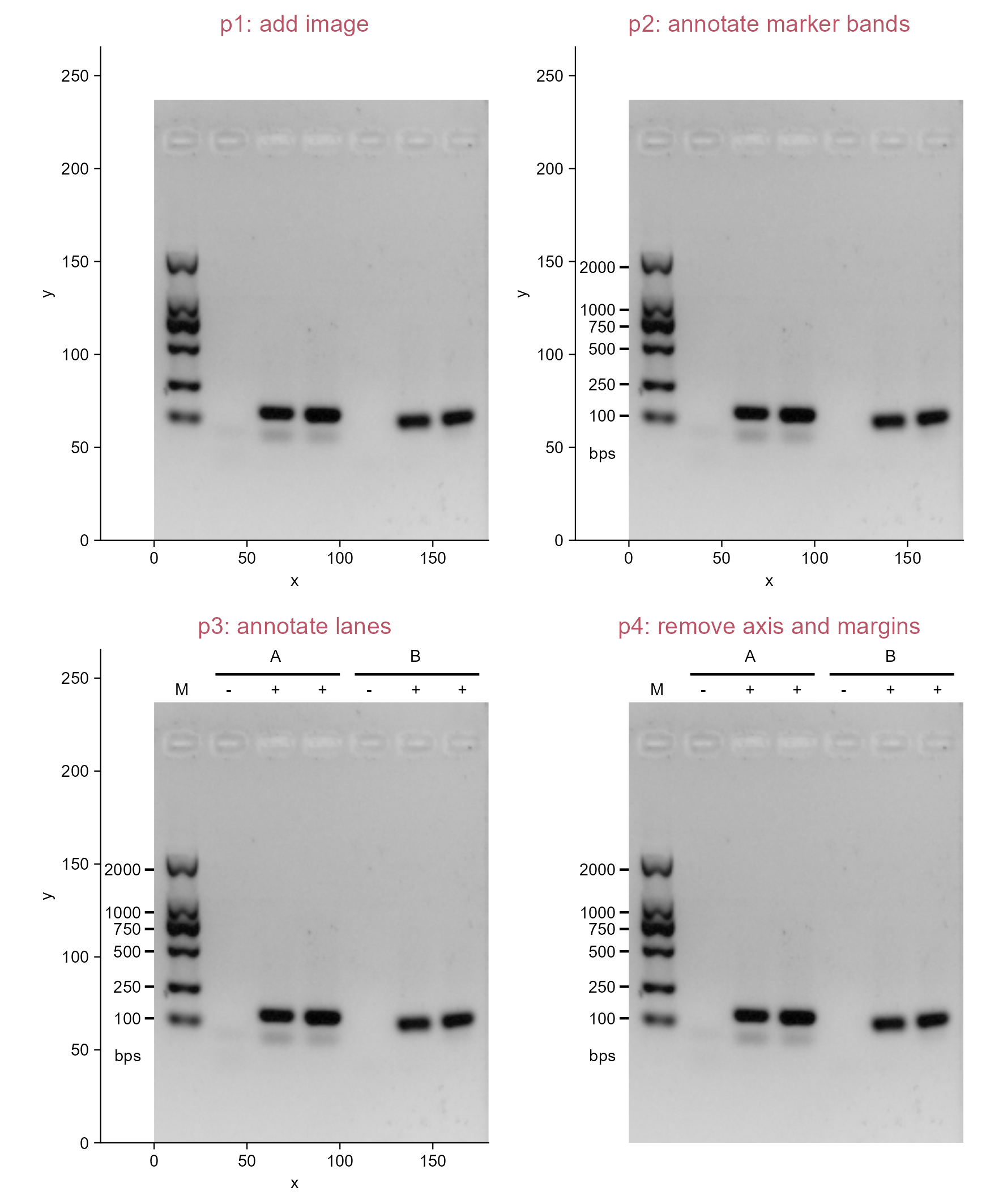
Annotate gel image.
Tip

Open the image in ImageJ/Fiji and hover over it; the pixel coordinates will be displayed in real time under the toolbar.

Note that the origin differs between systems: in ImageJ/Fiji, the top-left corner is (0, 0); whereas in tidyplots, the bottom-left corner is (0, 0) (also see Section 6.3).

5.4 Combining multiple images together

library(tidyplots)

# Get list of image names (four); All images are nearly identical in size here
img_names <- fs::dir_ls(path = "images", regexp = "^images/OS-2_.*")

# Read images
imgs <- purrr::set_names(
  purrr::map(img_names, magick::image_read),
  paste0("img", 1:length(img_names)))

# Get width and height of the 1st image
img_width <- magick::image_info(imgs[[1]])$width
img_height <- magick::image_info(imgs[[1]])$height

# Change images to graphic objectives
imgs_grob <- purrr::set_names(
  purrr::map(imgs, grid::rasterGrob),
  paste0("img", 1:length(imgs)))

# The intended width of combined image
img_intend_width = 50 # unit: mm
# Tailor relative extra spaces of plot (0 (0%) - 1 (100%))
top_extra = 0.1; right_extra = 0; bottom_extra = 0; left_extra = 0.1
# The width and height of plot
plot_width = img_intend_width * (1 + left_extra + right_extra) # unit: mm
plot_height = img_intend_width * (img_height/img_width) * (1 + top_extra + bottom_extra)

# Set a data frame for plotting
df <- tibble::tibble(x = 1:100, y = 1:100)

# Set the range of each img covered
image_cover_width <- 45 # note that df is 1:100 in x, and 1:100 in y
image_cover_height <- image_cover_width * (img_height/img_width) * (plot_width/plot_height)

# Set an intuitive function to add image to plot this time
add_image <- function(
  x, grob, top_left_x, top_left_y, 
  img_cover_width, img_cover_height) {
  x |> add(ggplot2::annotation_custom(
    grob = grob,
    xmin = top_left_x, xmax = top_left_x + img_cover_width,
    ymin = top_left_y - img_cover_height, ymax = top_left_y))}

# Plot
p1 <- df |> 
  tidyplot(x = x, y = y) |> 
  add_data_points(alpha = 0) |> 
  add_title(title = "p1: add 1st image") |> 
  adjust_size(width = plot_width, height = plot_height) |> 
  adjust_x_axis(limits = c(-100 * left_extra, 100 * (1 + right_extra))) |> 
  adjust_y_axis(limits = c(-100 * bottom_extra, 100 * (1 + top_extra))) |> 
  add_image(
    grob = imgs_grob$img1, top_left_x = 0, top_left_y = 100,
    img_cover_width = image_cover_width, img_cover_height = image_cover_height)

p2 <- p1 |> 
  adjust_title(title = "p2: add 2nd image") |> 
  add_image(
    grob = imgs_grob$img2, top_left_x = 50, top_left_y = 100,
    img_cover_width = image_cover_width, img_cover_height = image_cover_height)

p3 <- p2 |> 
  adjust_title(title = "p3: add 3rd and 4th images") |> 
  add_image(
    grob = imgs_grob$img3, top_left_x = 0, top_left_y = 50,
    img_cover_width = image_cover_width, img_cover_height = image_cover_height) |> 
  add_image(
    grob = imgs_grob$img4, top_left_x = 50, top_left_y = 50,
    img_cover_width = image_cover_width, img_cover_height = image_cover_height)

p4 <- p3 |> 
  adjust_title(title = "p4: add texts and remove axis") |> 
  add_annotation_text(
    text = paste("text", 1:4),
    x = c(22, 72, -5, -5), y = c(105, 105, 27, 77), angle = c(0, 0, 90, 90)) |> 
  remove_x_axis() |> remove_y_axis()

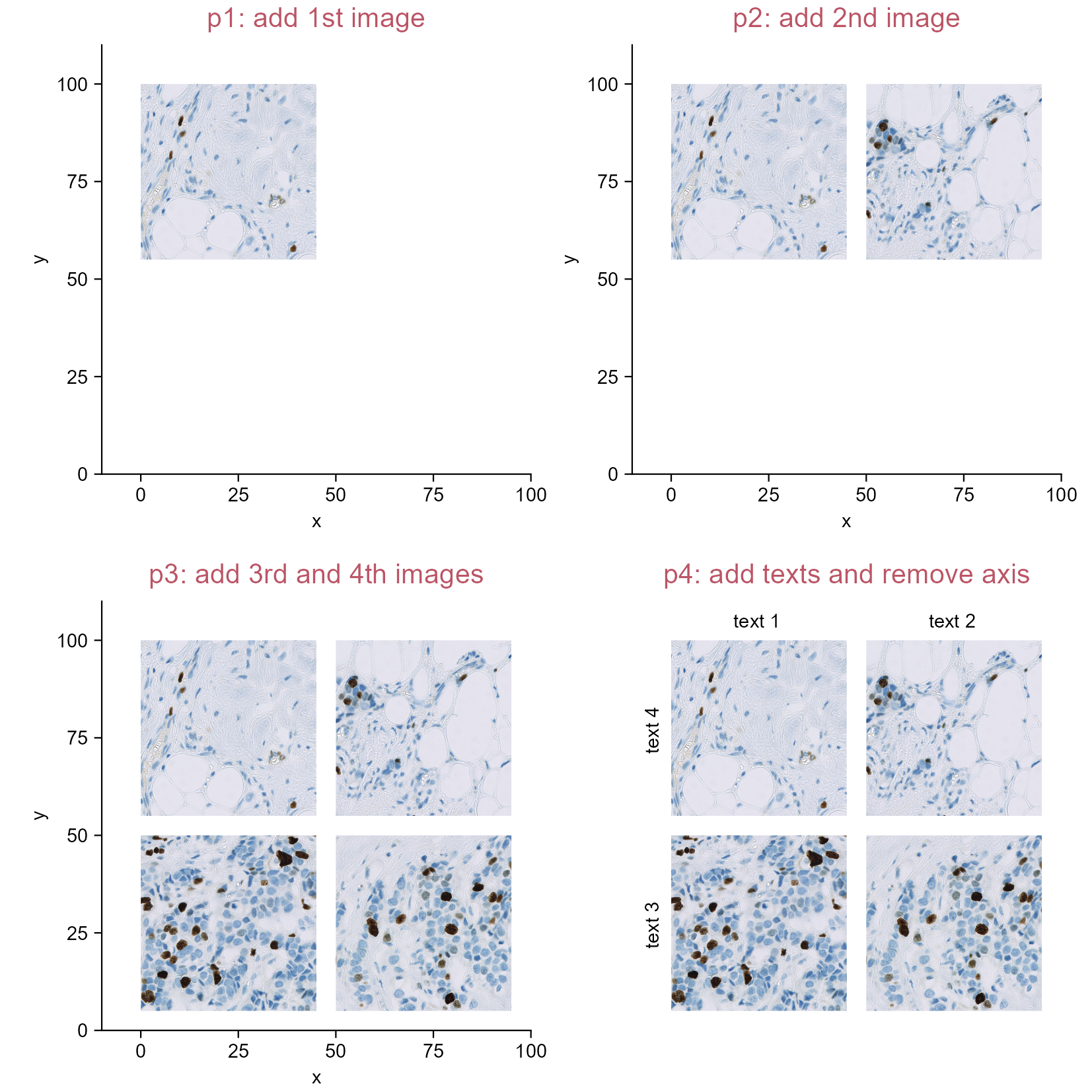
Combining multiple images together. The images are cropped from https://openslide.cs.cmu.edu/download/openslide-testdata/Hamamatsu/OS-2.ndpi using the QuPath software (Bankhead et al. 2017).

5.5 Display condition combinations in axis labels

library(tidyplots)

# View top 10 rows of the columns used
study |> dplyr::select(treatment, score) |> 
  dplyr::slice_head(n = 10)
# A tibble: 10 × 2
   treatment score
   <chr>     <dbl>
 1 A             2
 2 A             4
 3 A             5
 4 A             4
 5 A             6
 6 B             9
 7 B             8
 8 B            12
 9 B            15
10 B            16
# Plot
p1 <- study |> 
  tidyplot(x = treatment, y = score, color = treatment) |> 
  add_violin(trim = FALSE) |> 
  add_data_points_beeswarm(white_border = TRUE) |> 
  add_title(title = "p1") |> 
  remove_legend()

p2 <- p1 |> 
  adjust_title(title = "p2: + or - combination") |> 
  rename_x_axis_levels(new_names = c(
    "A" = "+\n+\n+", "B" = "+\n+\n-",
    "C" = "+\n-\n+", "D" = "-\n+\n+"))

p3 <- p2 |> 
  adjust_title(title = "p3: specifiy conditions") |> 
  add_annotation_text( # space could be used to offset the length differences
    text = "condition x\ncondition y\ncondition z", 
    x = 1, y = 0, # location of panel lowerleft
    vjust = 1.5, # should be tailored
    hjust = 1.5, # should be tailored
    fontsize = 5.8) |> # should be tailored
  add(ggplot2::coord_cartesian(clip = "off")) # ensure text could be visualized outside panel.

# Another way to p3
axis_labels <- c("+\n+\n+", "+\n+\n-", "+\n-\n+", "-\n+\n+")

p4 <- p1 |> 
  adjust_title(title = "p4: another way to p3") |> 
  adjust_x_axis(labels = axis_labels) |> 
  add_annotation_text(
    text = "condition x\ncondition y\ncondition z",
    x = 1, y = 0,
    vjust = 1.5, hjust = 1.5, fontsize = 5.8) |> 
  add(ggplot2::coord_cartesian(clip = "off")) 

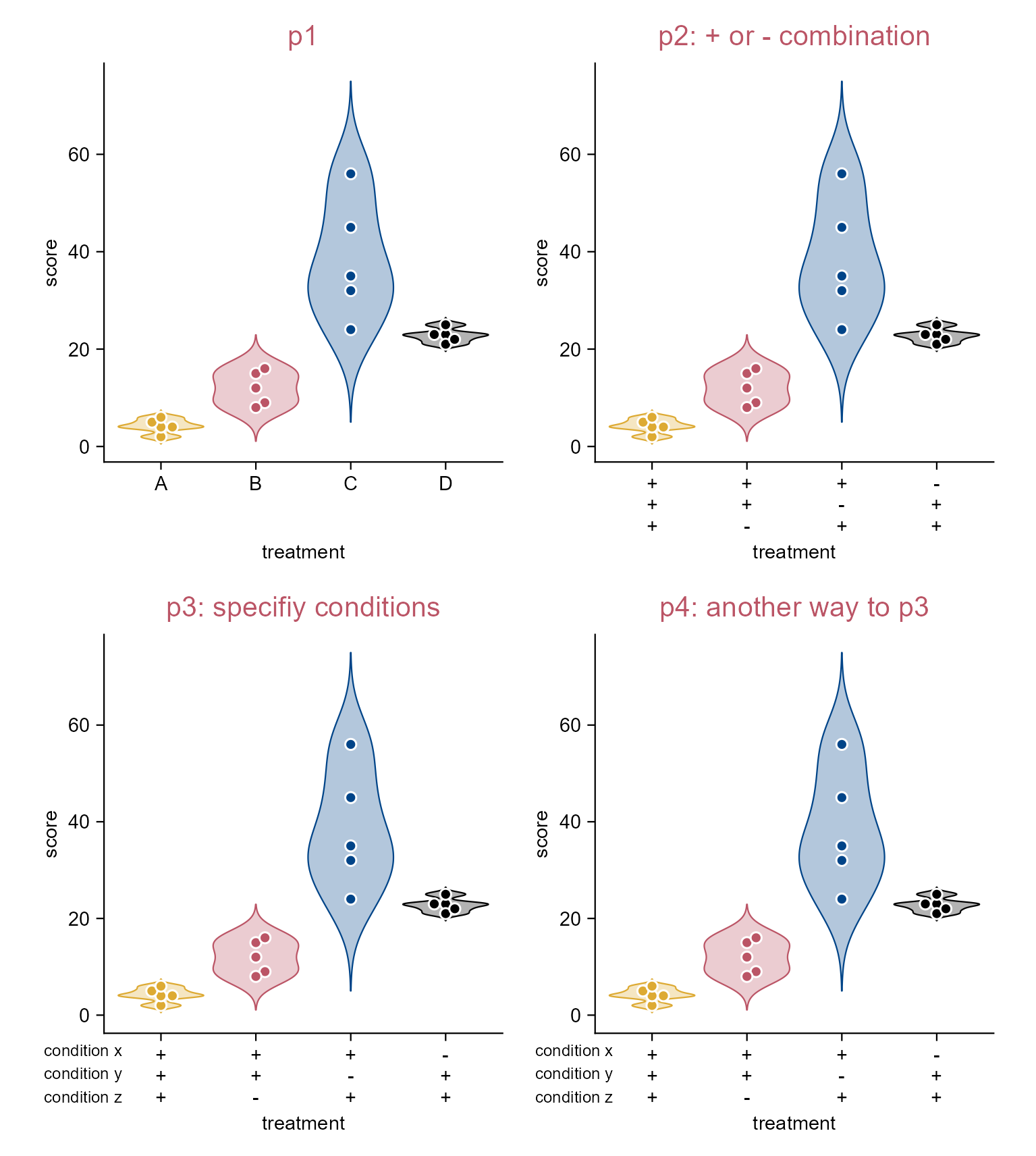
Displaying condition combinations in axis labels.
Note

So far so good, then perhaps minor adjustment might be needed via inkscape, adobe illustrator, or some other softwares for vector images.

5.6 Display condition combinations in axis labels (using add())

library(tidyplots)

# Add a column indicating combinations
study_comb <- study |> 
  dplyr::mutate(comb = c(
    rep("a,b,c", 5),
    rep("a,b", 5),
    rep("a,c", 5),
    rep("b,c", 5)))

# View top 10 rows of the columns used
study_comb |> 
  dplyr::select(comb, score) |> 
  dplyr::slice_head(n = 10)
# A tibble: 10 × 2
   comb  score
   <chr> <dbl>
 1 a,b,c     2
 2 a,b,c     4
 3 a,b,c     5
 4 a,b,c     4
 5 a,b,c     6
 6 a,b       9
 7 a,b       8
 8 a,b      12
 9 a,b      15
10 a,b      16
p1 <- study_comb |> 
  tidyplot(x = comb, y = score, color = comb) |> 
  add_violin(trim = FALSE) |> 
  add_data_points_beeswarm(white_border = TRUE) |> 
  add_title(title = "p1")

p2 <- p1 |> 
  adjust_title(title = "p2: reorder x levels") |> 
  reorder_x_axis_levels("a,b,c", "a,b", "a,c", "b,c")

p3 <- p2 |> 
  adjust_title(title = "p3: via 'add()' 1") |> 
  add(ggplot2::guides(x = legendry::guide_axis_upset(
    legendry::key_upset(sep = ","), 
    override.aes = list(size = 2),
    connect = NULL)))

p4 <- p2 |> 
  adjust_title(title = "p4: via 'add()' 2") |> 
  add(ggplot2::guides(x = legendry::guide_axis_upset(
    legendry::key_upset(sep = ","),
    override.aes = list(shape = c("+", "-", NA), size = 4),
    connect = NULL))) |> 
  theme_minimal_xy()

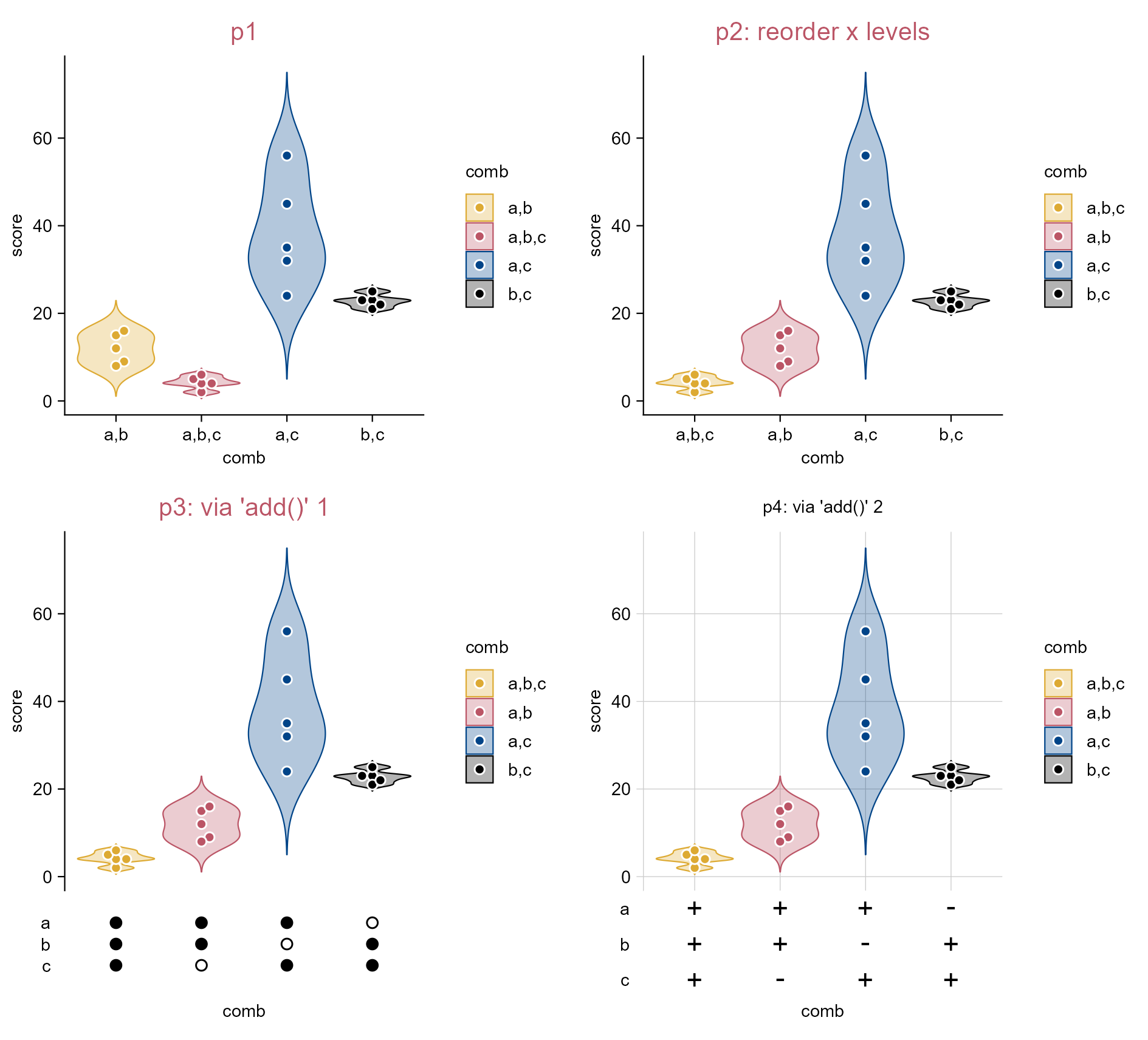
Displaying condition combinations in axis labels using add().

5.7 Change point shape/color and annotate axis

library(tidyplots)

# Add two columns to specify point shapes and colors
study_shape <- study |> 
  dplyr::mutate(
    shape = rep(c(21, 25, 22, 24, 23), 4),
    color = rep(c("#eecc66", "#994455"), each = 5, length.out = 20))

# View top 10 rows of the columns used
study_shape |> dplyr::select(treatment, score, shape, color) |> 
  dplyr::slice_head(n = 10)
# A tibble: 10 × 4
   treatment score shape color  
   <chr>     <dbl> <dbl> <chr>  
 1 A             2    21 #eecc66
 2 A             4    25 #eecc66
 3 A             5    22 #eecc66
 4 A             4    24 #eecc66
 5 A             6    23 #eecc66
 6 B             9    21 #994455
 7 B             8    25 #994455
 8 B            12    22 #994455
 9 B            15    24 #994455
10 B            16    23 #994455
# Plot
p1 <- study_shape |> 
  tidyplot(x = treatment, y = score) |> 
  add_data_points_beeswarm(shape = study_shape$shape, size = 2.5, 
    color = study_shape$color, fill = study_shape$color, alpha = 0.5) |> 
  add_mean_dash(color = "#000000") |> 
  add_test_pvalue(hide_info = TRUE, comparisons = list(c(1, 2), c(3, 4))) |> 
  add_reference_lines(x = 2.5, linetype = "solid", color = "#dddddd") |> 
  add_annotation_line(x = c(0.5, 2.5), xend = c(2.5, 4.5), 
    y = c(10, 30), yend = c(10, 30), linetype = "dotted", color = "#bbbbbb") |> 
  add_title(title = "p1: points, statistics, ref/cutoff lines")

p2 <- p1 |> 
  adjust_title(title = "p2: axis levels") |> 
  rename_x_axis_levels(new_names = c(
    "A" = "Cont IgG", "B" = "rmIFNγR1\n-IgG",
    "C" = "Cont IgG\n", "D" = "rmIFNγR1\n-IgG\n")) |> 
  adjust_x_axis(rotate_labels = TRUE, title = "") |> 
  adjust_y_axis(title = "$Log[10]*CFU$")

p3 <- p2 |> 
  adjust_title(title = "p3: lines below x axis levels") |> 
  add_annotation_line(x = c(0.6, 2.6), xend = c(2.4, 4.4), y = c(-26, -26),
    yend = c(-26, -26), linewidth = 0.3) |> 
  add(ggplot2::coord_cartesian(clip = "off", ylim = c(0, NA)))

p4 <- p3 |> 
  adjust_title(title = "p4: texts below x axis levels") |> 
  add_annotation_text(text = c("Granuloma", "Pulmonary LN"), 
    x = c(1.5, 3.5), y = c(0, 0), vjust = 9, fontsize = 8, fontface = "bold") |> 
  add_caption("mimic fig 1b of\nNat Commun. 2026. PMID: 42034649")

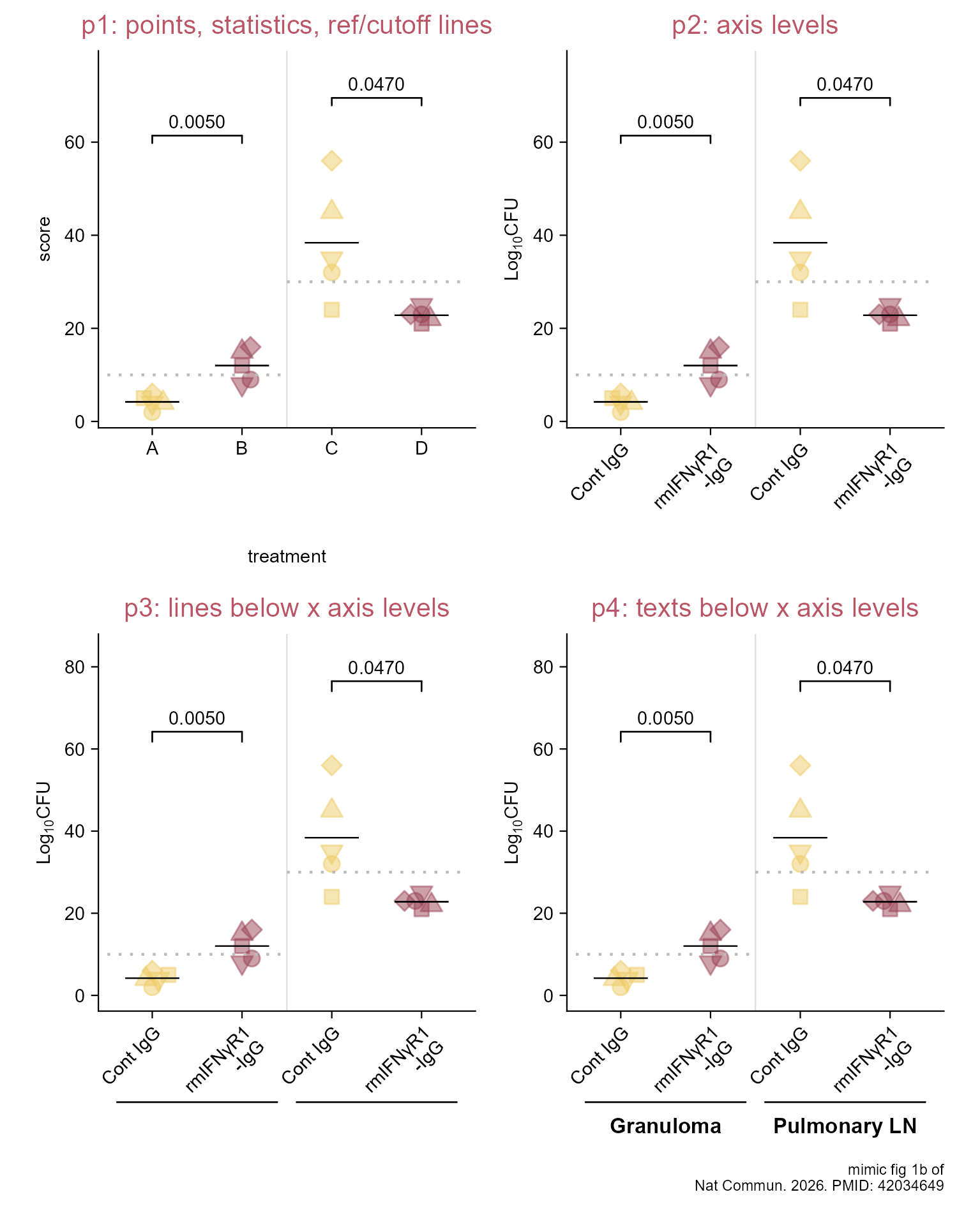
Change point shape/color and annotate axis.

5.8 Point annotation

library(tidyplots)

# Set a df for point annotation
df <- tibble::tibble(
  x = rep(1:5, length.out = 10),
  y = rep(c("a", "b"), each = 5),
  label = c("RC7", "RCK", "RJH", "RCD", "RFL", "RB9", "RML", "RED", "RHG", "RD6"),
  shape = rep(c(21, 25, 22, 24, 23), 2),
  color = rep(c("#eecc66", "#994455"), each = 5))

# View df
df
# A tibble: 10 × 5
       x y     label shape color  
   <int> <chr> <chr> <dbl> <chr>  
 1     1 a     RC7      21 #eecc66
 2     2 a     RCK      25 #eecc66
 3     3 a     RJH      22 #eecc66
 4     4 a     RCD      24 #eecc66
 5     5 a     RFL      23 #eecc66
 6     1 b     RB9      21 #994455
 7     2 b     RML      25 #994455
 8     3 b     RED      22 #994455
 9     4 b     RHG      24 #994455
10     5 b     RD6      23 #994455
# Plot
p5 <- df |>   
  tidyplot(x = x, y = y) |> 
  add_data_points(shape = df$shape, color = df$color, 
    fill = df$color, size = 2.5, alpha = 0.5) |> 
  remove_legend() |> 
  add_title(title = "p5: points") |> 
  adjust_size(width = 90, height = 10) |> 
  adjust_x_axis(limits = c(-1.6, 5.7))

p6 <- p5 |> 
  adjust_title(title = "p6: texts") |> 
  add_annotation_text(text = df$label, x = df$x, y = df$y, hjust = -0.5) |> 
  add_annotation_text(text = c("Control IgG:", "rmIFNγR1-IgG:"), x = c(0.85, 0.85),
    y = c(1, 2), hjust = 1) |> 
  add_annotation_text(text = "Animal ID", x = -0.6, y = 1.5, 
    hjust = 1, fontface = "bold")

p7 <- p6 |> 
  adjust_title(title = "p7: rectangle and remove axis") |> 
  add_annotation_line(x = -1.55, xend = -0.6, y = 1.15, yend = 1.15) |>
  add_annotation_rectangle(xmin = -1.6, xmax = 5.7, 
    ymin = 0.3, ymax = 2.8, color = "#000000", alpha = 0) |> 
  remove_x_axis() |> remove_y_axis() |> 
  adjust_theme_details(plot.margin = ggplot2::margin(0, 0, 0, 0)) |> 
  add_caption("mimic fig 1b of\nNat Commun. 2026. PMID: 42034649")

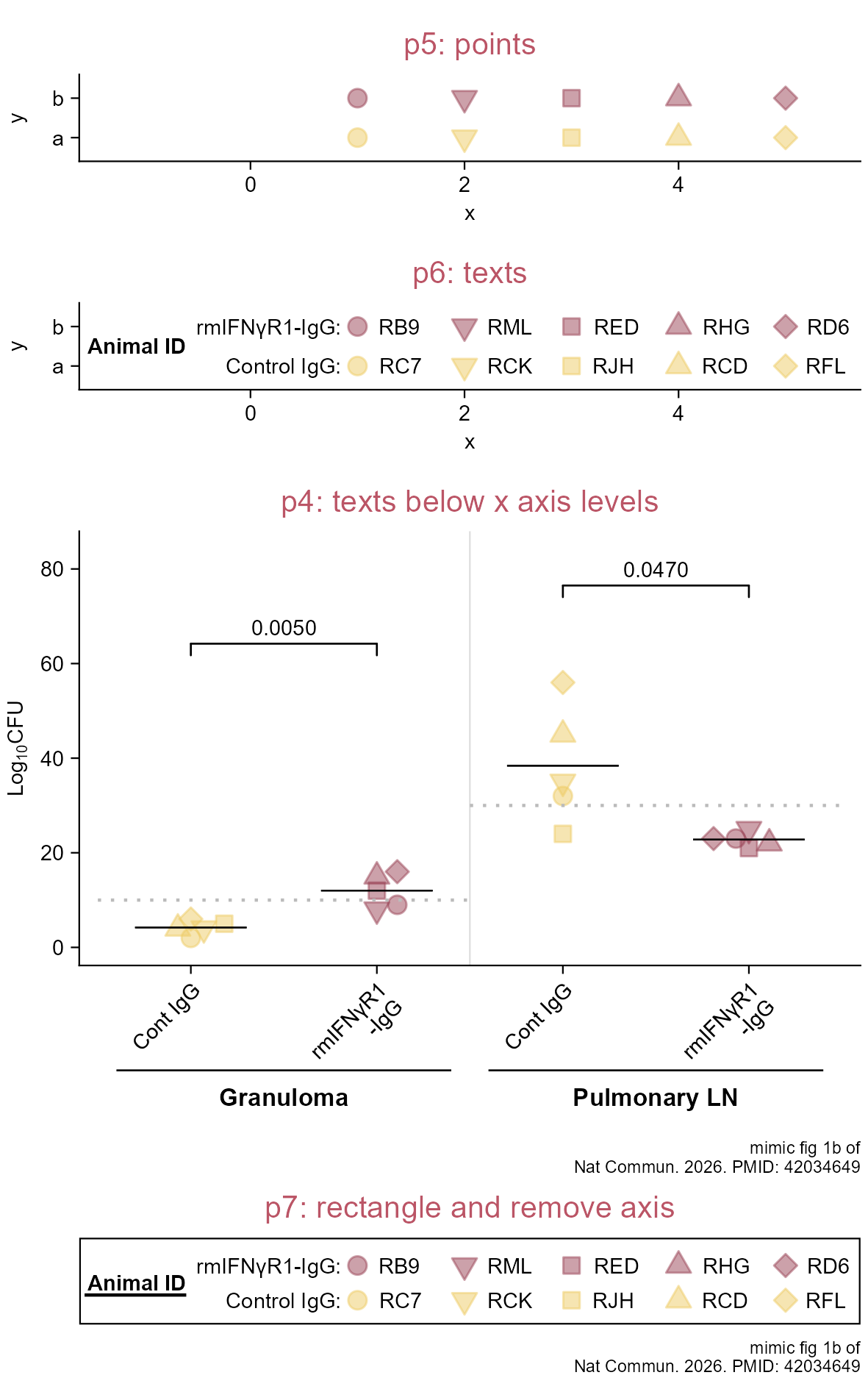
Point annotation. p4 is from the last section.
Note

Then perhaps adjustment might be needed via inkscape, adobe illustrator, or some other softwares for vector images.

5.9 Add sum values for negative bars

library(tidyplots)

df <- tibble::tibble(
  x = letters[1:10],
  y = seq(-5, 5, length.out = 10))

df <- df |> 
  dplyr::mutate(
    vjust_custom = c(ifelse(y >= 0, -1, 2)))

# View df
df
# A tibble: 10 × 3
   x          y vjust_custom
   <chr>  <dbl>        <dbl>
 1 a     -5                2
 2 b     -3.89             2
 3 c     -2.78             2
 4 d     -1.67             2
 5 e     -0.556            2
 6 f      0.556           -1
 7 g      1.67            -1
 8 h      2.78            -1
 9 i      3.89            -1
10 j      5               -1
p1 <- df |> 
  tidyplot(
    x = x, 
    y = y, 
    color = y) |> 
  add_sum_bar(alpha = 0.5) |> 
  add_title(title = "p1") |> 
  remove_legend()

p2 <- p1 |> 
  adjust_title(title = "p2: default value position") |> 
  add_sum_value(color = "#000000")

p3 <- p1 |> 
  adjust_title(title = "p3: vertical adjust = 0") |> 
  add_sum_value(color = "#000000", vjust = 0)

p4 <- p1 |> 
  adjust_title(title = "p4: custom vertical adjust") |> 
  adjust_y_axis(
    limits = c(min(df$y) - 2, max(df$y) + 2)) |> 
  add_sum_value(
    color = "#000000", 
    vjust = vjust_custom, 
    extra_padding = 0) # no extra spacing above panel

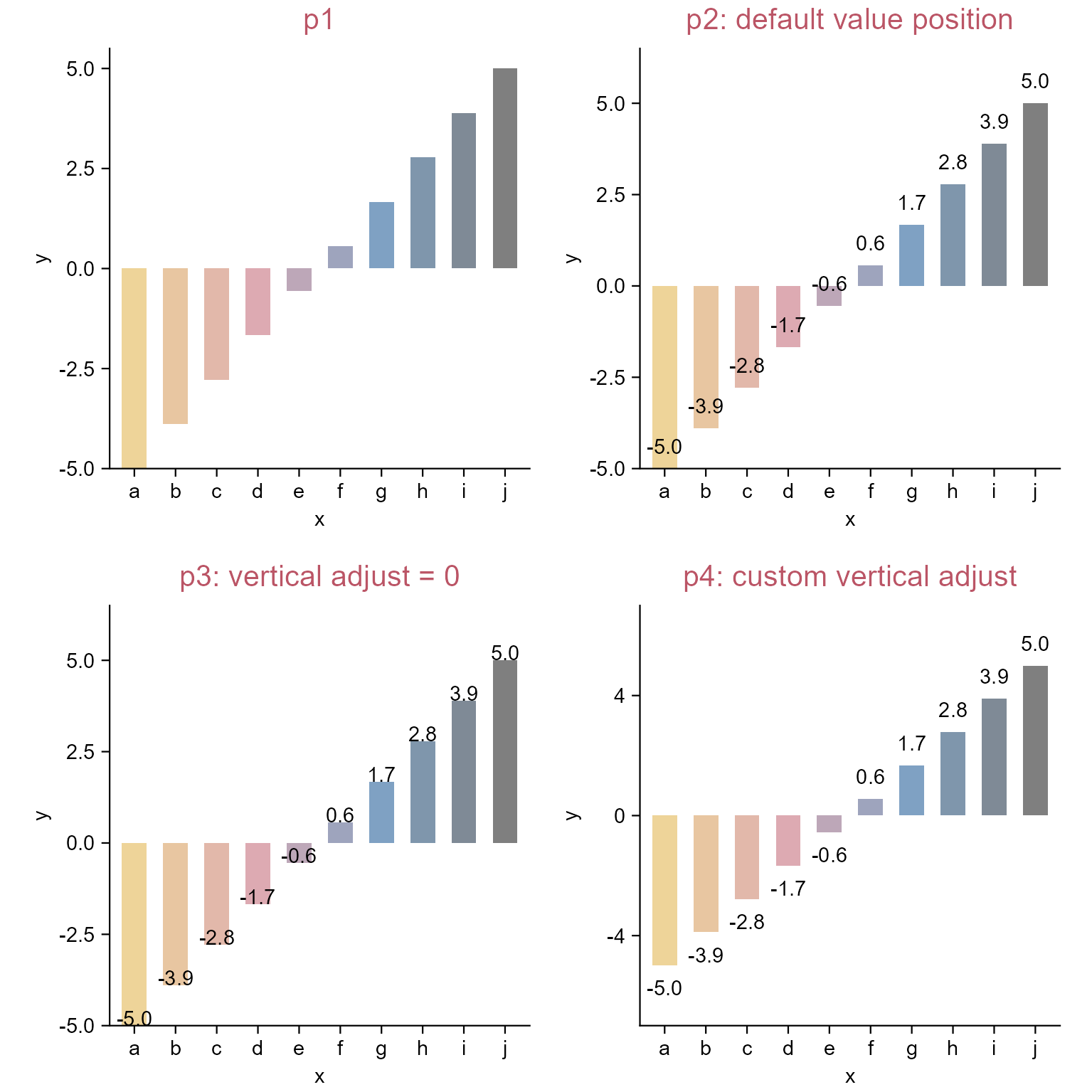
Add sum values for negative bars.

5.10 Sequencial issues

library(tidyplots)

df <- tibble::tibble(x = seq(1, 6), group = rep(1, 6))

# View df
df
# A tibble: 6 × 2
      x group
  <int> <dbl>
1     1     1
2     2     1
3     3     1
4     4     1
5     5     1
6     6     1
# Plot
p1 <- df |> 
  tidyplot(x = x, y = group) |> 
  add_line(
    arrow = grid::arrow(length = grid::unit(0.15, "cm")),
    color = "#3d4f6a", linewidth = 0.5) |> 
  add_title(title = "p1: line with arrowhead") |> remove_legend()

# Set several fixed locations/constants for efficient adjustment
text_up_dn <- 0.6 # vertical distance (tailored) to line
text_x <- df$x[1:5] # x axis locations (center) of texts
text_y <- df$group[1:5] + ifelse(seq_along(text_x) %% 2, text_up_dn, -text_up_dn)
rectangle_half_width <- 0.7 # half length (tailored) of rectangle behind text
rectangle_half_height <- 0.4
line_yend <- text_y + ifelse(seq_along(text_y) %% 2, -rectangle_half_height, rectangle_half_height) # yend locations of vertical lines

p2 <- p1 |> 
  adjust_title(title = "p2: rectangle") |> 
  add_annotation_rectangle(
    xmin = text_x - rectangle_half_width, xmax = text_x + rectangle_half_width,
    ymin = text_y - rectangle_half_height, ymax = text_y + rectangle_half_height,
    fill = "#b9e6f1", alpha = 1)

labels <- c(
  "Embrace\ndiversity as a\nkey aspect of\nscientific\nrigour",
  "Evolve ethical\nframeworks",
  "Democratise\ndata access\nand benefit\nsharing",
  "Invest in\ncapacity\nstrengthening",
  "Eevelop\ntrans-ethnic\nanalytical\nmethods")

p3 <- p2 |> 
  adjust_title(title = "p3: text") |> 
  add_annotation_text(text = labels, x = text_x, y = text_y)

p4 <- p3 |> 
  adjust_title(title = "p4: vertical lines") |> 
  add_annotation_line(x = text_x, xend = text_x,
    y = df$group[1:5], yend = line_yend, color = "#3d4f6a")

p5 <- p4 |> 
  adjust_title(title = "p5: add points and polish") |> 
  add_data_points(
    data = filter_rows(x <= 5), color = "#3d4f6a", 
    white_border = TRUE, size = 2) |> 
  adjust_size(width = 100) |> 
  remove_x_axis() |> remove_y_axis() |> 
  add_caption("redraw part of fig 1b of \nNat Rev Nephrol. 2026. PMID: 42014456")

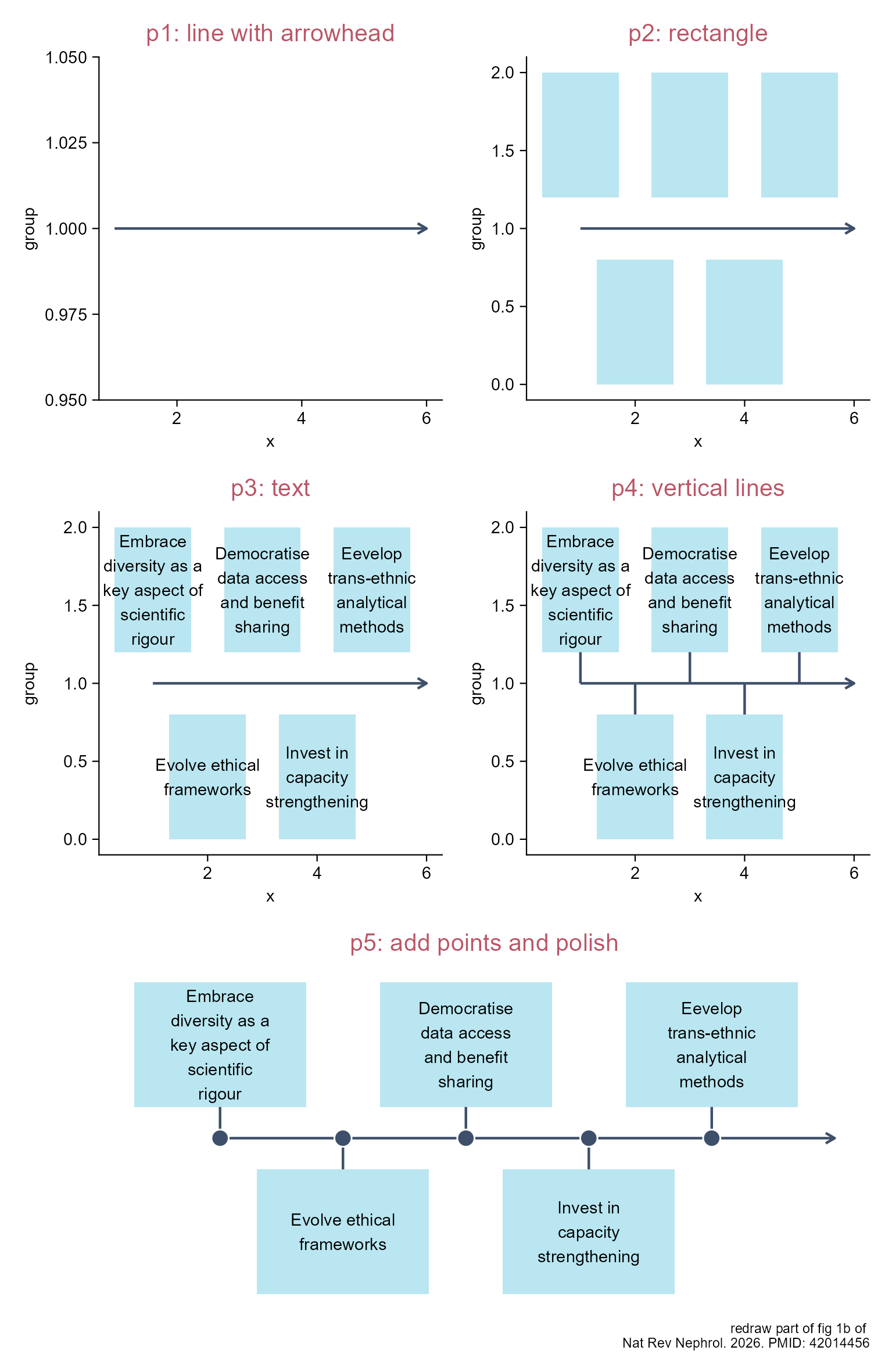
Sequencial issues.

5.11 Sequencial issues (using add())

library(tidyplots)

# Set a data frame
df <- tibble::tibble(
  phase = c("Phase 1", "Phase 2", "Phase 3", 
    "Candidate\na1", "Candidate\nb1", "Candidate\nc1", # \n means line feed
    "Candidate\nc2", "Candidate\nb2", "Candidate\na2"),
  x_start = c(rep(1:3, times = 2), 3:1),
  x_end = c(x_start[1:6] + 0.9, x_start[7:9] + 1.2),
  y = rep(3:1, each = 3))

# View
df
# A tibble: 9 × 4
  phase           x_start x_end     y
  <chr>             <int> <dbl> <int>
1 "Phase 1"             1   1.9     3
2 "Phase 2"             2   2.9     3
3 "Phase 3"             3   3.9     3
4 "Candidate\na1"       1   1.9     2
5 "Candidate\nb1"       2   2.9     2
6 "Candidate\nc1"       3   3.9     2
7 "Candidate\nc2"       3   4.2     1
8 "Candidate\nb2"       2   3.2     1
9 "Candidate\na2"       1   2.2     1
p1 <- df |> 
  tidyplot(y = y, color = x_start) |> 
  add(gggenes::geom_gene_arrow(
    mapping = ggplot2::aes(xmin = x_start, xmax = x_end),
    data = filter_rows(y == 3), 
    arrowhead_height = grid::unit(6, "mm"),
    color = "#000000", fill = "#ffffff")) |> 
  add_title(title = "p1") |> 
  adjust_size(width = 70, height = 30) |> 
  adjust_y_axis(limits = c(0.5, 3.5)) |> 
  remove_legend()

p2 <- p1 |> 
  adjust_title(title = "p2") |> 
  add(gggenes::geom_gene_label(
    mapping = ggplot2::aes(xmin = x_start, xmax = x_end, label = phase),
    data = dplyr::filter(df, y == 3),
    color = "#000000"))

p3 <- p2 |> 
  adjust_title(title = "p3") |> 
  add(gggenes::geom_gene_arrow(
    mapping = ggplot2::aes(xmin = x_start, xmax = x_end),
    data = filter_rows(y == 2), 
    arrowhead_width = grid::unit(0, "mm"),
    arrowhead_height = grid::unit(8, "mm"), 
    arrow_body_height = grid::unit(8, "mm"), 
    color = "#000000")) |> 
  adjust_colors(new_colors = c("#eecc66", "#ee99aa", "#6699cc"))

p4 <- p3 |> 
  adjust_title(title = "p4") |> 
  add_annotation_text(
    text = df$phase[4:6], 
    x = (df$x_start[4:6] + df$x_end[4:6])/2, 
    y = df$y[4:6]) |> 
  adjust_y_axis(limits = c(0, 3.5))

p5 <- p4 |> 
  adjust_title(title = "p5") |> 
  add(gggenes::geom_gene_arrow(
    mapping = ggplot2::aes(xmin = x_start, xmax = x_end, y = y),
    data = filter_rows(y == 1), 
    arrowhead_width = grid::unit(6, "mm"),
    arrowhead_height = grid::unit(5, "mm"),
    arrow_body_height = grid::unit(8, "mm"), 
    color = "#000000"))

p6 <- p5 |> 
  adjust_title(title = "p6") |> 
  add_annotation_text(
    text = df$phase[7:9], 
    x = (df$x_start[7:9] + df$x_end[7:9])/2, 
    y = df$y[7:9]) |> 
  remove_x_axis() |> remove_y_axis()

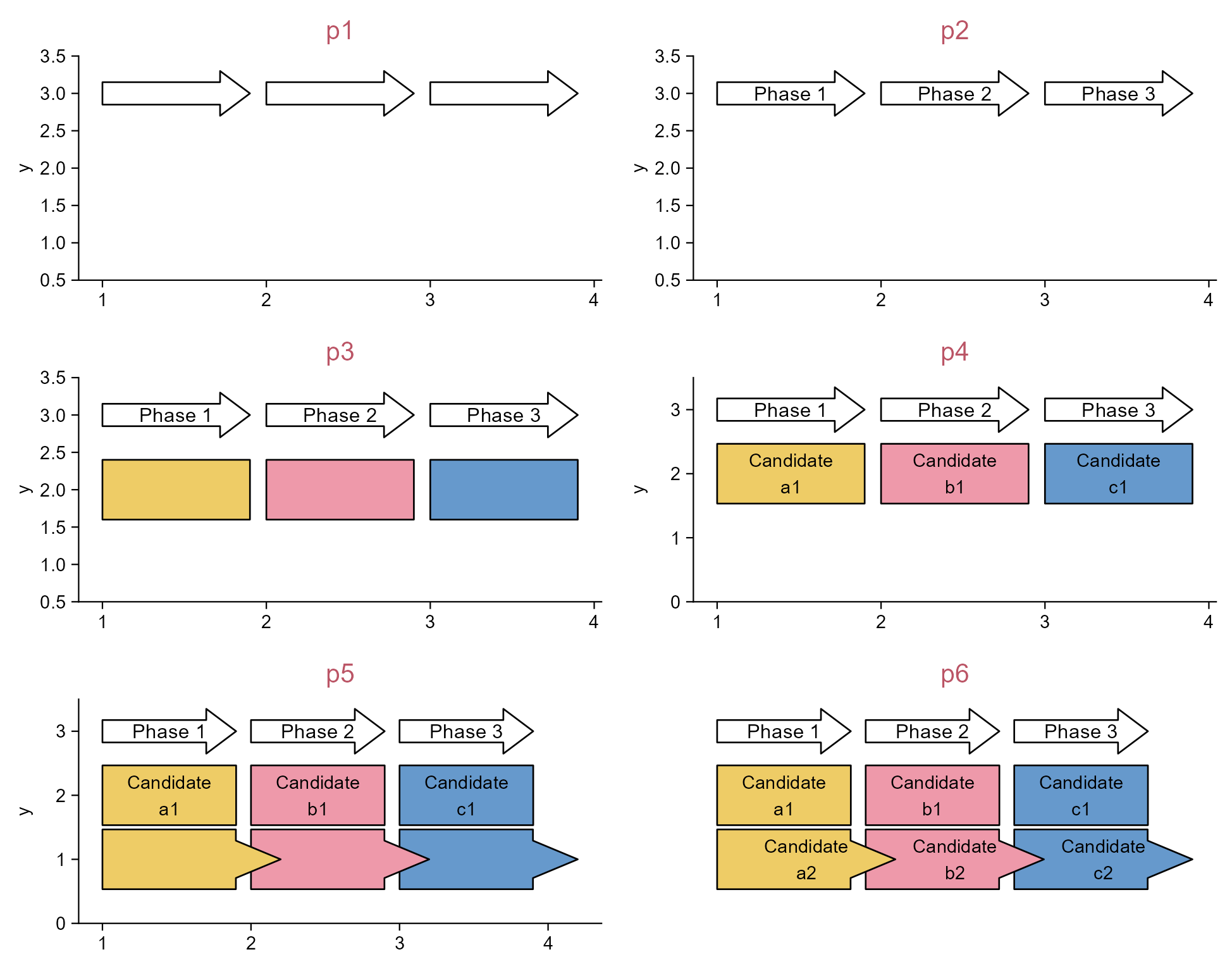
Sequencial issues (using add()).

5.12 Change Chinese date axis labels into English ones

Note

This is a (tedious) alternative way to Section 3.20.

library(tidyplots)

# Change date column with <dttm> type to a new column with <chr> type
energy_week_chr <- energy_week |> 
  dplyr::mutate(date_chr = as.character(date))

# View top 10 rows of the columns used
energy_week_chr |> 
  dplyr::select(date, date_chr, power, energy_source) |> 
  dplyr::slice_head(n = 10)
# A tibble: 10 × 4
   date                date_chr             power energy_source              
   <dttm>              <chr>                <dbl> <fct>                      
 1 2023-09-03 22:00:00 2023-09-03 22:00:00    0   Nuclear                    
 2 2023-09-03 22:00:00 2023-09-03 22:00:00 2634.  Hydro Run-of-River         
 3 2023-09-03 22:00:00 2023-09-03 22:00:00 4711.  Biomass                    
 4 2023-09-03 22:00:00 2023-09-03 22:00:00 8399.  Fossil brown coal / lignite
 5 2023-09-03 22:00:00 2023-09-03 22:00:00 1726.  Fossil hard coal           
 6 2023-09-03 22:00:00 2023-09-03 22:00:00  401.  Fossil oil                 
 7 2023-09-03 22:00:00 2023-09-03 22:00:00 4900.  Fossil gas                 
 8 2023-09-03 22:00:00 2023-09-03 22:00:00   17.9 Geothermal                 
 9 2023-09-03 22:00:00 2023-09-03 22:00:00  232.  Hydro water reservoir      
10 2023-09-03 22:00:00 2023-09-03 22:00:00  586   Hydro pumped storage       
# Also viewsome info about my computer
sessionInfo()$platform
[1] "x86_64-w64-mingw32/x64"
Sys.getlocale("LC_TIME")
[1] "Chinese (Simplified)_China.utf8"
# Plot
p1 <- energy_week_chr |> 
  tidyplot(x = date, y = power, color = energy_source) |> 
  add_title(title = "p1: x axis labels in Chinese") |>  
  add_areastack_relative()
# you can see the Chinese character "月" in the x axis labels.

p2 <- energy_week_chr |> 
  tidyplot(x = date_chr, y = power, color = energy_source) |> 
  add_title(title = "p2: x axis labels in English") |> 
  add_areastack_relative() |> 
  adjust_legend_position(position = "left") |> 
  adjust_x_axis(
    breaks = c("2023-09-05", "2023-09-07", "2023-09-09"),
    labels = c("Sep 05", "Sep 07", "Sep 09"))

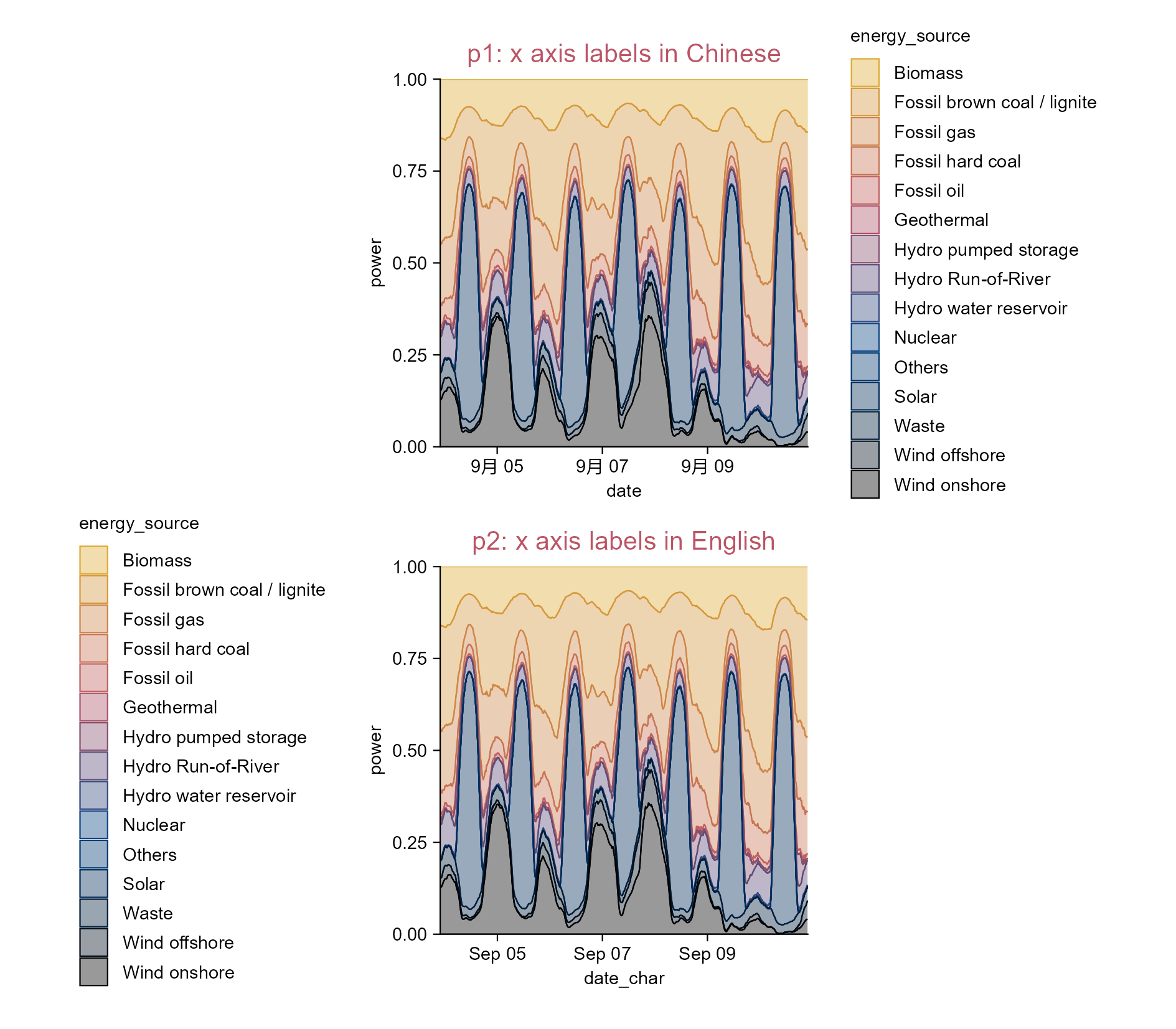
Change Chinese date axis labels into English ones.
Note

What about the same issue in non-English operating systems other than Chinese?

5.13 Plot with a broken axis

library(tidyplots)
library(patchwork)

# Enlarge score values of treatments "C" and "D" by adding 900
study_modi <- study |> 
  dplyr::mutate(score_modi = ifelse(treatment %in% c("C", "D"), score + 900, score))

# View rows 6 to 15 of the columns involved
study_modi |> dplyr::select(treatment, score, score_modi) |> 
  dplyr::slice(6:15)
# A tibble: 10 × 3
   treatment score score_modi
   <chr>     <dbl>      <dbl>
 1 B             9          9
 2 B             8          8
 3 B            12         12
 4 B            15         15
 5 B            16         16
 6 C            32        932
 7 C            35        935
 8 C            24        924
 9 C            45        945
10 C            56        956
p1 <- study_modi |> tidyplot(x = treatment, y = score_modi, color = treatment) |> 
  add_mean_bar(alpha = 0.3) |> 
  add_data_points_beeswarm(white_border = TRUE) |> 
  add_sem_errorbar() |> 
  add_test_asterisks(hide_info = TRUE) |> 
  add_title(title = "p1: treatments 'A' and 'B' are invisible")

p2 <- p1 |> 
  adjust_title(title = "p2: transform y axis via log10") |> 
  adjust_y_axis(transform = "log10")

study_AB <- study_modi |> 
  dplyr::filter(treatment %in% c("A", "B"))

p3_lower_segment <- p1 |> 
  adjust_y_axis(limits = c(0, max(study_AB$score_modi) + 5)) |> 
  adjust_size(height = 15) |> 
  remove_y_axis_title() |> 
  remove_title()

study_CD <- study_modi |> 
  dplyr::filter(treatment %in% c("C", "D"))

p3_upper_segment <- p1 |> 
  adjust_title(title = "p3: broken-axis plot") |> 
  adjust_y_axis(
    limits = c(min(study_CD$score_modi) - 100, NA)) |> 
  adjust_y_axis_title(hjust = -1) |> 
  adjust_size(height = 30) |> 
  adjust_padding(top = 0.1) |> 
  remove_x_axis()

# Combine plots into the same graphic
design <- "AB
           C#
           D#"

p1 + p2 + p3_upper_segment + p3_lower_segment + plot_layout(design = design)

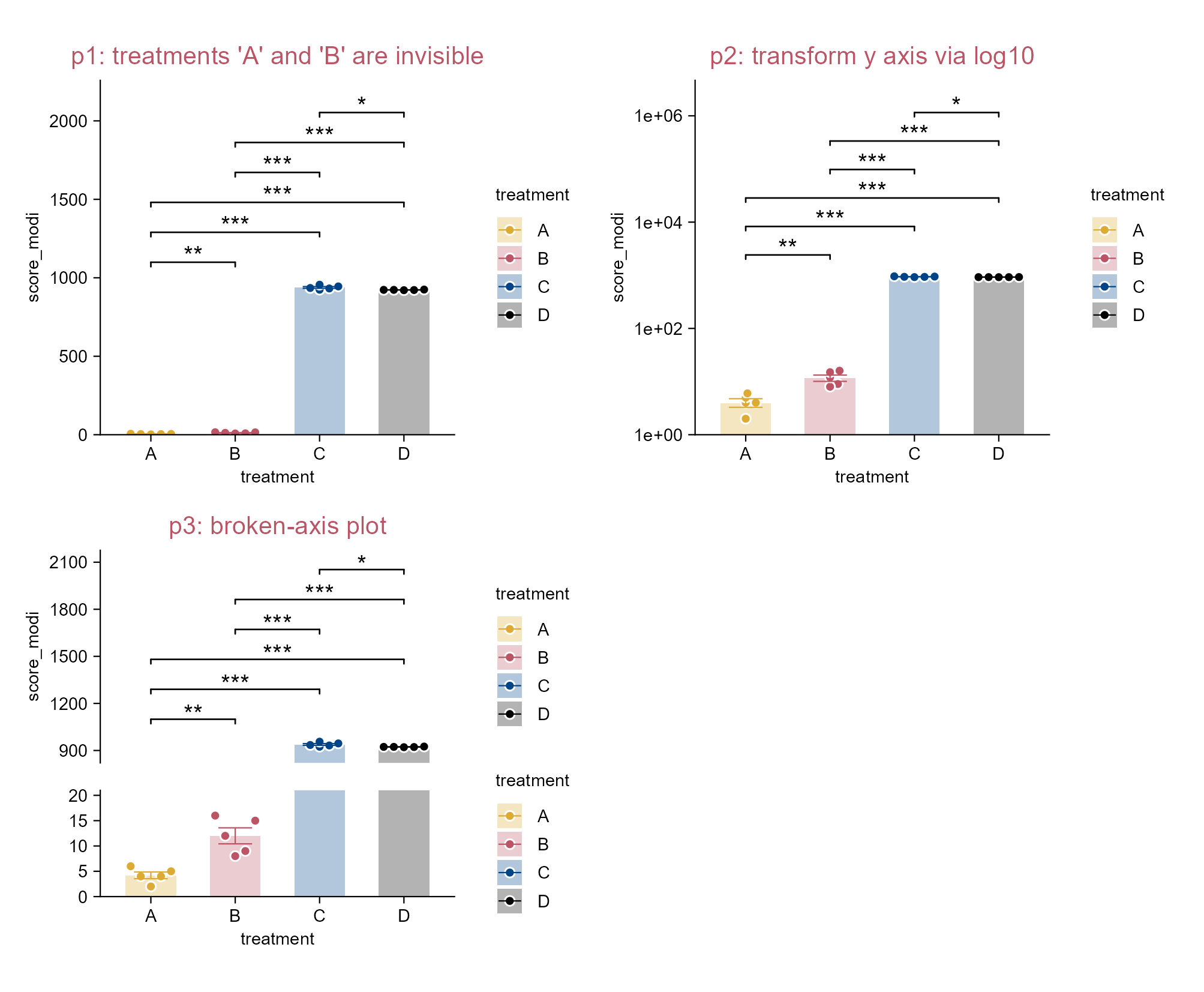
Plot with a broken y axis.
Note

Inkscape or adobe illustrator can be used to adjust, modify, remove plot elements of p3 (e.g. axis labels and legends).

P3 is actually composed of two plots: p3_upper_segment and p3_lower_segment.

By the way, it seems that the ggbreak package is incompatible with ggplot or tidyplot that use absolute dimentions (Mu et al. 2026).

5.14 Color each points within each group

library(tidyplots)

y <- c(2.3, 4.5, 6.3, 3.4, 7.8, 3.05, 5.30, 7.05, 4.20, 8.55)
colors <- c("#eecc66", "#ee99aa", "#6699cc", "#997700", "#994455")
df <- tibble::tibble(
  y = y, group = paste0("g", rep(c(1, 2), each = 5)), batch = paste0("b", c(1:5, 1:5)), 
  batch_color_1 = rep(colors, times = 2), batch_color_2 = rep(colors, each = 2))

# View df
df
# A tibble: 10 × 5
       y group batch batch_color_1 batch_color_2
   <dbl> <chr> <chr> <chr>         <chr>        
 1  2.3  g1    b1    #eecc66       #eecc66      
 2  4.5  g1    b2    #ee99aa       #eecc66      
 3  6.3  g1    b3    #6699cc       #ee99aa      
 4  3.4  g1    b4    #997700       #ee99aa      
 5  7.8  g1    b5    #994455       #6699cc      
 6  3.05 g2    b1    #eecc66       #6699cc      
 7  5.3  g2    b2    #ee99aa       #997700      
 8  7.05 g2    b3    #6699cc       #997700      
 9  4.2  g2    b4    #997700       #994455      
10  8.55 g2    b5    #994455       #994455      
p1 <- df |> 
  tidyplot(x = group, y = y, color = group) |> 
  add_boxplot() |> add_data_points(white_border = TRUE, size = 1.5) |> 
  add_title(title = "p1") |> add_test_pvalue(paired_by = batch, hide_info = TRUE)

p2 <- df |> 
  tidyplot(x = group, y = y, color = group) |> 
  add_boxplot(fill = "#000000", alpha = 0.2) |> add_title(title = "p2: no points")

p3 <- p2 |> 
  adjust_title(title = "p3: points with labels") |> 
  add_data_points(white_border = TRUE, size = 1.5) |> 
  add_data_labels_repel(label = batch) |> 
  add_line(group = batch, color = "#000000", linetype = "dotted") |> 
  add_test_pvalue(paired_by = batch, hide_info = TRUE, bracket.nudge.y = 0.2)

p4 <- p2 |> 
  adjust_title(title = "p4: different point colors (method 1)") |> 
  add_data_points(white_border = TRUE, size = 1.5, color = df$batch_color_2) |> 
  add_line(group = batch, color = "#000000", linetype = "dotted") |> 
  add_test_pvalue(paired_by = batch, hide_info = TRUE)

p5 <- p2 |> 
  adjust_title(title = "p5: different point colors (method 2)") |> 
  add_data_points(data = filter_rows(group == "g1"), white_border = TRUE, size = 1.5, color = df$batch_color_1[1:5]) |> 
  add_data_points(data = filter_rows(group == "g2"), white_border = TRUE, size = 1.5, color = df$batch_color_1[6:10]) |> 
  add_line(group = batch, color = "#000000", linetype = "dotted") |> 
  add_test_pvalue(paired_by = batch, hide_info = TRUE)

p6 <- p2 |> 
  adjust_title(title = "p6: different point colors (method 3)") |> 
  add(ggplot2::geom_point(
    ggplot2::aes(fill = I(batch_color_1)), shape = 21, 
    size = 2.25, color = "#ffffff", show.legend = FALSE)) |> 
  add_line(group = batch, color = "#000000", linetype = "dotted") |> 
  add_test_pvalue(paired_by = batch, hide_info = TRUE)

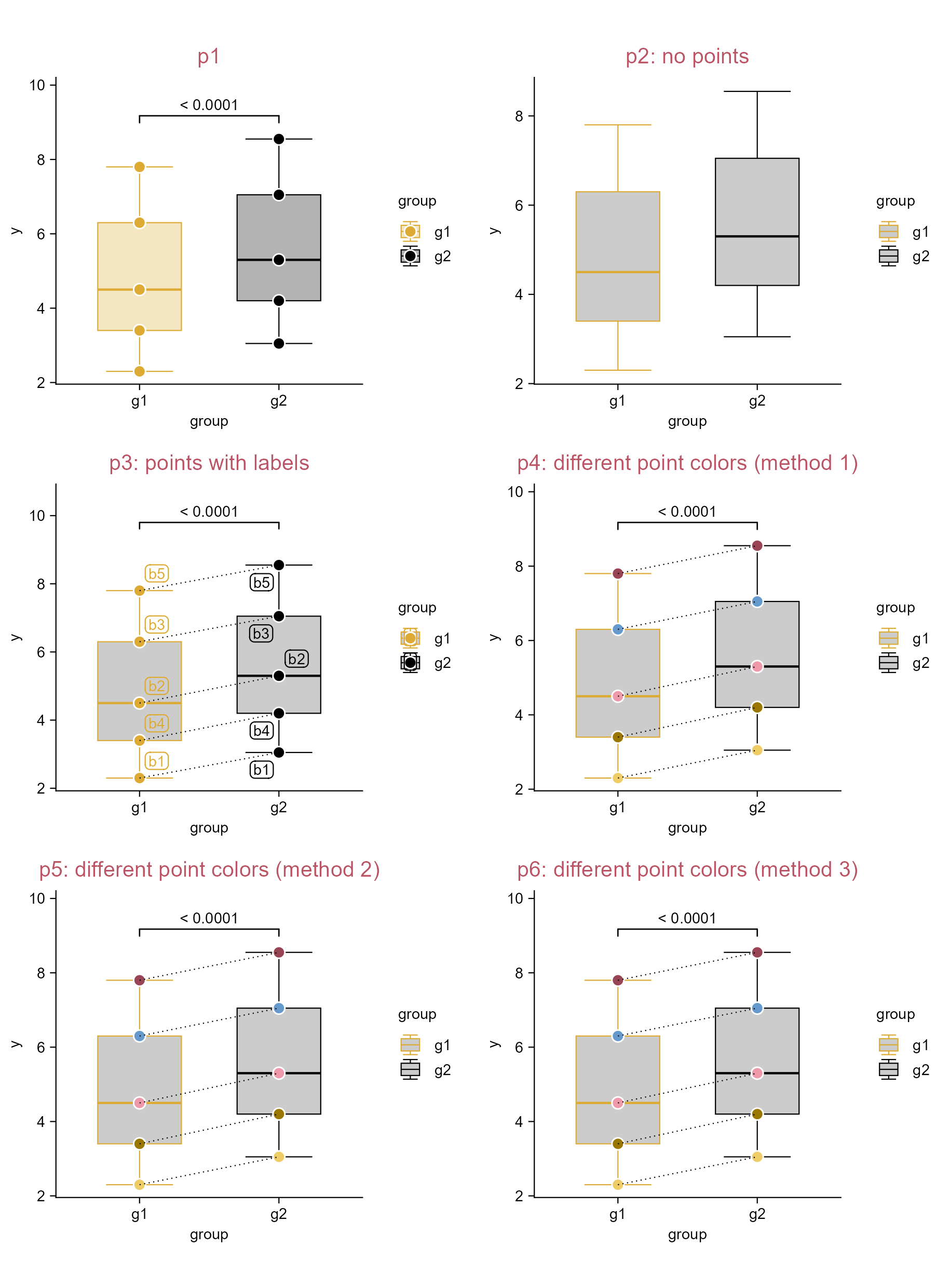
Color each points within each group.

5.15 Forest plot

library(tidyplots)

# Create a data frame (from Global Spine J. 2021. PMID: 33939533)
df <- tibble::tibble(
  studies = c(
    "Blumenthal et al, 2005", "Geisler et al, 2009", 
    "Gornet et al, 2011", "total"),
  weight = c(0.208, 0.279, 0.513, 1),
  rr = c(1.38, 1.15, 1.14, 1.19),
  ci95_lower = c(1.13, 0.97, 1.04, 1.07),
  ci95_upper = c(1.68, 1.35, 1.25, 1.32))

# View
df
# A tibble: 4 × 5
  studies                weight    rr ci95_lower ci95_upper
  <chr>                   <dbl> <dbl>      <dbl>      <dbl>
1 Blumenthal et al, 2005  0.208  1.38       1.13       1.68
2 Geisler et al, 2009     0.279  1.15       0.97       1.35
3 Gornet et al, 2011      0.513  1.14       1.04       1.25
4 total                   1      1.19       1.07       1.32
p1 <- df |> 
  tidyplot(
    x = rr, 
    y = studies) |> 
  add(ggplot2::geom_linerange(
    ggplot2::aes(xmin = ci95_lower, xmax = ci95_upper), 
    color = "#000000")) |> 
  add_data_points(
    size = 8 * df$weight, 
    shape = c(15, 15, 15, 18), 
    color = "#000000") |> 
  add_title(title = "p1: involving `add()`") |> 
  reverse_y_axis_levels() |> 
  add_reference_lines(x = 1) # line of no effect

p2 <- df |> 
  tidyplot(
    x = rr, 
    y = studies) |> 
  add_annotation_line(
    x = df$ci95_lower, 
    xend = df$ci95_upper, 
    y = df$studies, 
    yend = df$studies) |> 
  add_data_points(
    size = 8 * df$weight, 
    shape = c(15, 15, 15, 18), 
    color = "#000000") |> 
  add_title(title = "p2: without involving `add()`") |> 
  reverse_y_axis_levels() |> 
  add_reference_lines(x = 1) # line of no effect

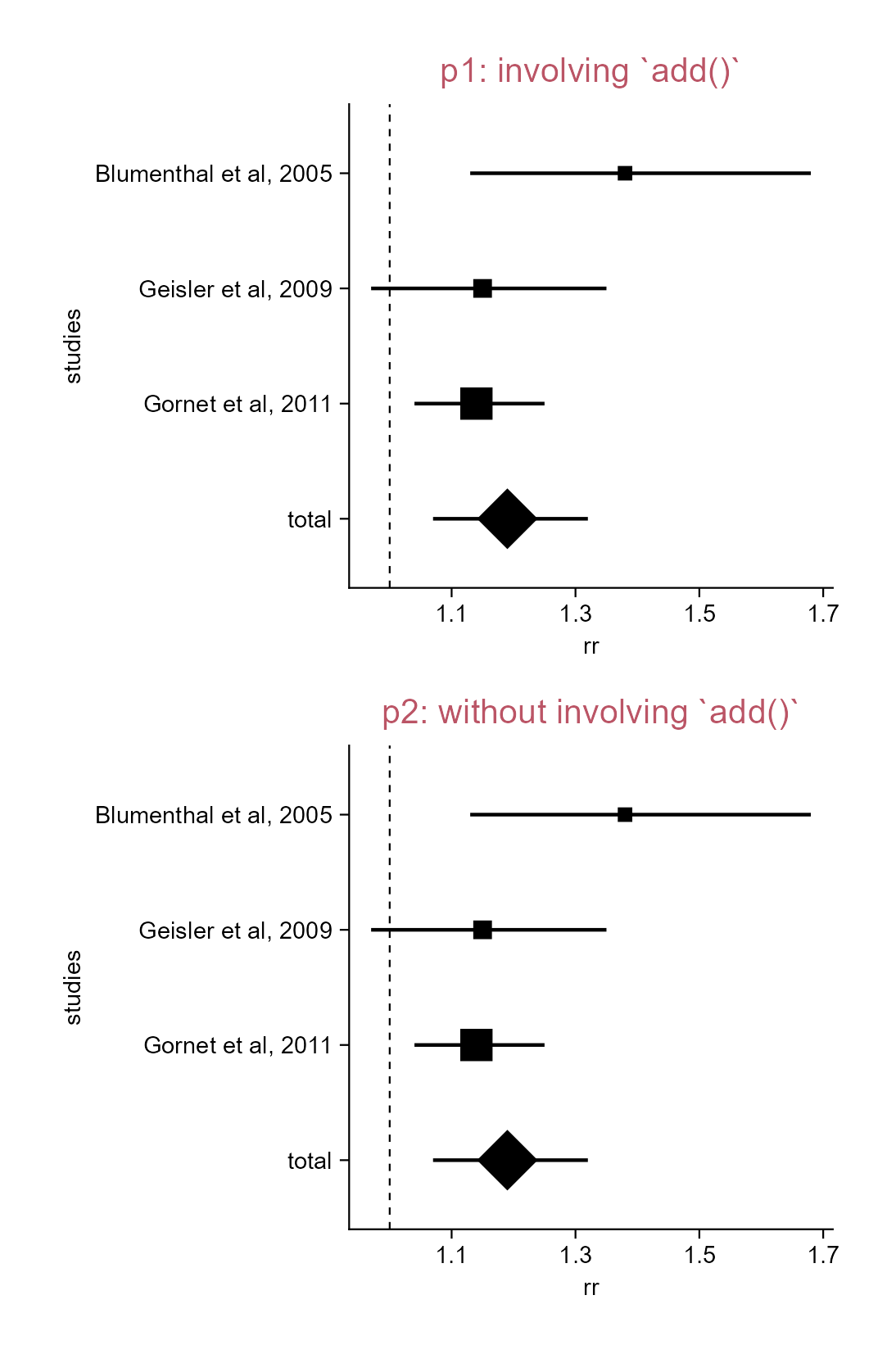
Forest plot. The data involved are from (Dettori et al. 2021).
Bankhead, Peter, Maurice B. Loughrey, José A. Fernández, et al. 2017. “QuPath: Open Source Software for Digital Pathology Image Analysis.” Scientific Reports 7 (1). https://doi.org/10.1038/s41598-017-17204-5.
Dettori, Joseph R., Daniel C. Norvell, and Jens R. Chapman. 2021. “Seeing the Forest by Looking at the Trees: How to Interpret a Meta-Analysis Forest Plot.” Global Spine Journal 11 (4): 614–16. https://doi.org/10.1177/21925682211003889.
Gearty, William, and Lewis A. Jones. 2023. “Rphylopic: An r Package for Fetching, Transforming, and Visualising PhyloPic Silhouettes.” Methods in Ecology and Evolution 14 (11): 2700–2708. https://doi.org/10.1111/2041-210X.14221.
Mu, Zepeng, Pratik Rath, and Jan Broder Engler. 2026. “Use Ggbreak.” February. https://github.com/jbengler/tidyplots/discussions/158.
Turner, Stephen D. 2026. “Free and Open-Source Images, Icons, and Tools for Creating Scientific Illustrations.” May 2. https://blog.stephenturner.us/p/free-open-source-images-tools-scientific-illustrations.