3  Plots and skills (part 1)

3.1 Three main verbs (e.g. bar plot)

Tip

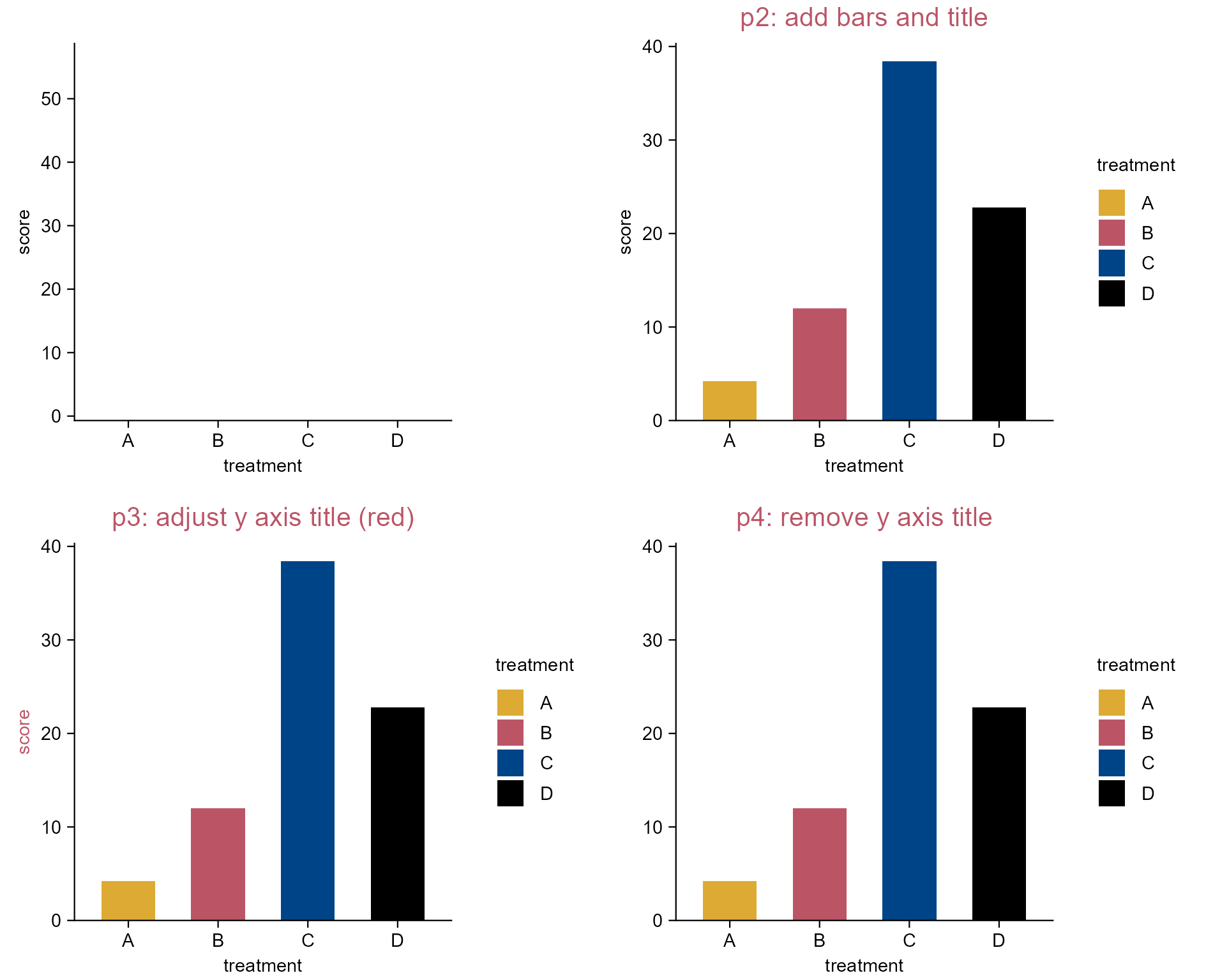
There are three main verbs in tidyplots:

  • add 👉 to add element to the plots.
  • adjust 👉 to modify elements in the plot.
  • remove 👉 to remove elements form the plot.
library(tidyplots)

# View top 10 rows of the columns used
study |> 
  dplyr::select(treatment, score) |> 
  dplyr::slice_head(n = 10)
# A tibble: 10 × 2
   treatment score
   <chr>     <dbl>
 1 A             2
 2 A             4
 3 A             5
 4 A             4
 5 A             6
 6 B             9
 7 B             8
 8 B            12
 9 B            15
10 B            16
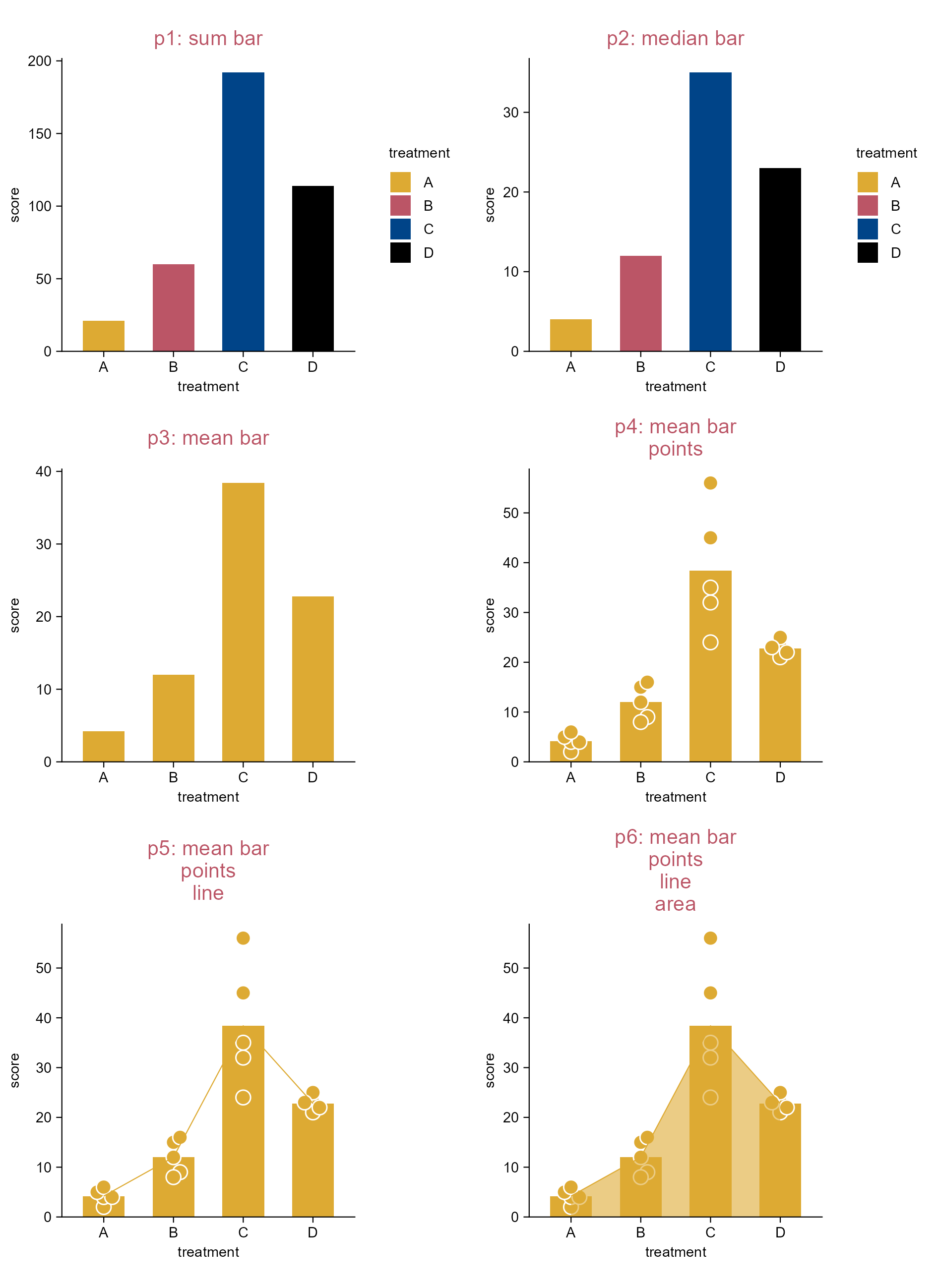
# Plot
p1 <- study |> 
  tidyplot(
    x = treatment, 
    y = score, 
    color = treatment)

p2 <- p1 |> 
  add_mean_bar() |>
  add_title(title = "p2: add bars and title")

p3 <- p2 |> 
  adjust_title(title = "p3: adjust y axis title (red)") |> 
  adjust_y_axis_title(color = "#bb5566")

p4 <- p3 |> 
  adjust_title(title = "p4: remove y axis title") |> 
  remove_y_axis_title()
Note

Explore the package index (https://jbengler.github.io/tidyplots/reference/index.html) for a full list of functions.

The three main verbs of tidyplots.

3.2 The scheme of add functions (e.g. bar plot)

Tip

Most add funtions in tidyplots follow the same scheme

add_<statistical-entity>_<graphical-representation>

  • add_mean_dot(), add_mean_dash(), add_mean_bar(), add_median_bar(), add_sum_bar() etc.

  • add_sem_errorbar(), add_sd_errorbar() etc.

library(tidyplots)

# View top 10 rows of the columns used
study |> 
  dplyr::select(treatment, score) |> 
  dplyr::slice_head(n = 10)
# A tibble: 10 × 2
   treatment score
   <chr>     <dbl>
 1 A             2
 2 A             4
 3 A             5
 4 A             4
 5 A             6
 6 B             9
 7 B             8
 8 B            12
 9 B            15
10 B            16
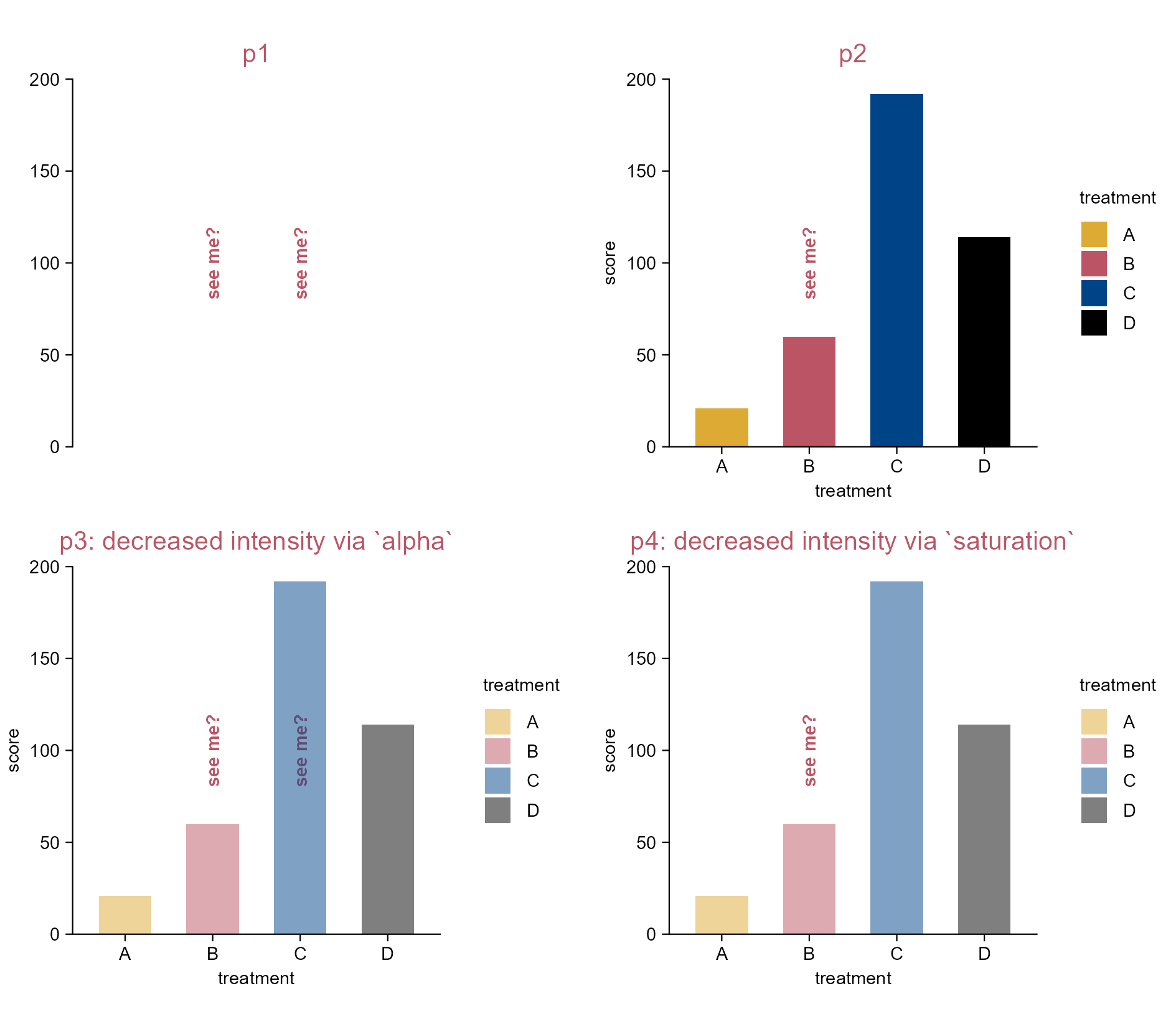
# Plot
p1 <- study |> 
  tidyplot(x = treatment, y = score, color = treatment) |> 
  add_sum_bar() |> add_title(title = "p1: sum bar")

p2 <- study |> 
  tidyplot(x = treatment, y = score, color = treatment) |> 
  add_median_bar() |> add_title(title = "p2: median bar")

p3 <- study |> 
  tidyplot(x = treatment, y = score) |> 
  add_mean_bar() |> add_title(title = "p3: mean bar")

p4 <- p3 |> 
  adjust_title(title = paste("p4: mean bar", "points", sep = "\n")) |> 
  add_data_points_beeswarm(white_border = TRUE, size = 2)

p5 <- p4 |> 
  adjust_title(title = paste("p5: mean bar", "points", "line", sep = "\n")) |> 
  add_mean_line()

p6 <- p5 |> 
  adjust_title(title = paste(
    "p6: mean bar", "points", "line", "area", sep = "\n")) |> 
  add_mean_area(alpha = 0.6)

The scheme of add functions.

3.3 Color alpha vs. saturation (e.g. bar plot)

library(tidyplots)

# View top 10 rows of the columns used
study |> 
  dplyr::select(treatment, score) |> 
  dplyr::slice_head(n = 10)
# A tibble: 10 × 2
   treatment score
   <chr>     <dbl>
 1 A             2
 2 A             4
 3 A             5
 4 A             4
 5 A             6
 6 B             9
 7 B             8
 8 B            12
 9 B            15
10 B            16
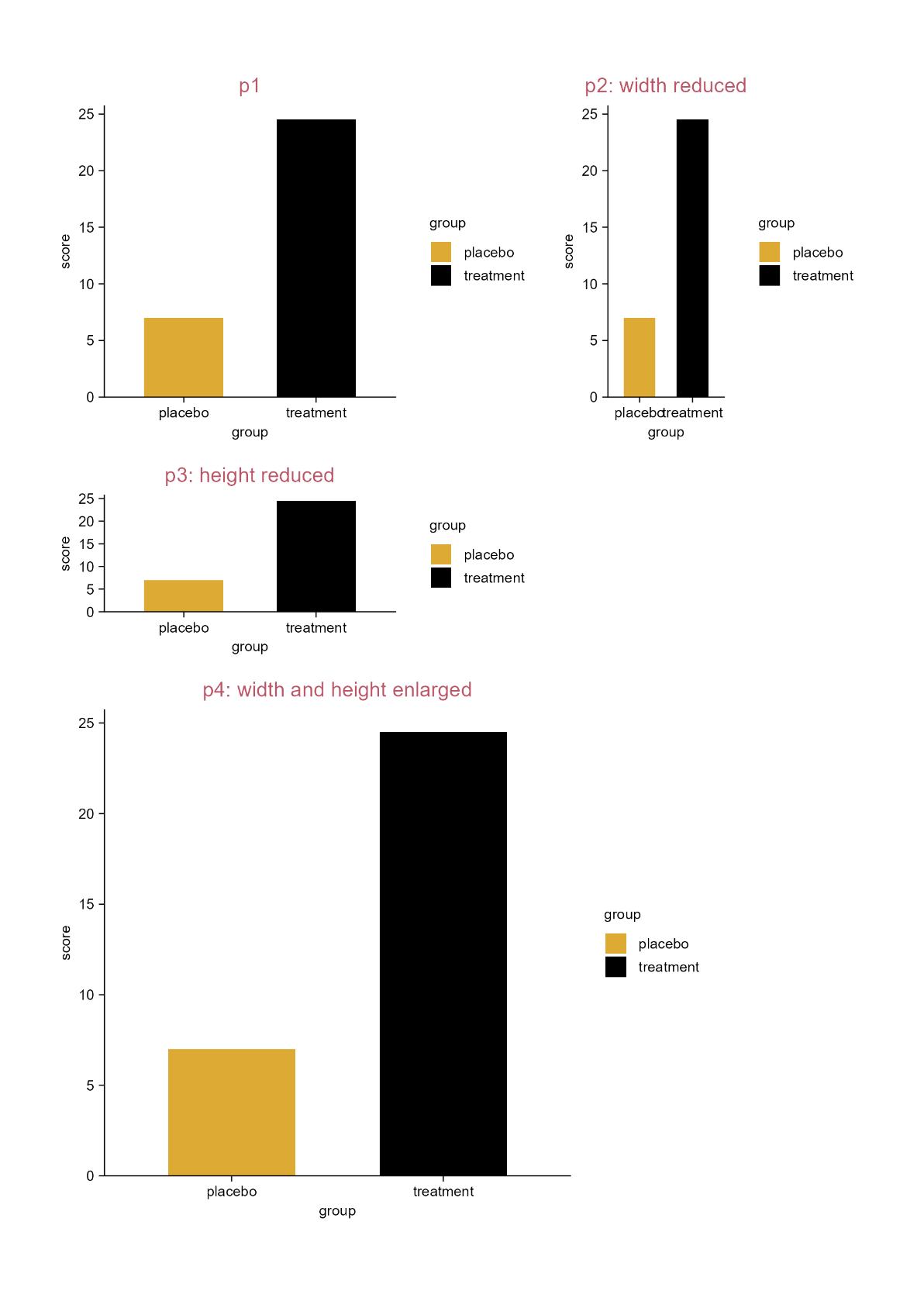
# Plot
p1 <- study |> 
  tidyplot(
    x = treatment, 
    y = score, 
    color = treatment) |>
  add_annotation_text(
    text = c("see me?", "see me?"), 
    x = c(2, 3), 
    y = 100, 
    angle = 90, 
    color = "#bb5566", 
    fontface = "bold") |> 
  add_title(title = "p1") |> 
  adjust_y_axis(limit = c(0, 200)) |> 
  adjust_x_axis(limit = c(1, 4))

p2 <- p1 |> 
  adjust_title(title = "p2") |> 
  add_sum_bar()

p3 <- p1 |> 
  adjust_title(title = "p3: decreased intensity via `alpha`") |> 
  add_sum_bar(alpha = 0.5)

p4 <- p1 |> 
  adjust_title(title = "p4: decreased intensity via `saturation`") |>
  add_sum_bar(saturation = 0.5)

Color alpha vs. saturation.

3.4 Plot size (e.g. bar plot)

library(tidyplots)

# View top 10 rows of the columns used
study |> 
  dplyr::select(group, score) |> 
  dplyr::slice_head(n = 10)
# A tibble: 10 × 2
   group   score
   <chr>   <dbl>
 1 placebo     2
 2 placebo     4
 3 placebo     5
 4 placebo     4
 5 placebo     6
 6 placebo     9
 7 placebo     8
 8 placebo    12
 9 placebo    15
10 placebo    16
# Plot
p1 <- study |> 
  tidyplot(
    x = group, 
    y = score, 
    color = group) |> 
  add_median_bar() |> 
  add_title(title = "p1")

p2 <- p1 |> 
  adjust_title(title = "p2: width reduced") |> 
  adjust_size(width = 20)

p3 <- p1 |> 
  adjust_title(title = "p3: height reduced") |> 
  adjust_size(height = 20)

p4 <- p1 |> 
  adjust_title(title = "p4: width and height enlarged") |> 
  adjust_size(
    width = 8, 
    height = 8, 
    unit = "cm")
Note

All plots in tidyplots have absolute dimensions.

By default this is 50 mm in width and 50 mm in height.

If you want the plot to fill all available space (ggplot2 default), do adjust_size(width = NA, height = NA).

Absolute dimention is to be the only reliable way to maintain consistent proportions of plot area size, font size, line width, etc.

Adjust plot size.

3.5 Remove plot elements (e.g. bar plot)

library(tidyplots)

# View top 10 rows of the columns used
study |> 
  dplyr::select(treatment, score) |> 
  dplyr::slice_head(n = 10)
# A tibble: 10 × 2
   treatment score
   <chr>     <dbl>
 1 A             2
 2 A             4
 3 A             5
 4 A             4
 5 A             6
 6 B             9
 7 B             8
 8 B            12
 9 B            15
10 B            16
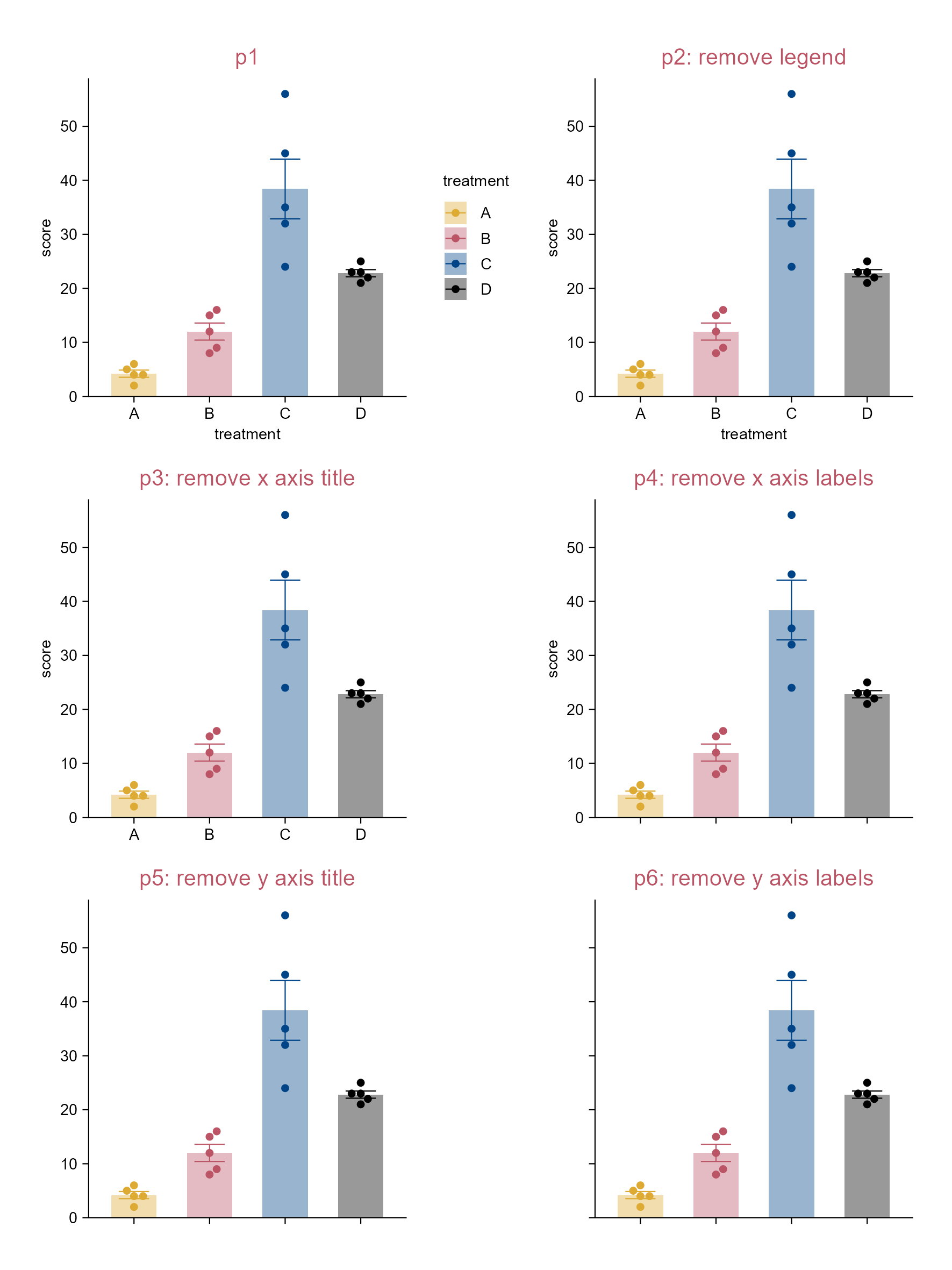
# Plot
p1 <- study |> 
  tidyplot(
    x = treatment, 
    y = score, 
    color = treatment) |> 
  add_mean_bar(alpha = 0.4) |> 
  add_sem_errorbar() |> 
  add_data_points_beeswarm() |> 
  add_title(title = "p1")

p2 <- p1 |> 
  adjust_title(title = "p2: remove legend") |> 
  remove_legend()

p3 <- p2 |> 
  adjust_title(title = "p3: remove x axis title") |> 
  remove_x_axis_title()

p4 <- p3 |> 
  adjust_title(title = "p4: remove x axis labels") |> 
  remove_x_axis_labels()

p5 <- p4 |> 
  adjust_title(title = "p5: remove y axis title") |> 
  remove_y_axis_title()

p6 <- p5 |> 
  adjust_title(title = "p6: remove y axis labels") |> 
  remove_y_axis_labels()

Remove plot elements.

3.6 Highlight a subset of dataset (i.e. dot plot)

library(tidyplots)

# View top 10 rows of the columns used
animals |> 
  dplyr::select(weight, size, animal) |> 
  dplyr::slice_head(n = 10)
# A tibble: 10 × 3
      weight  size animal           
       <dbl> <dbl> <chr>            
 1 0.00012     1.5 Honeybee         
 2 0.00045    10   Monarch Butterfly
 3 0.0002     10   Dragonfly        
 4 0.00002     2.5 Firefly          
 5 0.003      17   Praying Mantis   
 6 0.0000025   1   Mosquito         
 7 0.000005    4   Ant              
 8 0.00001     0.8 Ladybug          
 9 0.0002      7.5 Grasshopper      
10 0.0004      9   Butterfly        
# Plot
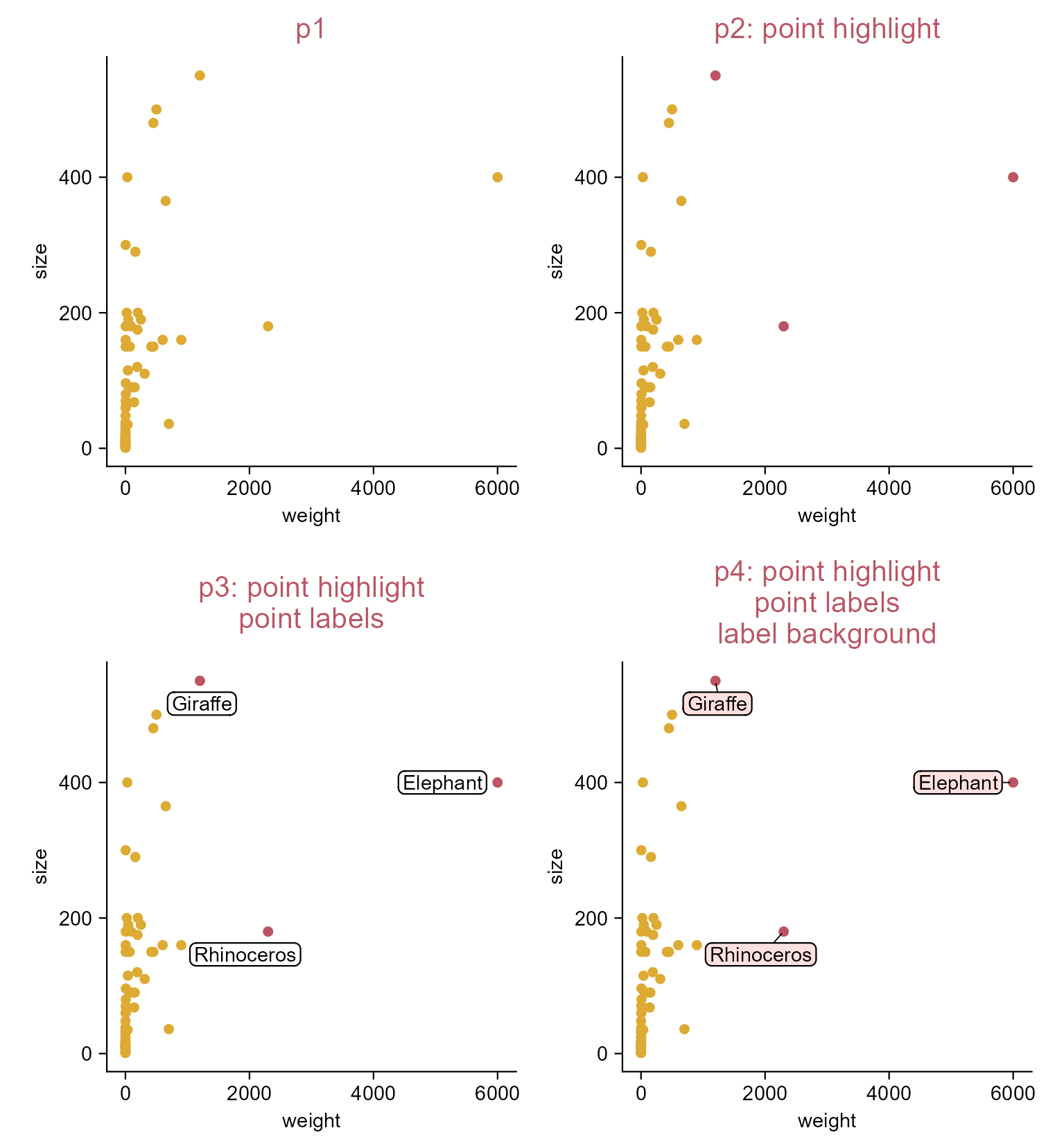
p1 <- animals |> 
  tidyplot(x = weight, y = size) |> 
  add_data_points(color = "#ddaa33") |> 
  add_title(title = "p1")

p2 <- p1 |> 
  add_data_points(
    data = max_rows(weight, n = 3),
    color = "#bb5566") |> 
  adjust_title(title = "p2: point highlight")

p3 <- p2 |> 
  add_data_labels_repel(data = max_rows(weight, n = 3), 
    label = animal, color = "black") |> 
  adjust_title(title = paste(
    "p3: point highlight", 
    "point labels", 
    sep = "\n"))

p4 <- p2 |> 
  add_data_labels_repel(data = max_rows(weight, n = 3), 
    background = TRUE, background_color = "#ffcccc", 
    min.segment.length = 0, 
    label = animal, 
    color = "black") |> 
  add_title(title = paste(
    "p4: point highlight", 
    "point labels", 
    "label background", 
    sep = "\n"))

Highlight a subset of dataset.

3.7 Point shape and size (e.g. dot plot)

library(tidyplots)

# View top 10 rows of the columns used
animals |> 
  dplyr::select(weight, size, animal) |> 
  dplyr::slice_head(n = 10)
# A tibble: 10 × 3
      weight  size animal           
       <dbl> <dbl> <chr>            
 1 0.00012     1.5 Honeybee         
 2 0.00045    10   Monarch Butterfly
 3 0.0002     10   Dragonfly        
 4 0.00002     2.5 Firefly          
 5 0.003      17   Praying Mantis   
 6 0.0000025   1   Mosquito         
 7 0.000005    4   Ant              
 8 0.00001     0.8 Ladybug          
 9 0.0002      7.5 Grasshopper      
10 0.0004      9   Butterfly        
# Plot
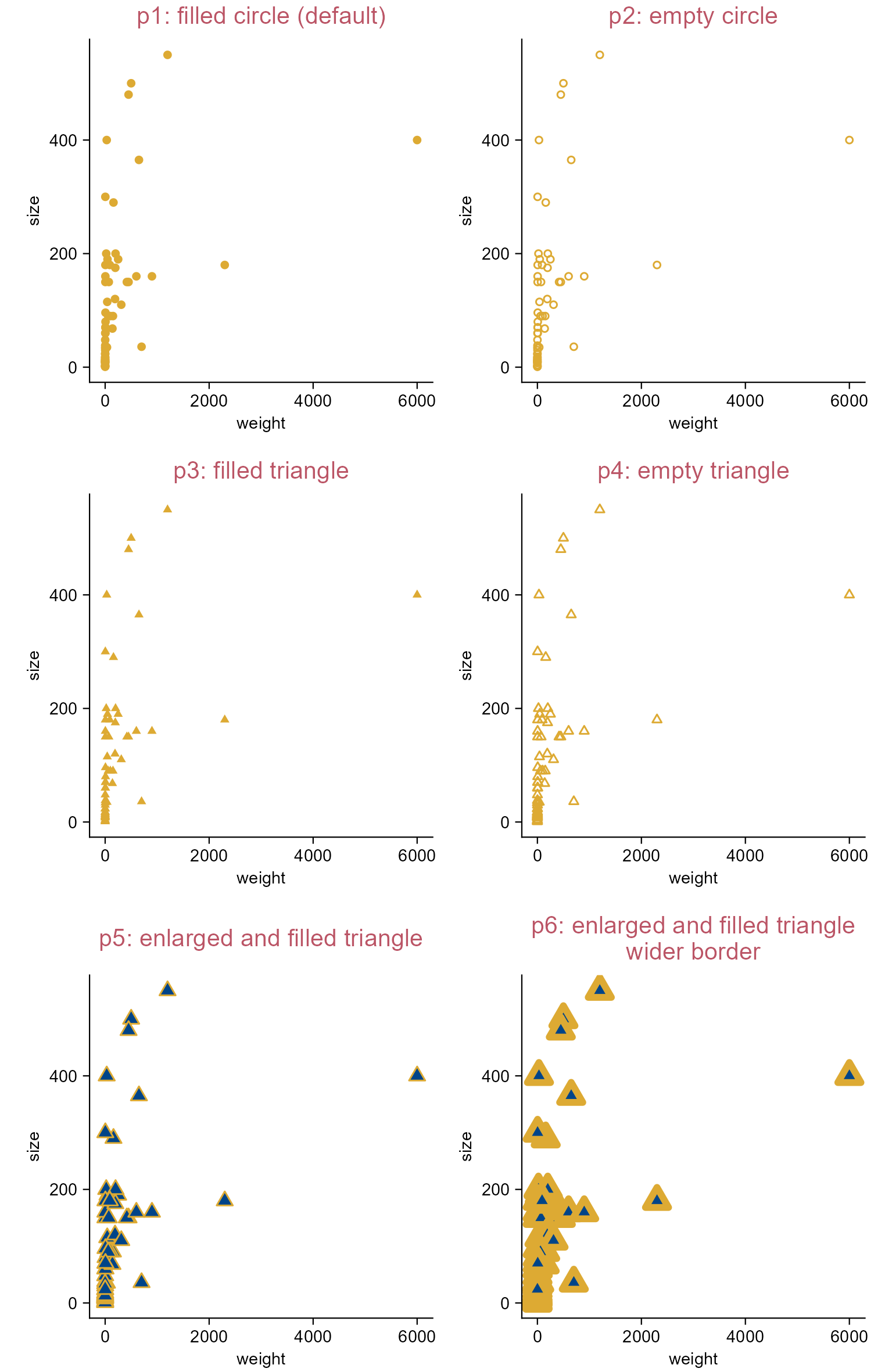
p0 <- animals |> 
  tidyplot(x = weight, y = size)

p1 <- p0 |> 
  add_title(title = "p1: filled circle (default)") |> 
  add_data_points(color = "#ddaa33", shape = 19)

p2 <- p0 |> 
  add_title(title = "p2: empty circle") |> 
  add_data_points(color = "#ddaa33", shape = 1)

p3 <- p0 |> 
  add_title(title = "p3: filled triangle") |> 
  add_data_points(color = "#ddaa33", shape = 17)

p4 <- p0 |> 
  add_title(title = "p4: empty triangle") |> 
  add_data_points(color = "#ddaa33", shape = 2)

p5 <- p0 |> 
  add_title(title = "p5: enlarged and filled triangle") |> 
  add_data_points(
    color = "#ddaa33", fill = "#004488", shape = 24, size = 2)

p6 <- p0 |> 
  add_title(title = paste(
    "p6: enlarged and filled triangle", "wider border", sep = "\n")) |> 
  add_data_points(
    color = "#ddaa33", fill = "#004488", shape = 24, size = 2, 
    stroke = 2)
Note

See Section 7.1 and Section 7.2 for details about shape.

Change point shape and size.

3.8 Reference lines/rectangle (e.g. dot plot)

library(tidyplots)

# View top 10 rows of the columns used
animals |> 
  dplyr::select(weight, speed) |> 
  dplyr::slice_head(n = 10)
# A tibble: 10 × 2
      weight   speed
       <dbl>   <dbl>
 1 0.00012   0.72   
 2 0.00045   0.432  
 3 0.0002    2.09   
 4 0.00002   0.0432 
 5 0.003     0.144  
 6 0.0000025 0.054  
 7 0.000005  0.00216
 8 0.00001   0.054  
 9 0.0002    0.576  
10 0.0004    0.432  
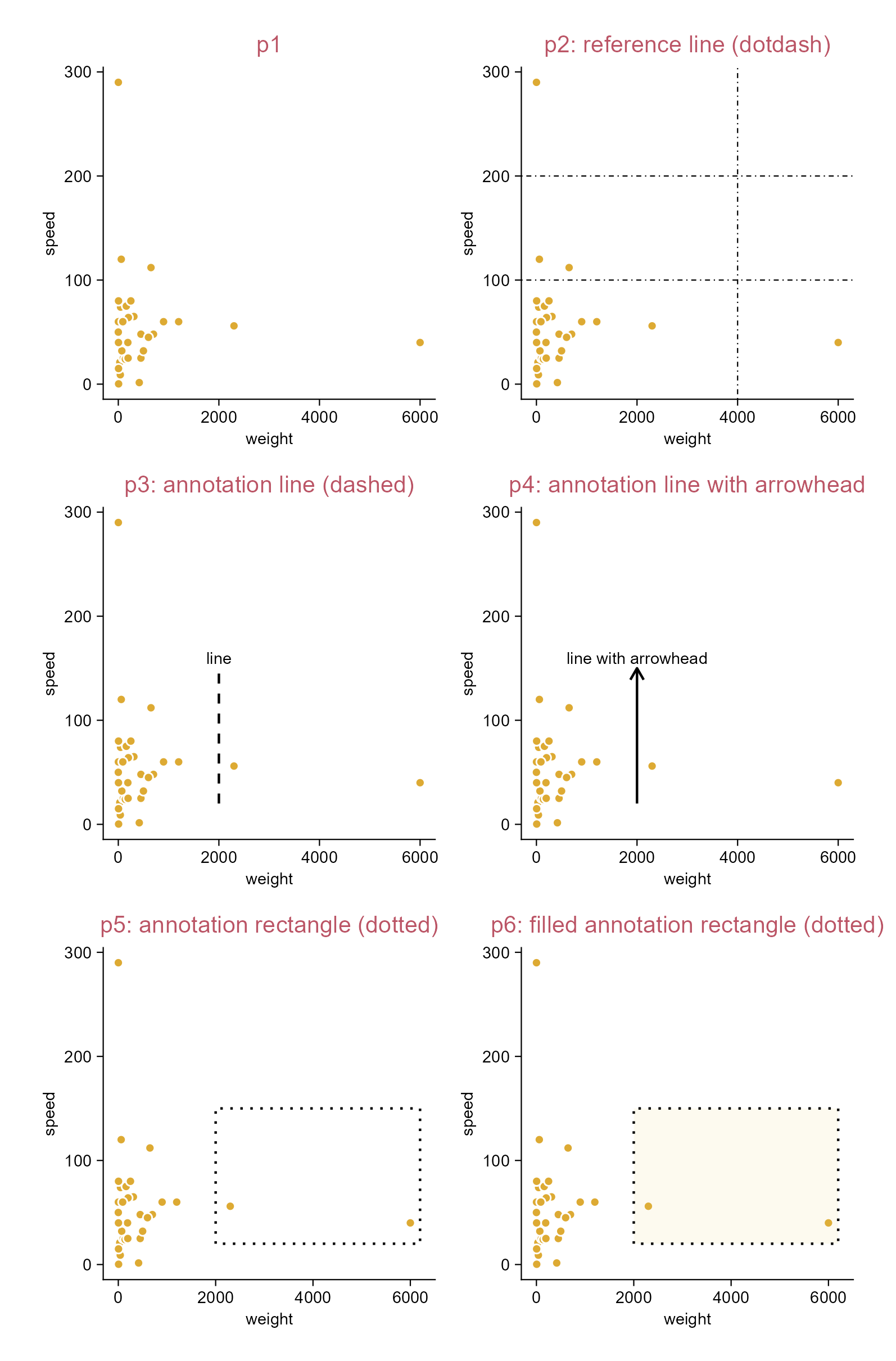
p1 <- animals |> 
  tidyplot(x = weight, y = speed) |> 
  add_data_points(white_border = TRUE) |>
  add_title(title = "p1") 

p2 <- p1 |> 
  adjust_title(title = "p2: reference line (dotdash)") |> 
  add_reference_lines(
    x = 4000, y = c(100, 200), linetype = "dotdash")

p3 <- p1 |> 
  adjust_title(title = "p3: annotation line (dashed)") |> 
  add_annotation_line(
    x = 2000, xend = 2000, y = 20, yend = 150, linetype = "dashed") |> 
  add_annotation_text(text = "line", x = 2000, y = 160)

p4 <- p1 |> 
  adjust_title(title = "p4: annotation line with arrowhead") |> 
  add_annotation_line(
    x = 2000, xend = 2000, y = 20, yend = 150,
    arrow = grid::arrow(length = grid::unit(2, "mm"))) |> 
  add_annotation_text(text = "line with arrowhead", x = 2000, y = 160)

p5 <- p1 |> 
  adjust_title(title = "p5: annotation rectangle (dotted)") |> 
  add_annotation_rectangle(
    xmin = 2000, xmax = 6200, ymin = 20, ymax = 150, 
    linetype = "dotted", color = "#000000", fill = NA)

p6 <- p1 |> 
  adjust_title(title = "p6: filled annotation rectangle (dotted)") |> 
  add_annotation_rectangle(
    xmin = 2000, xmax = 6200, ymin = 20, ymax = 150, 
    linetype = "dotted", color = "#000000", fill = "#eecc66")

Add reference lines or rectangle.

3.9 Rename axis levels (e.g. violin plot)

library(tidyplots)

# View the top 10 rows of the columns used
study |> 
  dplyr::select(group, score, dose) |> 
  dplyr::slice_head(n = 10)
# A tibble: 10 × 3
   group   score dose 
   <chr>   <dbl> <chr>
 1 placebo     2 high 
 2 placebo     4 high 
 3 placebo     5 high 
 4 placebo     4 high 
 5 placebo     6 high 
 6 placebo     9 low  
 7 placebo     8 low  
 8 placebo    12 low  
 9 placebo    15 low  
10 placebo    16 low  
# Plot
p1 <- study |> 
  tidyplot(
    x = group, 
    y = score, 
    color = dose) |> 
  add_violin(trim = FALSE) |> 
  add_data_points_beeswarm(white_border = TRUE) |> 
  add_title(title = "p1")

p2 <- p1 |> 
  adjust_title(
    title = "p2: rename x axis levels") |> 
  rename_x_axis_levels(
    new_names = c(
      "placebo" = "A", 
      "treatment" = "B"))

p3 <- p2 |> 
  adjust_title(
    title = "p3: rename color levels") |> 
  rename_color_levels(
    new_names = c(
      "high" = "up", 
      "low" = "down"))

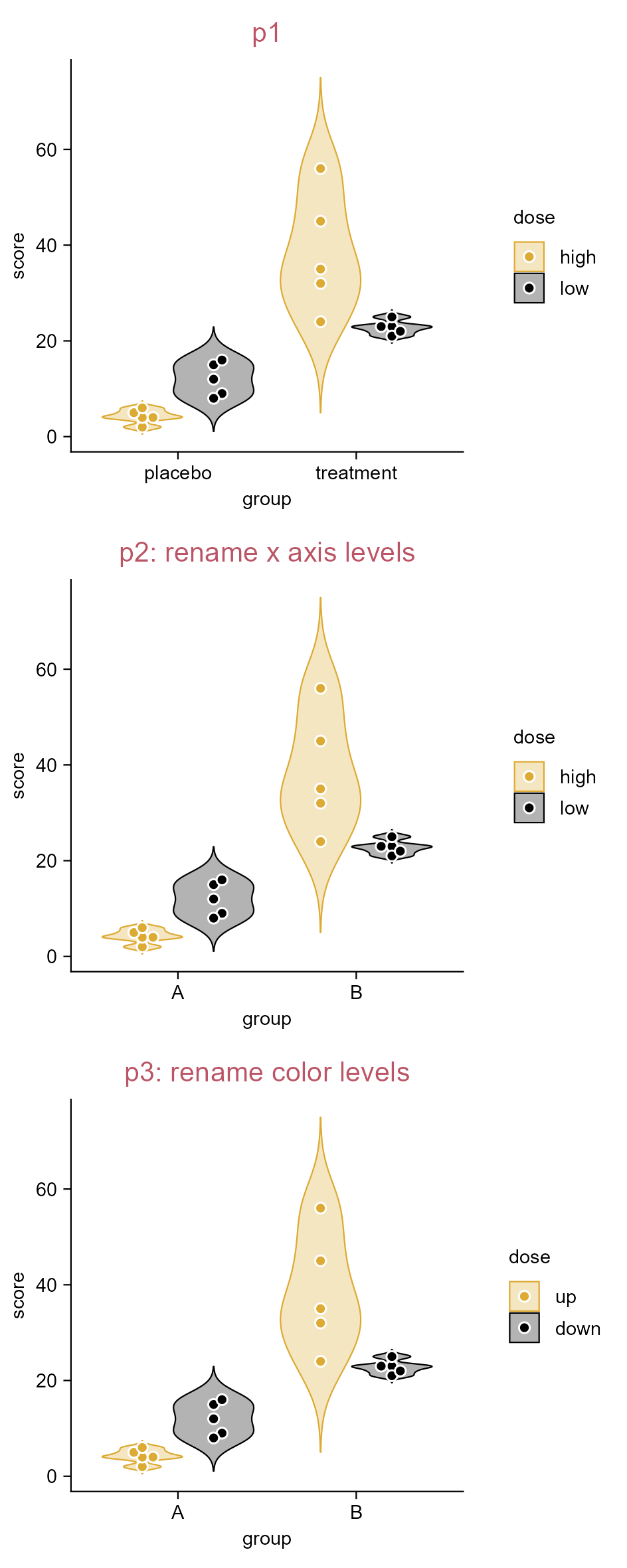
Rename axis levels.

3.10 Assign colors (e.g. violin plot)

library(tidyplots)

# View top 10 rows of the columns used
study |> 
  dplyr::select(group, score, dose) |> 
  dplyr::slice_head(n = 10)
# A tibble: 10 × 3
   group   score dose 
   <chr>   <dbl> <chr>
 1 placebo     2 high 
 2 placebo     4 high 
 3 placebo     5 high 
 4 placebo     4 high 
 5 placebo     6 high 
 6 placebo     9 low  
 7 placebo     8 low  
 8 placebo    12 low  
 9 placebo    15 low  
10 placebo    16 low  
p1 <- study |> 
  tidyplot(
    x = group, 
    y = score, 
    color = dose) |> 
  add_violin(trim = FALSE) |> 
  add_data_points_beeswarm() |> 
  add_title(title = "p1")  

p2 <- p1 |> 
  adjust_title(title = "p2: assign colors") |> 
  adjust_colors(
    new_colors = c(
      "high" = "#bb5566", 
      "low" = "#ddaa33"))

p3 <- study |> 
  tidyplot(
    x = treatment, 
    y = score, 
    color = treatment) |> 
  add_violin(trim = FALSE) |> 
  add_data_points_beeswarm() |> 
  add_title(title = "p3")

p4 <- p3 |> 
  adjust_title(title = "p4: assign colors") |> 
  adjust_colors(
    new_colors = c(
      "A" = "#000000", 
      "B" = "#004488",
      "C" = "#bb5566", 
      "D" = "#ddaa33"))

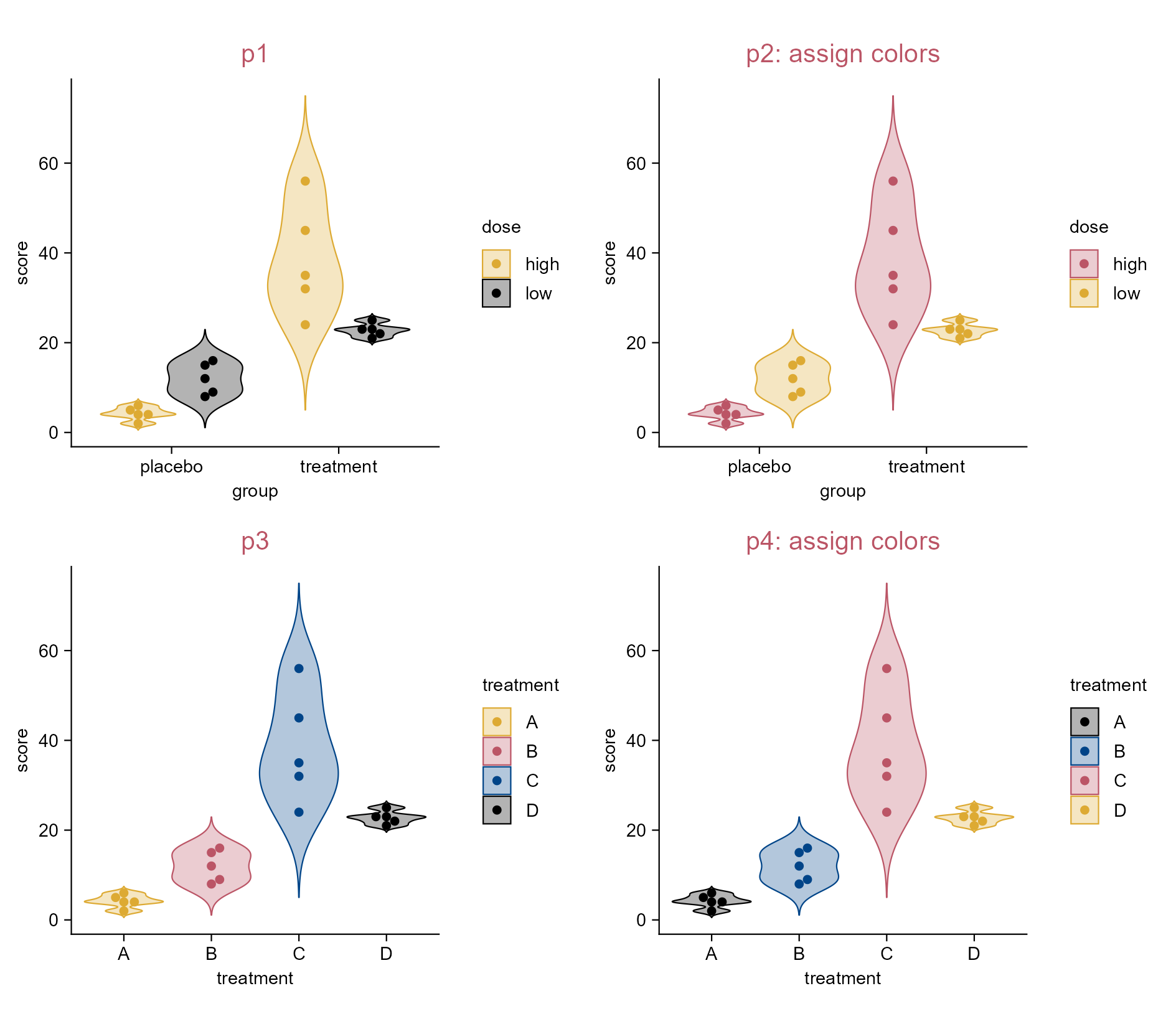
Assign colors.

3.11 Define a custom color scheme (e.g. violin plot)

library(tidyplots)

# Define a custom color scheme
high_contrast_qualitative_colour <- new_color_scheme(
  c("#000000", 
    "#004488", 
    "#bb5566", 
    "#ddaa33"), 
  name = "high_contrast_qualitative_colour")

# View top 10 rows of the columns used
study |> 
  dplyr::select(treatment, score) |> 
  dplyr::slice_head(n = 10)
# A tibble: 10 × 2
   treatment score
   <chr>     <dbl>
 1 A             2
 2 A             4
 3 A             5
 4 A             4
 5 A             6
 6 B             9
 7 B             8
 8 B            12
 9 B            15
10 B            16
# Plot
p1 <- study |> 
  tidyplot(
    x = treatment, 
    y = score, 
    color = treatment) |> 
  add_violin(trim = FALSE) |> 
  add_data_points_beeswarm(white_border = TRUE) |> 
  adjust_legend_position(position = "bottom") |> 
  add_title(title = "p1")

p2 <- p1 |> 
  adjust_title(title = "p2: a custom color scheme") |> 
  adjust_colors(new_colors = high_contrast_qualitative_colour)

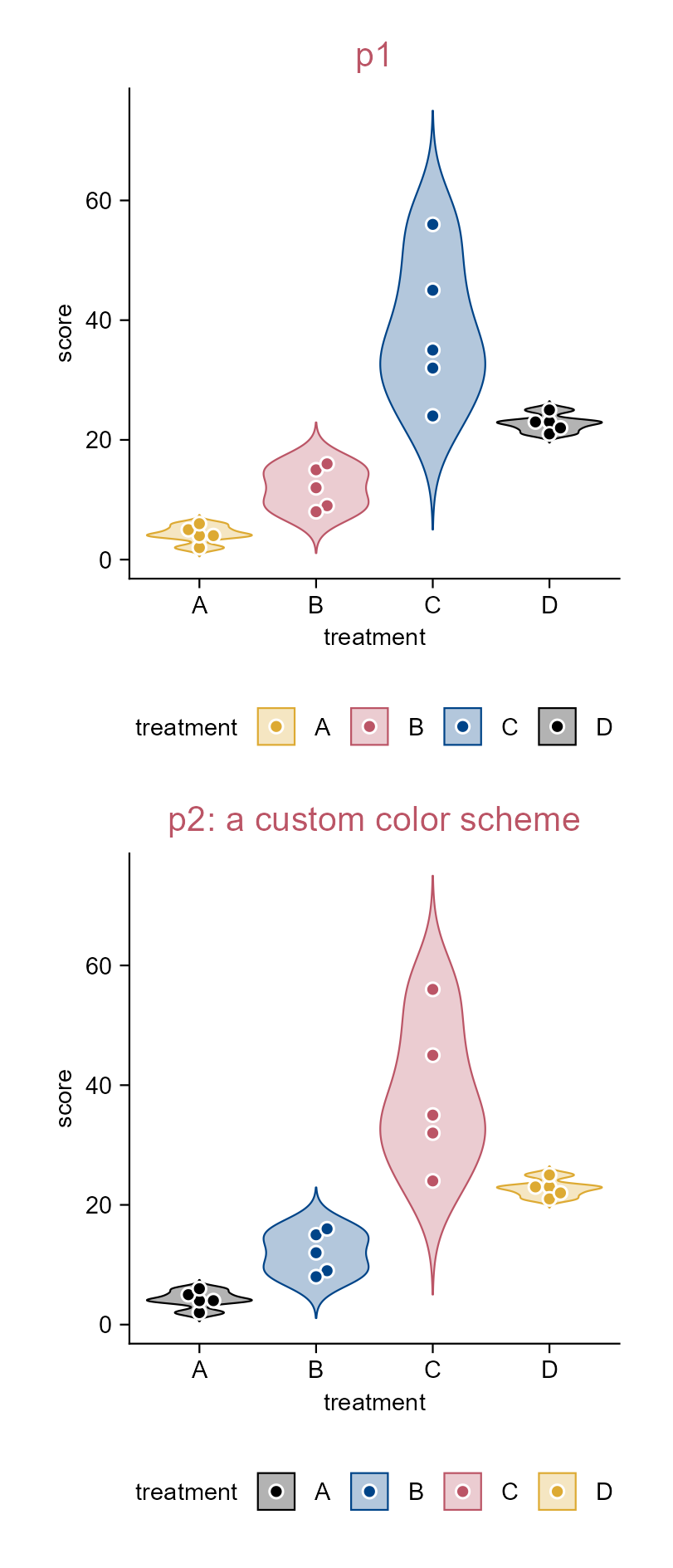
Define a custom color scheme.

3.12 Add sum values (e.g. bar plot)

library(tidyplots)

# View top 10 rows of the columns used
spendings |> 
  dplyr::select(category, amount) |> 
  dplyr::slice_head(n = 10)
# A tibble: 10 × 2
   category       amount
   <chr>           <dbl>
 1 Food              100
 2 Transportation     40
 3 Housing          1200
 4 Utilities          80
 5 Education          75
 6 Insurance         200
 7 Food               60
 8 Utilities          50
 9 Food               90
10 Transportation     40
# Plot
p1 <- spendings |> 
  tidyplot(
    x = category, 
    y = amount, 
    color = category) |> 
  add_sum_bar(alpha = 0.2) |> 
  add_sum_dash() |> 
  add_title(title = "p1") |> 
  adjust_x_axis(rotate_labels = TRUE) |> 
  remove_legend()

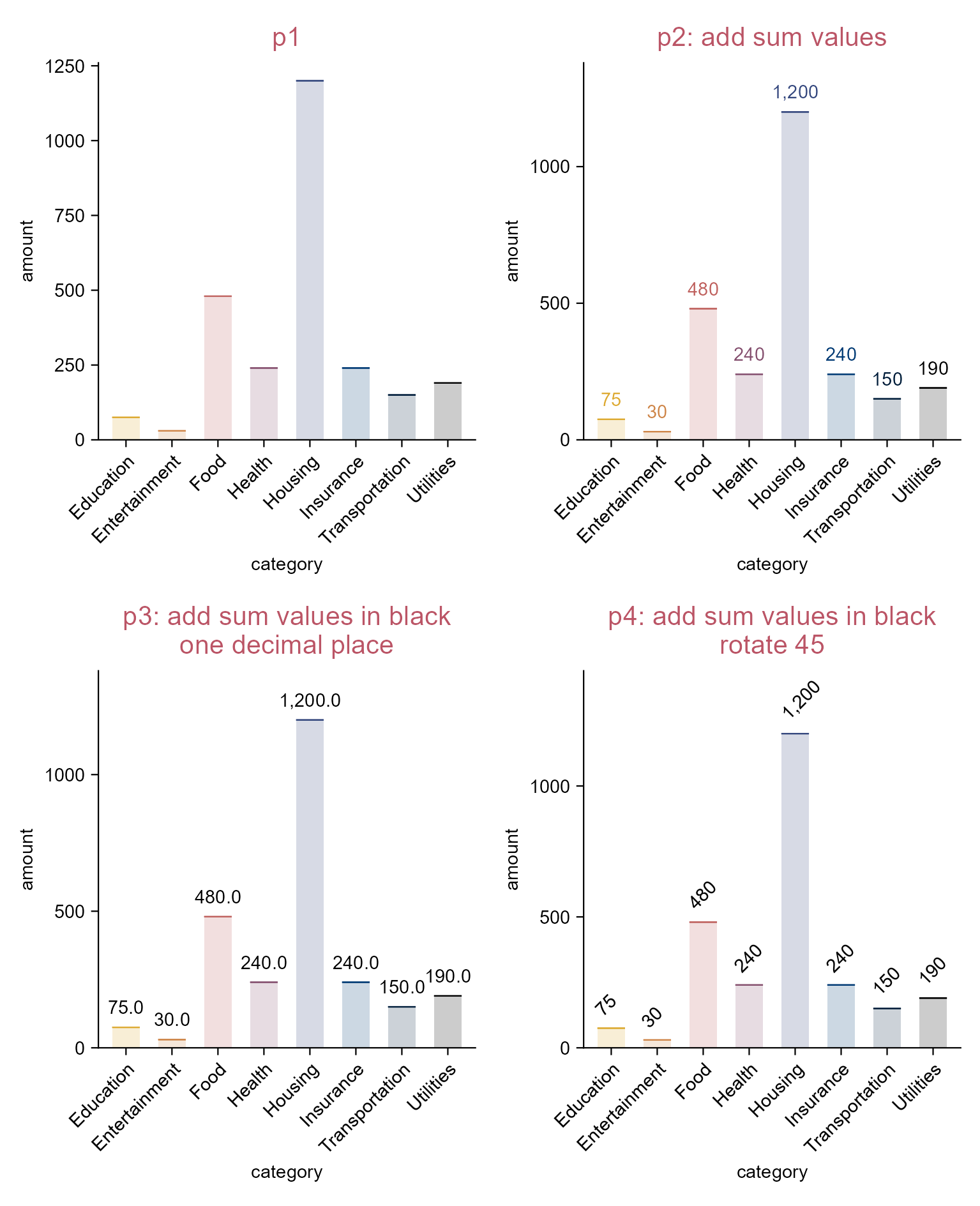
p2 <- p1 |> 
  adjust_title(title = "p2: add sum values") |> 
  add_sum_value(accuracy = 1)

p3 <- p1 |> 
  adjust_title(title = paste(
    "p3: add sum values in black",
    "one decimal place",
    sep = "\n")) |> 
  add_sum_value(accuracy = 0.1, color = "black")

p4 <- p1 |> 
  adjust_title(title = paste(
    "p4: add sum values in black",
    "rotate 45",
    sep = "\n")) |> 
  add_sum_value(
    accuracy = 1, 
    color = "black",
    angle = 45, 
    hjust = -0.1) |> 
  adjust_padding(top = 0.2)

Add sum values.

3.13 Sort axis levels (e.g. bar plot)

library(tidyplots)

# View the top 10 rows of the columns used
spendings |> 
  dplyr::select(category, amount) |> 
  dplyr::slice_head(n = 10)
# A tibble: 10 × 2
   category       amount
   <chr>           <dbl>
 1 Food              100
 2 Transportation     40
 3 Housing          1200
 4 Utilities          80
 5 Education          75
 6 Insurance         200
 7 Food               60
 8 Utilities          50
 9 Food               90
10 Transportation     40
# Plot
p1 <- spendings |> 
  tidyplot(
    x = category, 
    y = amount, 
    color = category) |> 
  add_sum_bar(alpha = 0.2) |> 
  add_sum_dash() |> 
  add_sum_value(
    accuracy = 1, 
    color = "black") |> 
  adjust_x_axis(rotate_labels = TRUE) |> 
  add_title(title = "p1") |> 
  remove_legend()

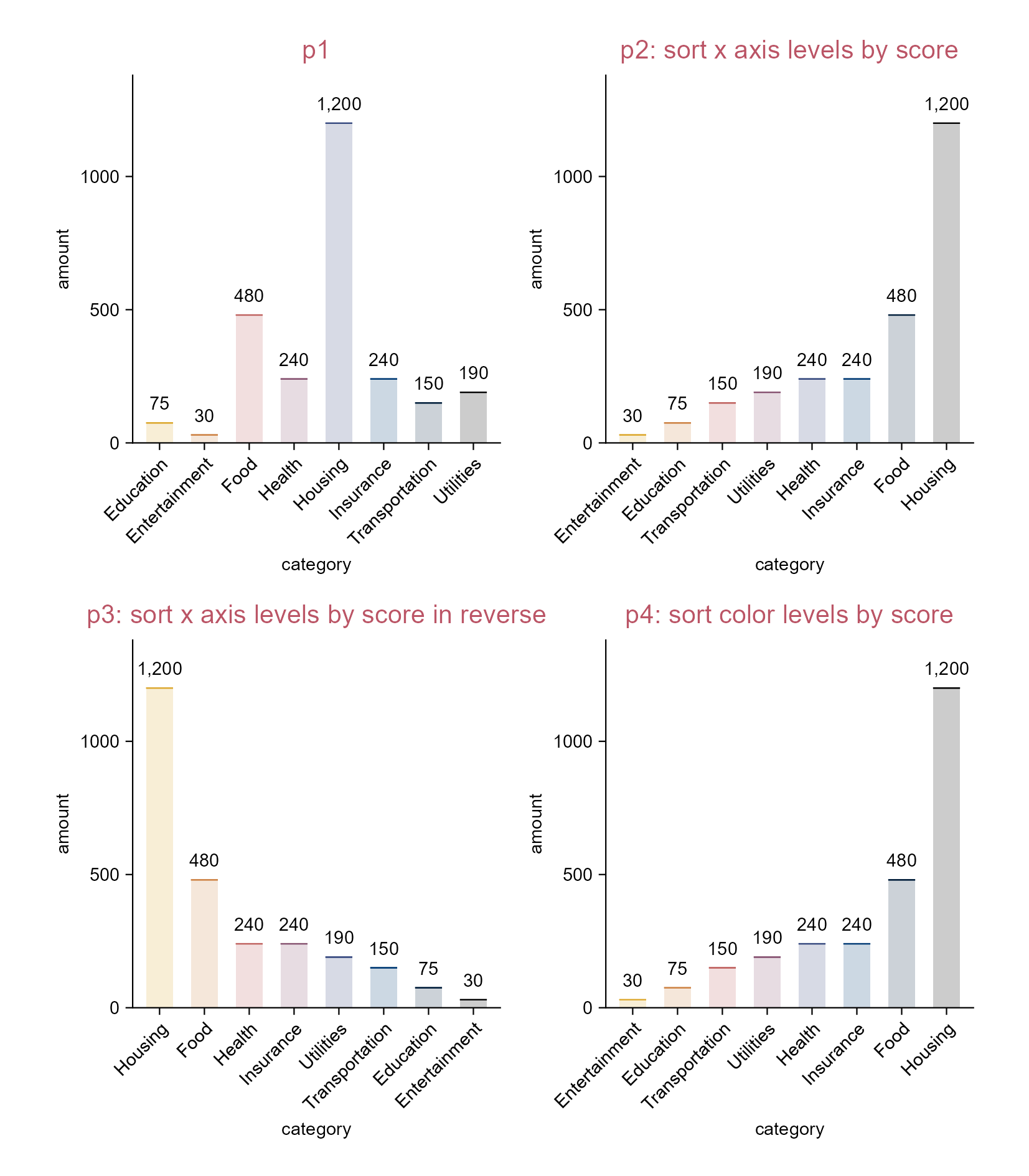
p2 <- p1 |> 
  adjust_title(title = "p2: sort x axis levels by score") |> 
  sort_x_axis_levels()

p3 <- p1 |> 
  adjust_title(title = "p3: sort x axis levels by score in reverse") |> 
  sort_x_axis_levels(.reverse = TRUE)

p4 <- p1 |> 
  adjust_title(title = "p4: sort color levels by score") |> 
  sort_color_levels()

Sort axis levels.

3.14 Reorder axis levels (e.g. violin plot)

library(tidyplots)

# View top 10 rows of the columns used
study |> 
  dplyr::select(treatment, score) |> 
  dplyr::slice_head(n = 10)
# A tibble: 10 × 2
   treatment score
   <chr>     <dbl>
 1 A             2
 2 A             4
 3 A             5
 4 A             4
 5 A             6
 6 B             9
 7 B             8
 8 B            12
 9 B            15
10 B            16
# Plot
p1 <- study |> 
  tidyplot(
    x = treatment, 
    y = score, 
    color = treatment) |> 
  add_violin(trim = FALSE) |> 
  add_data_points_beeswarm(white_border = TRUE) |> 
  add_title(title = "p1")

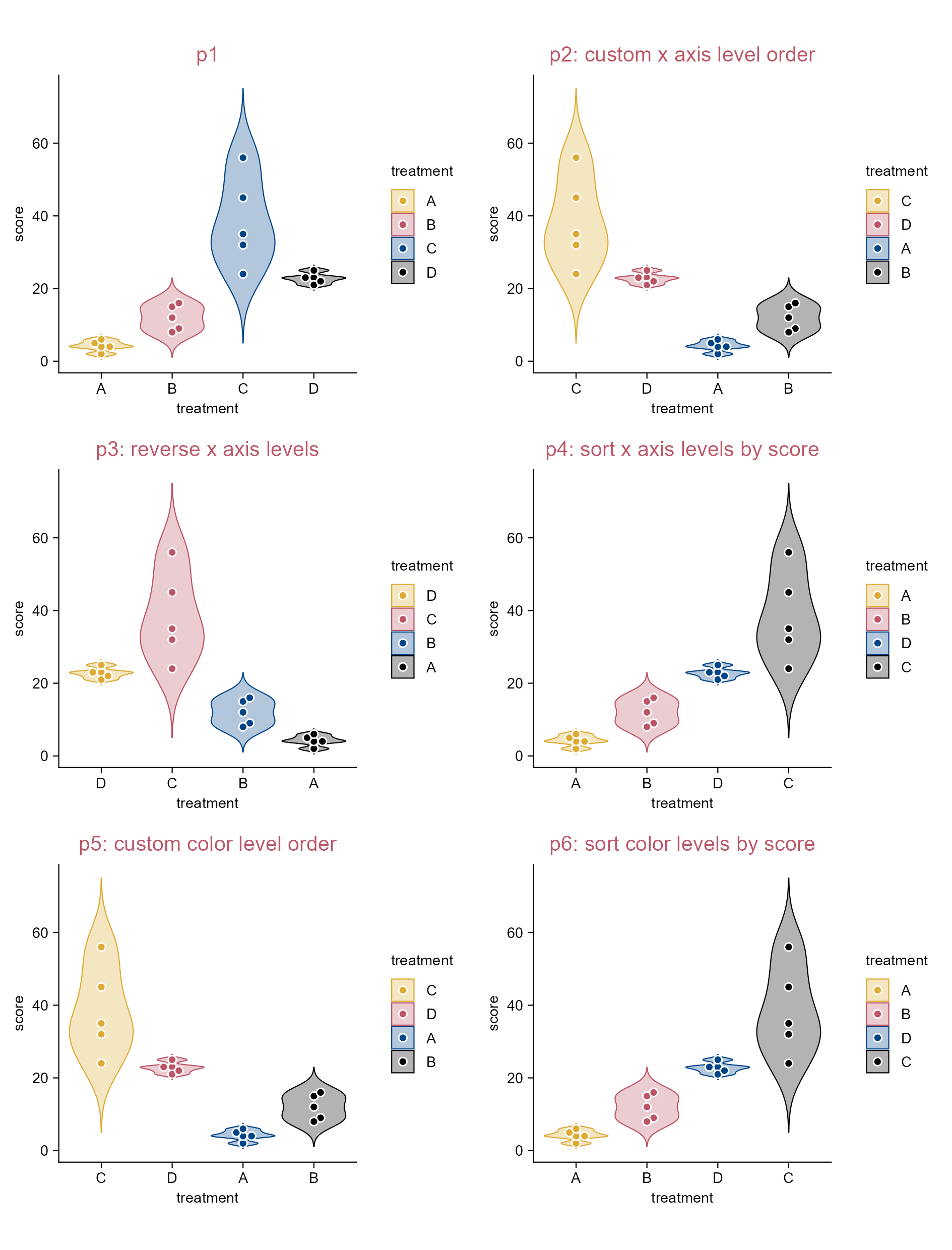
p2 <- p1 |> 
  adjust_title(title = "p2: custom x axis level order") |> 
  reorder_x_axis_levels("C", "D", "A", "B")

p3 <- p1 |> 
  adjust_title(title = "p3: reverse x axis levels") |> 
  reverse_x_axis_levels()

p4 <- p1 |>
  adjust_title(title = "p4: sort x axis levels by score") |> 
  sort_x_axis_levels()

p5 <- p1 |>
  adjust_title(title = "p5: custom color level order") |> 
  reorder_color_levels("C", "D")

p6 <- p1 |> 
  adjust_title(title = "p6: sort color levels by score") |> 
  sort_color_levels()

Reorder axis levels.

3.15 Guide attention (e.g. bar plot)

library(tidyplots)

# View top 10 rows of the columns used
spendings |> 
  dplyr::select(category, amount) |> 
  dplyr::slice_head(n = 10)
# A tibble: 10 × 2
   category       amount
   <chr>           <dbl>
 1 Food              100
 2 Transportation     40
 3 Housing          1200
 4 Utilities          80
 5 Education          75
 6 Insurance         200
 7 Food               60
 8 Utilities          50
 9 Food               90
10 Transportation     40
# Plot
p1 <- spendings |> 
  tidyplot(
    x = category, 
    y = amount, 
    color = category) |> 
  add_sum_bar() |> 
  add_title(title = "p1") |> 
  adjust_x_axis(rotate_labels = TRUE)  
  
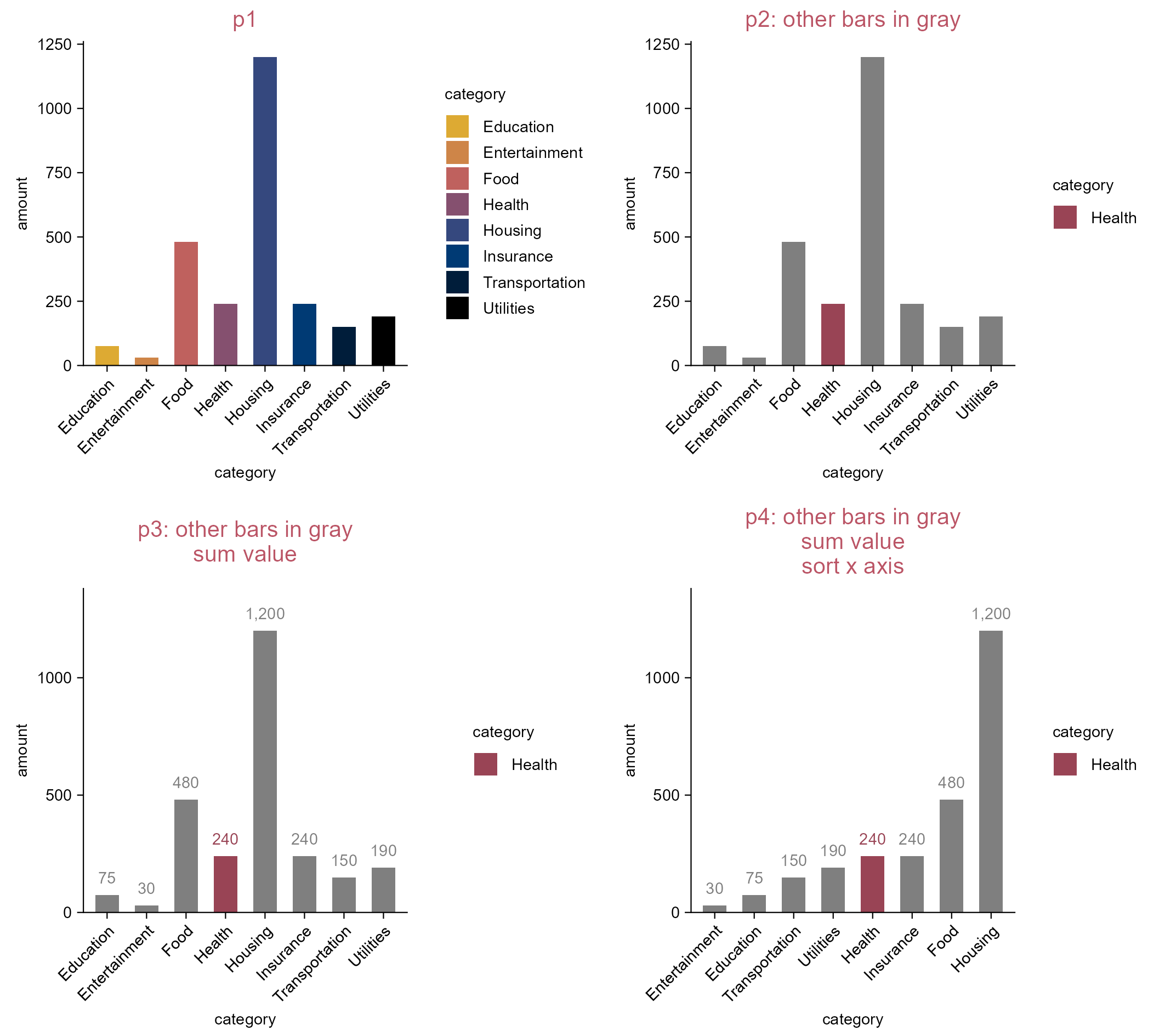
p2 <- p1 |> 
  adjust_title(title = "p2: other bars in gray") |> 
  adjust_colors(
    new_colors = c(
      "Health" = "#994455", 
      na.value = "#dddddd"))

p3 <- p1 |> 
  adjust_title(title = paste(
    "p3: other bars in gray",
    "sum value",
    sep = "\n")) |> 
  add_sum_value(accuracy = 1) |> 
  adjust_colors(
    new_colors = c(
      "Health" = "#994455", 
      na.value = "#dddddd"))

p4 <- p3 |> 
  adjust_title(title = paste(
    "p4: other bars in gray",
    "sum value",
    "sort x axis",
    sep = "\n")) |> 
  sort_x_axis_levels()

Guide attention.

3.16 Horizontal bars (e.g. bar plot)

library(tidyplots)

# View top 10 rows of the columns used
spendings |> dplyr::select(amount, category) |> dplyr::slice_head(n = 10)
# A tibble: 10 × 2
   amount category      
    <dbl> <chr>         
 1    100 Food          
 2     40 Transportation
 3   1200 Housing       
 4     80 Utilities     
 5     75 Education     
 6    200 Insurance     
 7     60 Food          
 8     50 Utilities     
 9     90 Food          
10     40 Transportation
# Plot
p1 <- spendings |> 
  tidyplot(x = category, y = amount, color = category) |> 
  add_sum_bar(alpha = 0.2) |> 
  add_sum_dash() |> 
  add_sum_value(accuracy = 1, color = "black") |>
  add_title(title = "p1") |> 
  sort_x_axis_levels() |> 
  adjust_x_axis(rotate_labels = TRUE) |> 
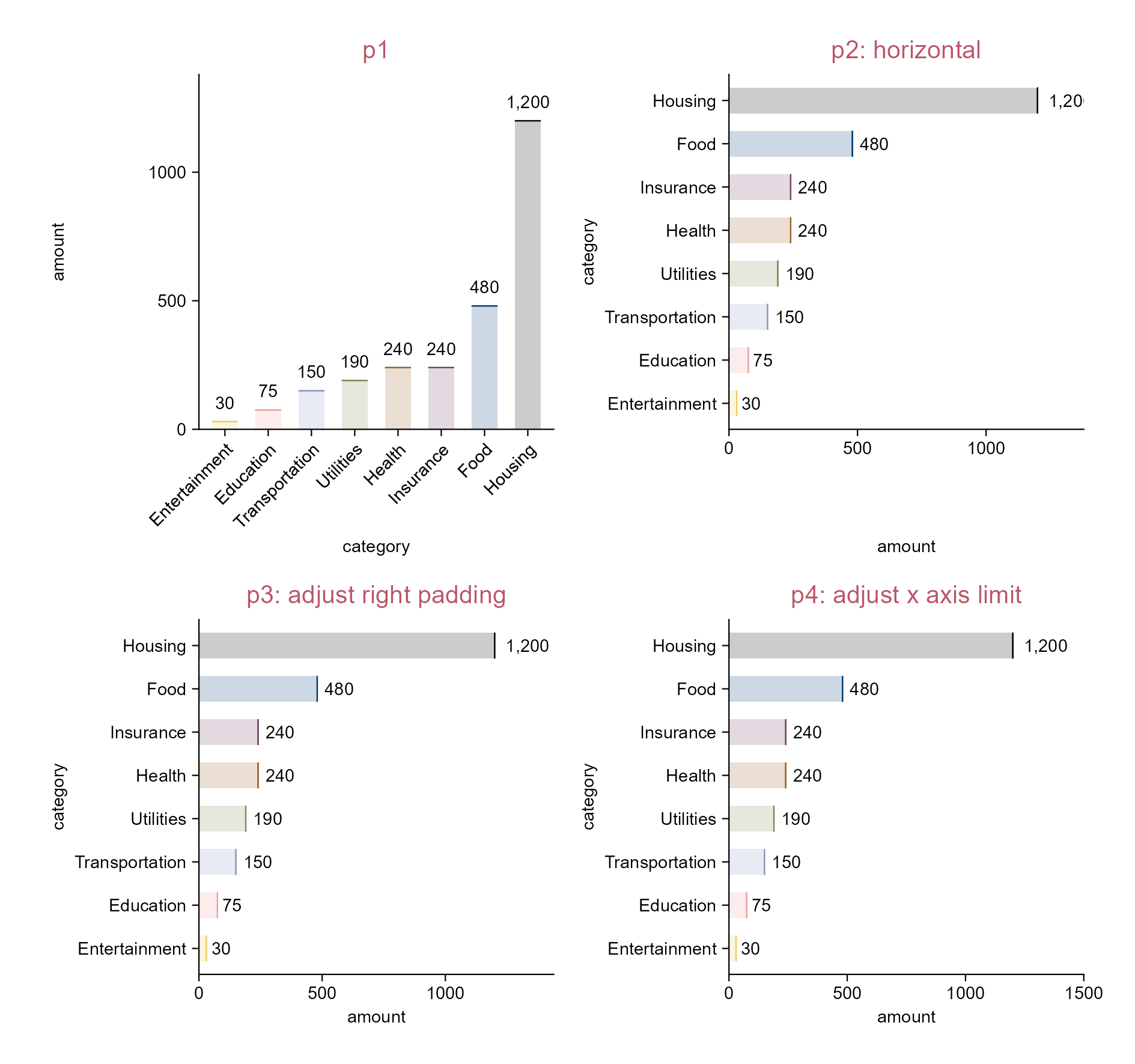
  adjust_colors(new_colors = c("#eecc66", "#ee99aa", "#6699cc", 
    "#997700", "#994455", "#004488", "#000000")) |> 
  remove_legend() |> 
  adjust_padding(right = 0.2)

p2 <- spendings |> 
  tidyplot(x = amount, y = category, color = category) |> 
  add_sum_bar(alpha = 0.2) |> 
  add_sum_dash() |> 
  add_sum_value(accuracy = 1, color = "black") |> 
  adjust_title(title = "p2: horizontal") |> 
  sort_y_axis_levels() |> 
  adjust_colors(new_colors = c("#eecc66", "#ee99aa", "#6699cc", 
    "#997700", "#994455", "#004488", "#000000")) |> 
  remove_legend()

p3 <- p2 |> 
  adjust_title(title = "p3: adjust right padding") |> 
  adjust_padding(right = 0.2)

p4 <- p2 |> 
  adjust_title(title = "p4: adjust x axis limit") |> 
  adjust_x_axis(limits = c(0, 1500))

p5 <- p2 |> 
  adjust_title(title = "p5: via 'add()'") |> 
  add(ggplot2::coord_cartesian(clip = "off"))

p6 <- p2 |> 
  adjust_title(title = "p6: via 'remove_clipping()'") |> 
  remove_clipping()

Horizontal bars.
Note

remove_clipping() is only available if you install a specific commit (on 2026-04-01), i.e. pak("jbengler/tidyplots@4a08bfe") via the pak package, or use a later version.

3.17 Preview a subset of dataset (e.g. violin plot)

library(tidyplots)

# View top 10 rows of the columns used
gene_expression |> 
  dplyr::select(group, expression, external_gene_name) |> 
  dplyr::slice_head(n = 10)
# A tibble: 10 × 3
   group expression external_gene_name
   <chr>      <dbl> <chr>             
 1 Hin         2.20 Apol6             
 2 Hin         2.20 Apol6             
 3 Hin         2.66 Apol6             
 4 Hin         2.65 Apol6             
 5 Hin         3.44 Apol6             
 6 Ein         5.03 Apol6             
 7 Ein         5.31 Apol6             
 8 Ein         5.37 Apol6             
 9 Ein         5.54 Apol6             
10 Ein         5.65 Apol6             
# Plot
gene_expression |> 
  tidyplot(
    x = group, 
    y = expression, 
    color = group) |> 
  add_violin(trim = FALSE) |> 
  add_data_points_beeswarm(
    white_border = TRUE) |>
  view_plot(
    title = "All") |> 
  view_plot(
    data = filter_rows(
      external_gene_name %in% c(
        "Apol6", 
        "Col5a3")),
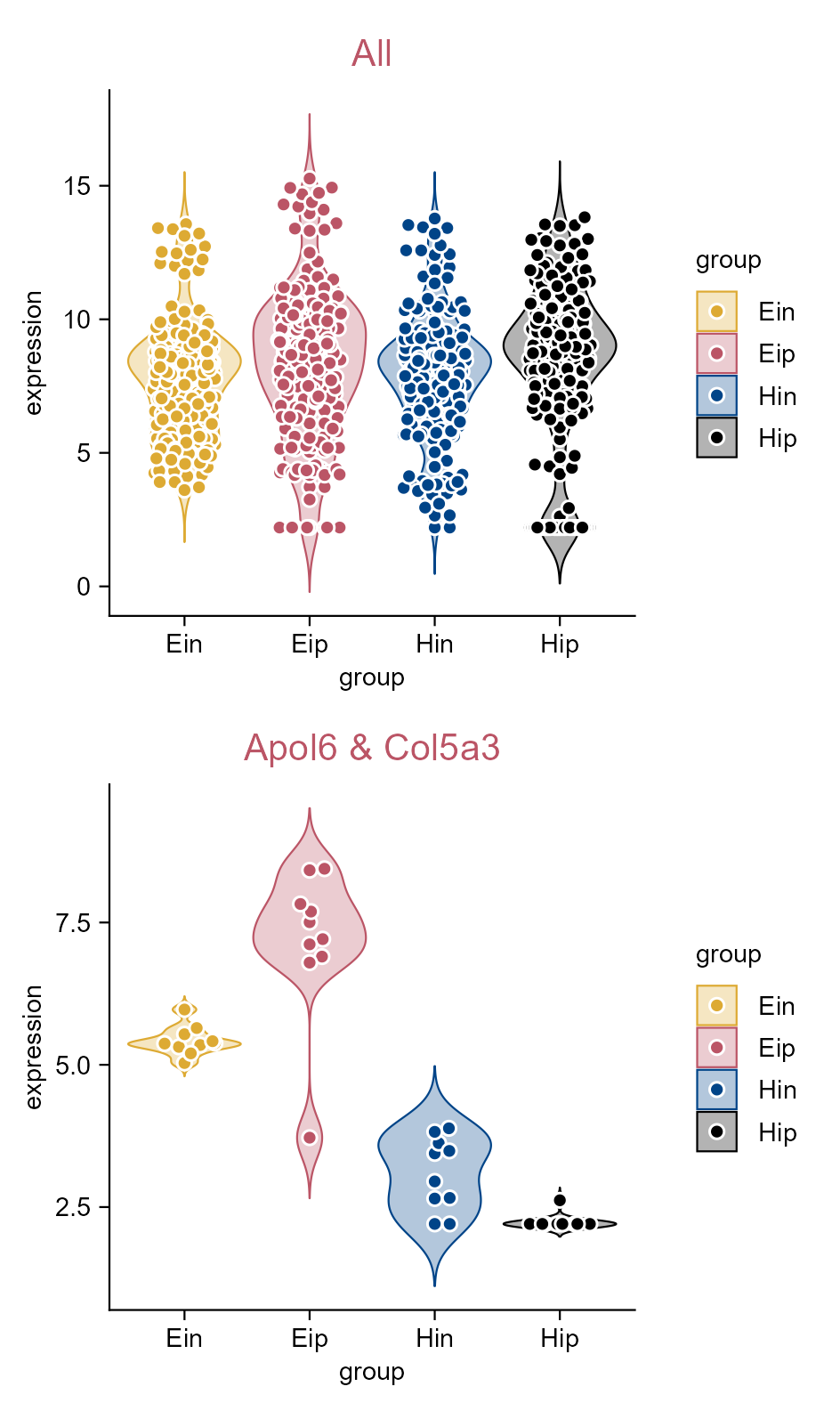
    title = "Apol6 & Col5a3")

Preview a subset of dataset.

3.18 Set a global default style (e.g. bar plot)

library(tidyplots)

# View top 10 rows of the columns used
study |> 
  dplyr::select(group, score, dose) |> 
  dplyr::slice_head(n = 10)
# A tibble: 10 × 3
   group   score dose 
   <chr>   <dbl> <chr>
 1 placebo     2 high 
 2 placebo     4 high 
 3 placebo     5 high 
 4 placebo     4 high 
 5 placebo     6 high 
 6 placebo     9 low  
 7 placebo     8 low  
 8 placebo    12 low  
 9 placebo    15 low  
10 placebo    16 low  
# eval: false

# Define a global style
my_style <- function(x) {
  x |> 
  adjust_colors(new_colors = c("#bb5566", "#ddaa33")) |> 
  adjust_size(width = 50, height = 30, unit = "mm") |> 
  adjust_title(fontsize = 10, color = "#004488")}

# Plot
p1 <- study |> 
  tidyplot(
    x = group, 
    y = score, 
    color = dose) |> 
  add_mean_bar() |> 
  adjust_size() |> 
  add_title("p1: default style")

# Set global options
tidyplots_options(my_style = my_style)

# Plot
p2 <- study |> 
  tidyplot(
    x = group, 
    y = score, 
    color = dose) |> 
  add_mean_bar() |> 
  add_title("p2: defined global style")

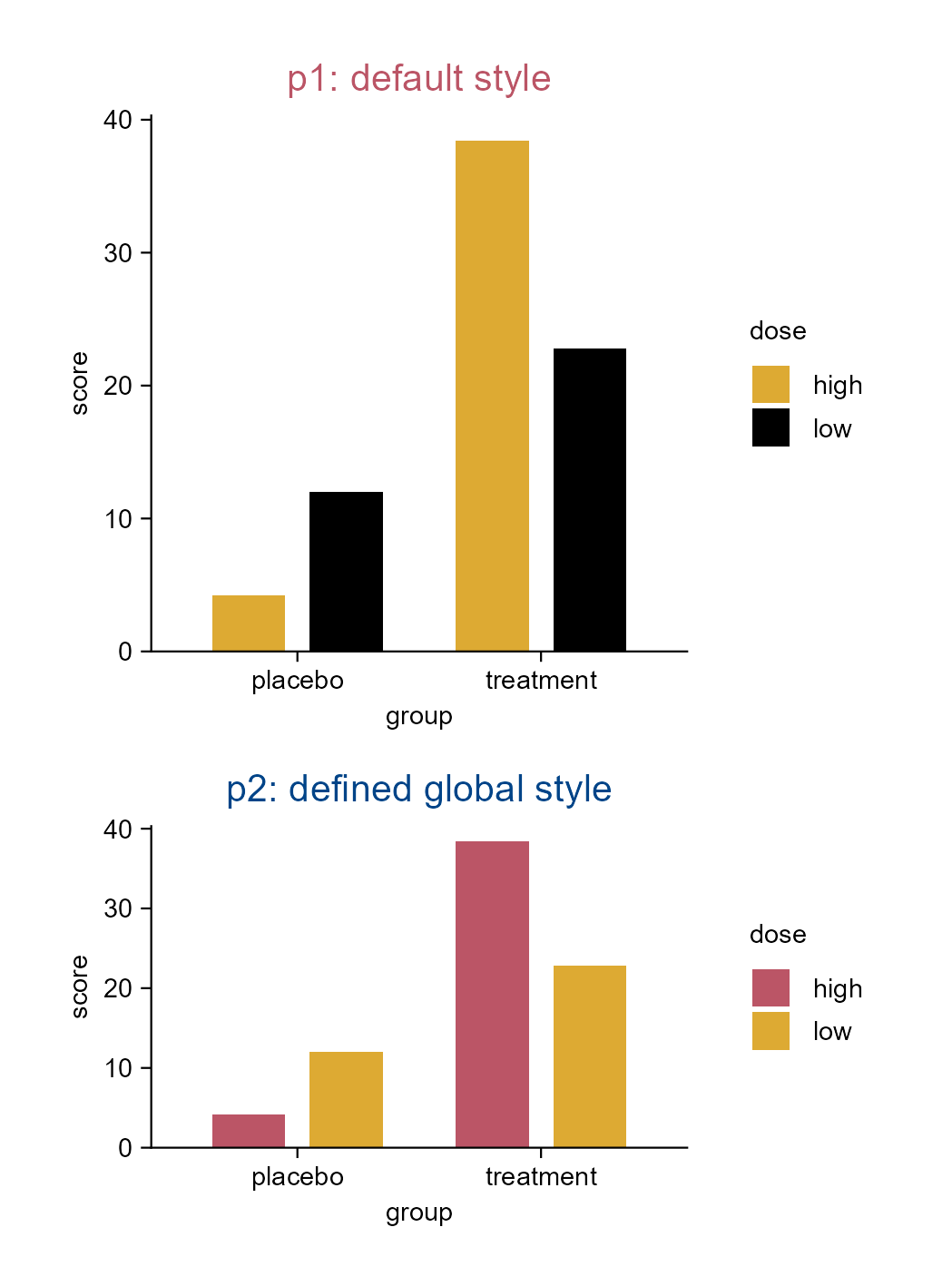
Set a global default style.

3.19 Set a custom style to reuse (e.g. bar plot)

library(tidyplots)

# View top 10 rows of the columns used
study |> 
  dplyr::select(group, score, dose) |> 
  dplyr::slice_head(n = 10)
# A tibble: 10 × 3
   group   score dose 
   <chr>   <dbl> <chr>
 1 placebo     2 high 
 2 placebo     4 high 
 3 placebo     5 high 
 4 placebo     4 high 
 5 placebo     6 high 
 6 placebo     9 low  
 7 placebo     8 low  
 8 placebo    12 low  
 9 placebo    15 low  
10 placebo    16 low  
# Define a style
my_style <- function(x) {
  x |> 
  adjust_colors(new_colors = c("#bb5566", "#ddaa33")) |> 
  adjust_size(width = 50, height = 30, unit = "mm") |> 
  adjust_title(fontsize = 10, color = "#ddaa33")}

p1 <- study |> 
  tidyplot(
    x = group, 
    y = score, 
    color = dose) |> 
  add_mean_bar() |> 
  adjust_size() |> 
  add_title("p1: default style")

p2 <- study |> 
  tidyplot(
    x = group, 
    y = score, 
    color = dose) |> 
  add_mean_bar() |> 
  add_title("p2: defined custom style") |> 
  my_style()

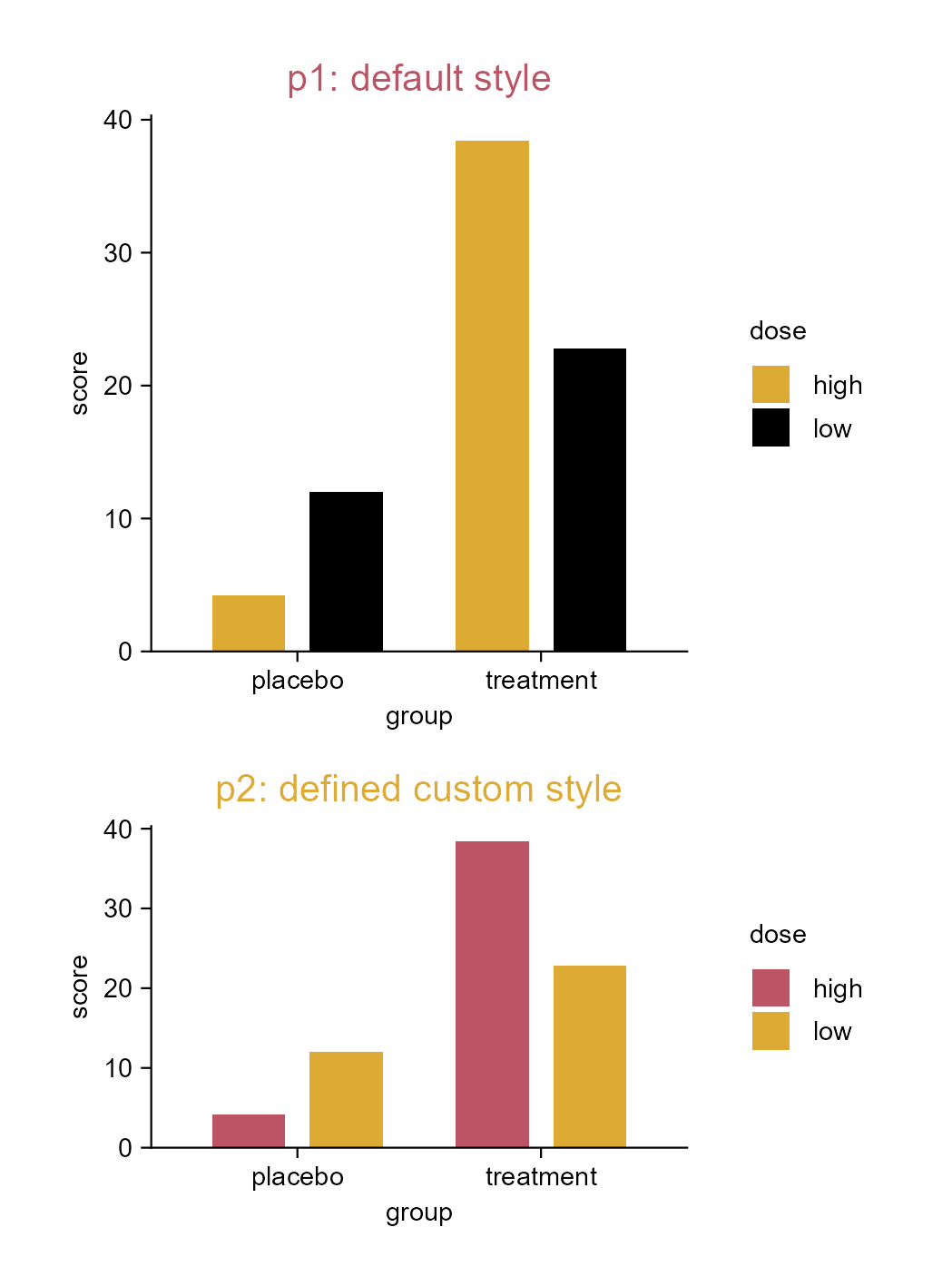
Set a custom style to reuse.

3.20 Set a custom style to reuse (e.g. areastack plot)

library(tidyplots)

# View top 10 rows of the columns used
energy_week |> 
  dplyr::select(date, power, energy_source) |> 
  dplyr::slice_head(n = 10)
# A tibble: 10 × 3
   date                 power energy_source              
   <dttm>               <dbl> <fct>                      
 1 2023-09-03 22:00:00    0   Nuclear                    
 2 2023-09-03 22:00:00 2634.  Hydro Run-of-River         
 3 2023-09-03 22:00:00 4711.  Biomass                    
 4 2023-09-03 22:00:00 8399.  Fossil brown coal / lignite
 5 2023-09-03 22:00:00 1726.  Fossil hard coal           
 6 2023-09-03 22:00:00  401.  Fossil oil                 
 7 2023-09-03 22:00:00 4900.  Fossil gas                 
 8 2023-09-03 22:00:00   17.9 Geothermal                 
 9 2023-09-03 22:00:00  232.  Hydro water reservoir      
10 2023-09-03 22:00:00  586   Hydro pumped storage       
# Define a style
my_style <- function(x) {
  x |> 
    adjust_font(family = "mono", face = "bold") |> 
    adjust_title(fontsize = 10) |> 
    reverse_color_levels() |> 
    adjust_x_axis(labels = scales::label_date( # display dates as "Sep 05" etc.
      format = "%b %d", locale = "en"))}

# Plot
p1 <- energy_week |> 
  tidyplot(
    x = date, 
    y = power, 
    color = energy_source) |> 
  add_areastack_relative() |> 
  add_title(title = "p1: areastack relative")

p2 <- p1 |> 
  adjust_title(
    title = paste("p2: areastack relative", "defined custom style", sep = "\n")) |> 
  adjust_legend_title(title = "ENERGY_SOURCE", color = "#bb5566") |>   
  adjust_legend_position(position = "left") |> 
  my_style()

p3 <- energy_week |> 
  tidyplot(
    x = date, 
    y = power, 
    color = energy_source) |> 
  adjust_title(
    title = paste("p3: areastack absolute", "defined custom style", sep = "\n")) |> 
  add_areastack_absolute() |> 
  my_style()

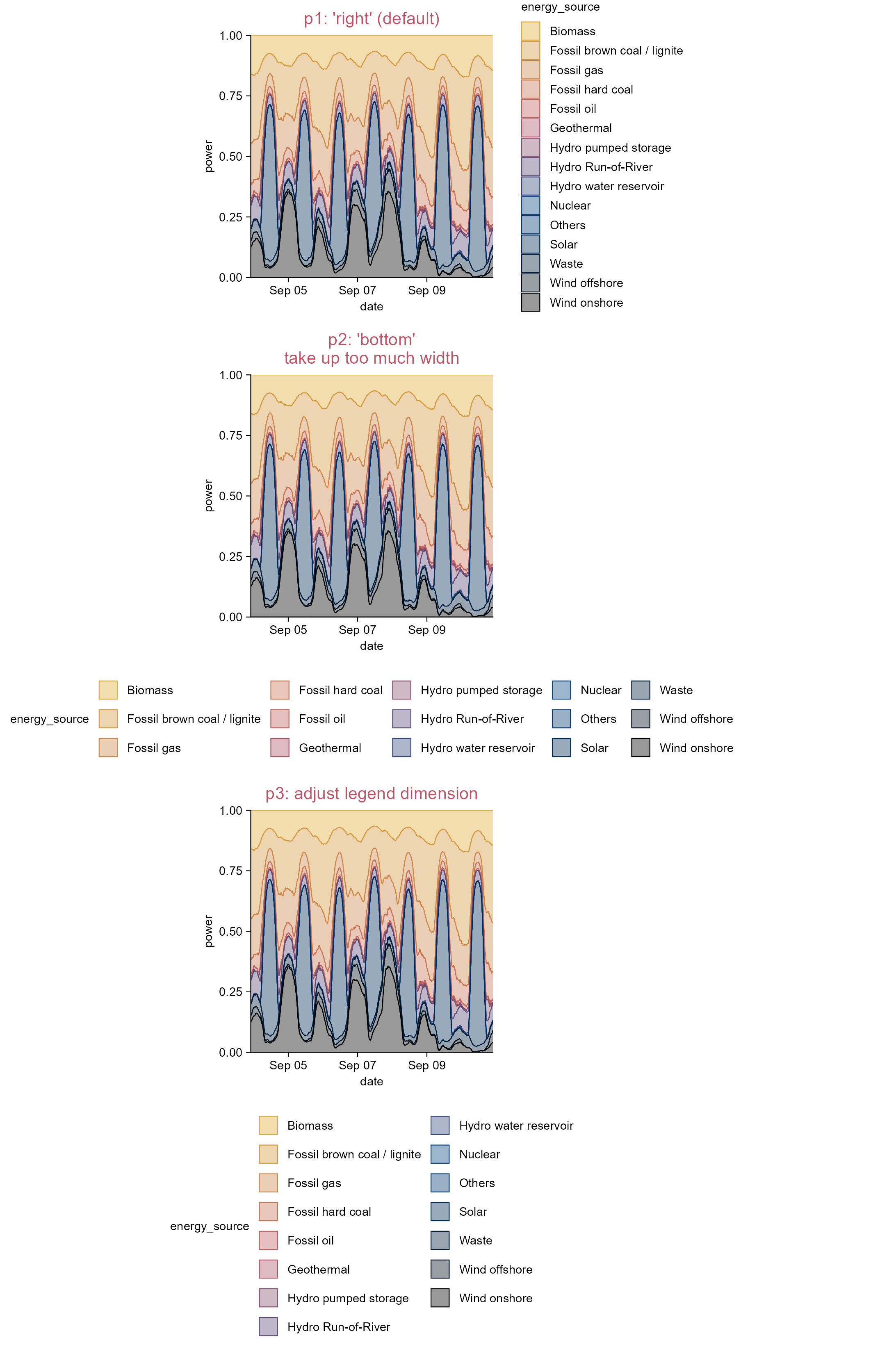
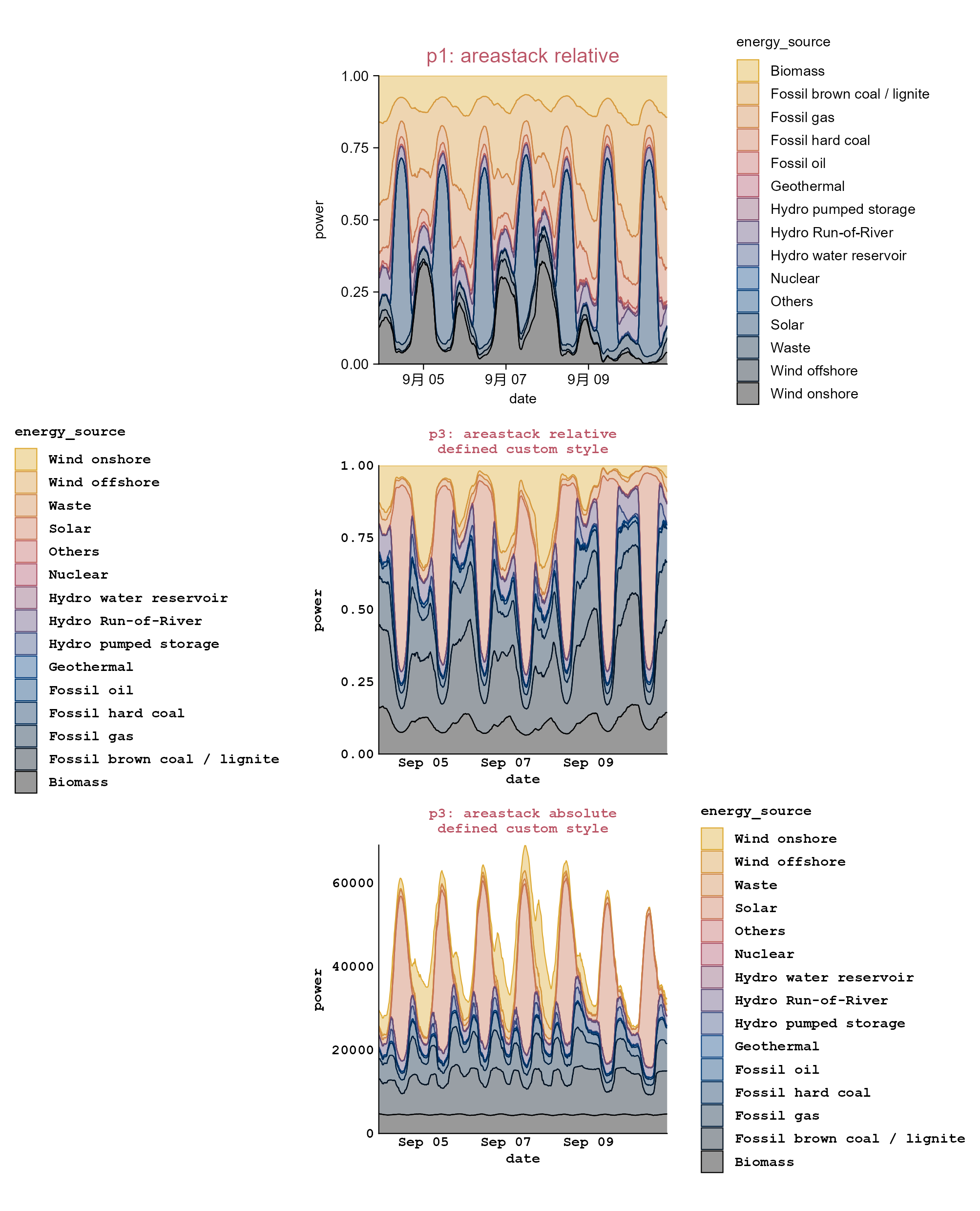
Set a custom style to reuse.
Note

Please note the Chinese character “月” on the x-axis of p1, as the code was run on an x86_64-w64-mingw32/x64 platform with the locale set to Chinese (Simplified)_China.utf8.

3.21 Plot paper and ink colors (e.g. bar plot)

library(tidyplots)

# View top 10 rows of the columns used
study |> 
  dplyr::select(treatment, score) |> 
  dplyr::slice_head(n = 10)
# A tibble: 10 × 2
   treatment score
   <chr>     <dbl>
 1 A             2
 2 A             4
 3 A             5
 4 A             4
 5 A             6
 6 B             9
 7 B             8
 8 B            12
 9 B            15
10 B            16
# Define a style to reuse
my_style <- function(x) {
  x |> 
  add_mean_bar(alpha = 0.4) |> 
  add_sem_errorbar() |> 
  add_data_points_beeswarm()}

p1 <- study |> 
  tidyplot(x = treatment, y = score, color = treatment) |> 
  my_style() |> 
  add_title(title = "p1")

p2 <- study |> 
  tidyplot(x = treatment, y = score, color = treatment, paper = "#dddddd") |> 
  my_style() |> 
  add_title(title = "p2: paper/background color changed")

p3 <- study |> 
  tidyplot(x = treatment, y = score, color = treatment, paper = "#dddddd", ink = "#004488") |> 
  my_style() |> 
  add_title(title = "p3: paper/background and ink/foreground\n color changed")
# Set global options
tidyplots_options(paper = "#dddddd", ink = "#004488")

p4 <- study |> 
  tidyplot(x = treatment, y = score, color = treatment) |> 
  my_style() |> 
  add_title(
    title = "p4: paper/background and ink/foreground\n color changed via 'tidyplots_options()'")

# Reset tidyplots options
tidyplots_options()

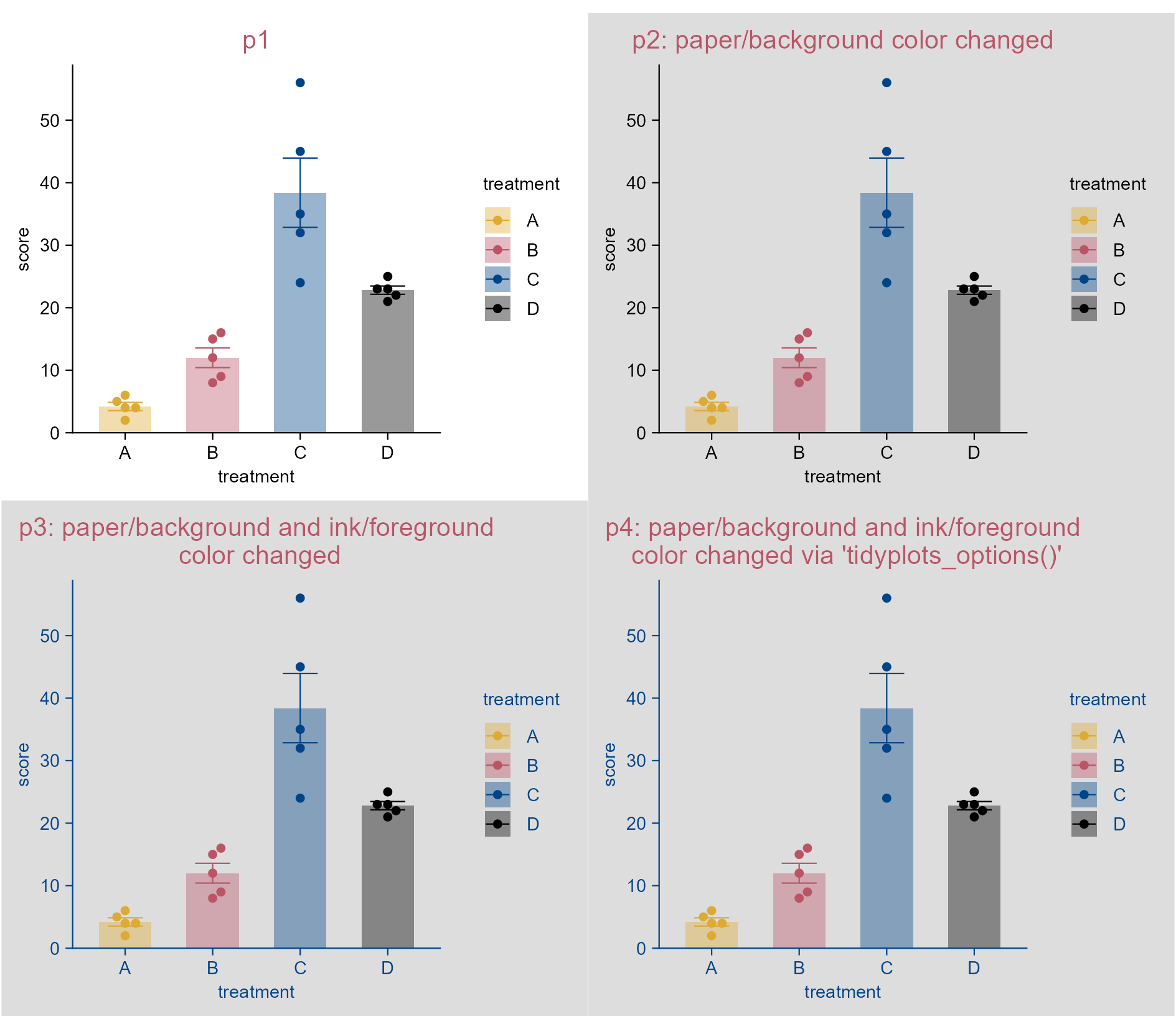
Change plot paper and ink colors.
Note

The title color of p3 and p4 should be in the ink color (i.e. blue #004488). However, it has been changed to red (i.e. #bb5566) to follow the global setting applied throughout this book.

By the way, it seems unreasonable to change the default paper and ink colors for scientific figures.

3.22 Change color scheme (e.g. bar plot)

library(tidyplots)

# View top 10 rows of the columns used
spendings |> 
  dplyr::select(category, amount) |> 
  dplyr::slice_head(n = 10)
# A tibble: 10 × 2
   category       amount
   <chr>           <dbl>
 1 Food              100
 2 Transportation     40
 3 Housing          1200
 4 Utilities          80
 5 Education          75
 6 Insurance         200
 7 Food               60
 8 Utilities          50
 9 Food               90
10 Transportation     40
# Plot
p1 <- spendings |> 
  tidyplot(
    x = category, 
    y = amount, 
    color = category) |> 
  add_sum_bar() |> 
  add_title(title = "p1") |> 
  adjust_x_axis(rotate_labels = TRUE) |> 
  adjust_size(width = 40) |> 
  sort_x_axis_levels() 

p2 <- p1 |> 
  adjust_title(title = "p2: colors_discrete_friendly (3rd & 4th colors)") |> 
  adjust_colors(new_colors = colors_discrete_friendly[3:4])

p3 <- p1 |> 
  adjust_title(title = "p3: custom color scheme (2 colors)") |> 
  adjust_colors(new_colors = c("#eecc66", "#997700"))

p4 <- p1 |> 
  adjust_title(title = "p4: colors_continuous_cividis (265 colors)") |> 
  adjust_colors(new_colors = colors_continuous_cividis)
Note

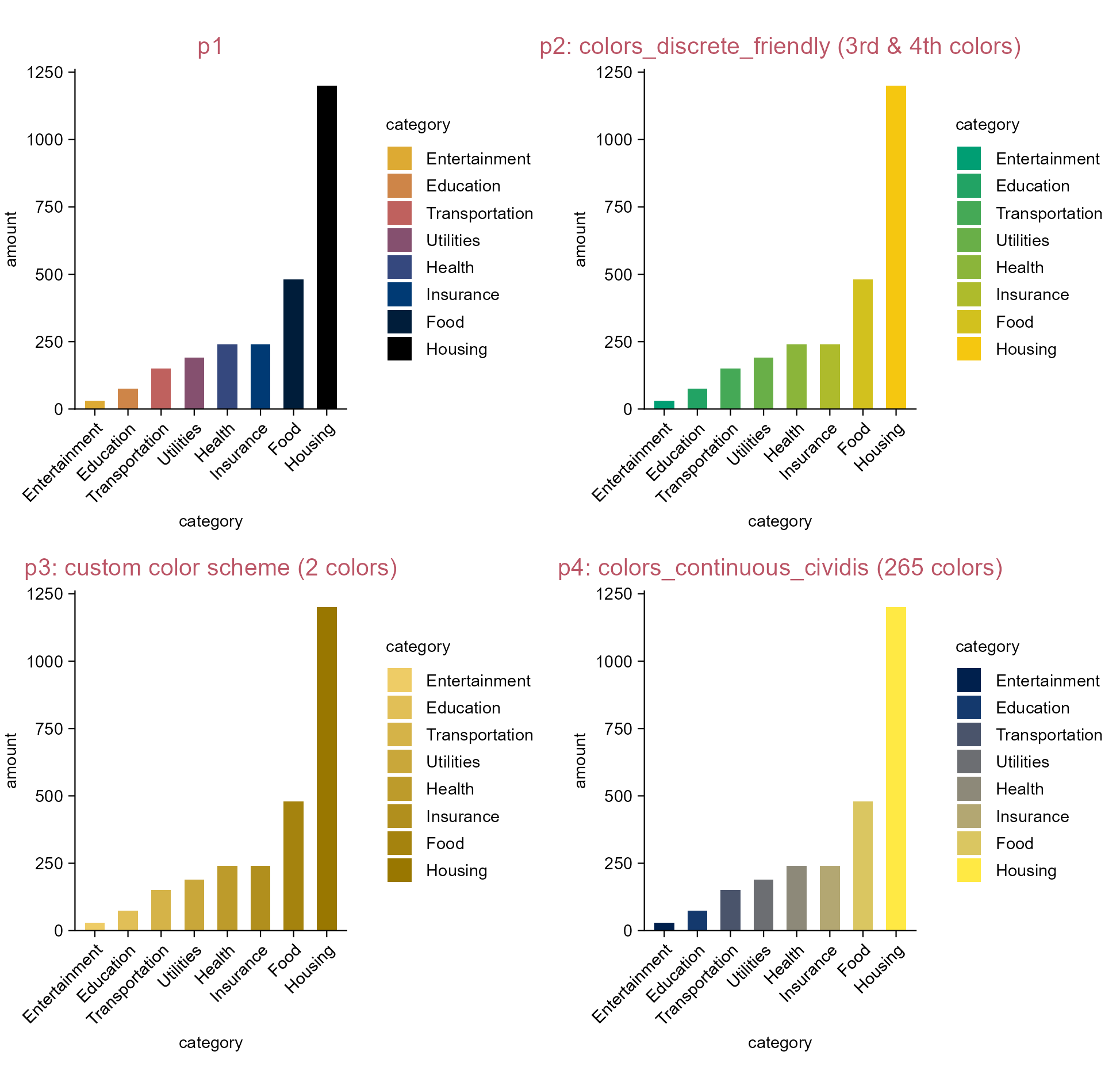
Tidyplots comes with a number of default color schemes.

A color scheme (default or custom) might contain limited number of colors (e.g. p3), tidyplots will automatically fill up the gaps between colors to deliver exactly the number that is required for the plot.

Similarly, when a color scheme contains more colors than needed (e.g. p4), tidyplots will select the required number of colors by attempting to evenly sample from the supplied color vector.

Change the color scheme.

3.23 Add data ellipses (e.g. dot plot)

library(tidyplots)

# View top 10 rows of the columns used
pca |> 
  dplyr::select(pc1, pc2, group) |> 
  dplyr::slice_head(n = 10)
# A tibble: 10 × 3
      pc1    pc2 group
    <dbl>  <dbl> <chr>
 1 -10.8  -9.17  Hin  
 2 -11.5  -7.84  Hin  
 3 -10.2  -9.11  Hin  
 4  -8.18 -7.30  Hin  
 5 -10.7  -8.15  Hin  
 6 -17.6   3.75  Ein  
 7 -20.8   7.37  Ein  
 8 -15.8  -0.644 Ein  
 9 -17.6   4.16  Ein  
10 -16.0   4.13  Ein  
# Plot
p1 <- pca |> 
  tidyplot(
    x = pc1, 
    y = pc2, 
    color = group) |> 
  add_data_points(white_border = TRUE) |> 
  add_title(title = "p1")

p2 <- p1 |> 
  adjust_title(title = "p2: ellipses") |> 
  add_ellipse()

p3 <- p1 |> 
  adjust_title(title = "p3: dotted ellipses") |> 
  add_ellipse(linetype = "dotted")

p4 <- p1 |> 
  adjust_title(title = "p4: filled ellipses") |> 
  add_ellipse(geom = "polygon", alpha = 0.2)

p5 <- p1 |> 
  adjust_title(title = paste("p5: filled ellipses", 
  "reduced level", sep = "\n")) |> 
  add_ellipse(geom = "polygon", alpha = 0.2, level = 0.8)

p6 <- p1 |> 
  adjust_title(title = paste("p6: filled ellipses", 
  "reduced level", "'norm' type", sep = "\n")) |> 
  add_ellipse(geom = "polygon", alpha = 0.2, level = 0.8, type = "norm")

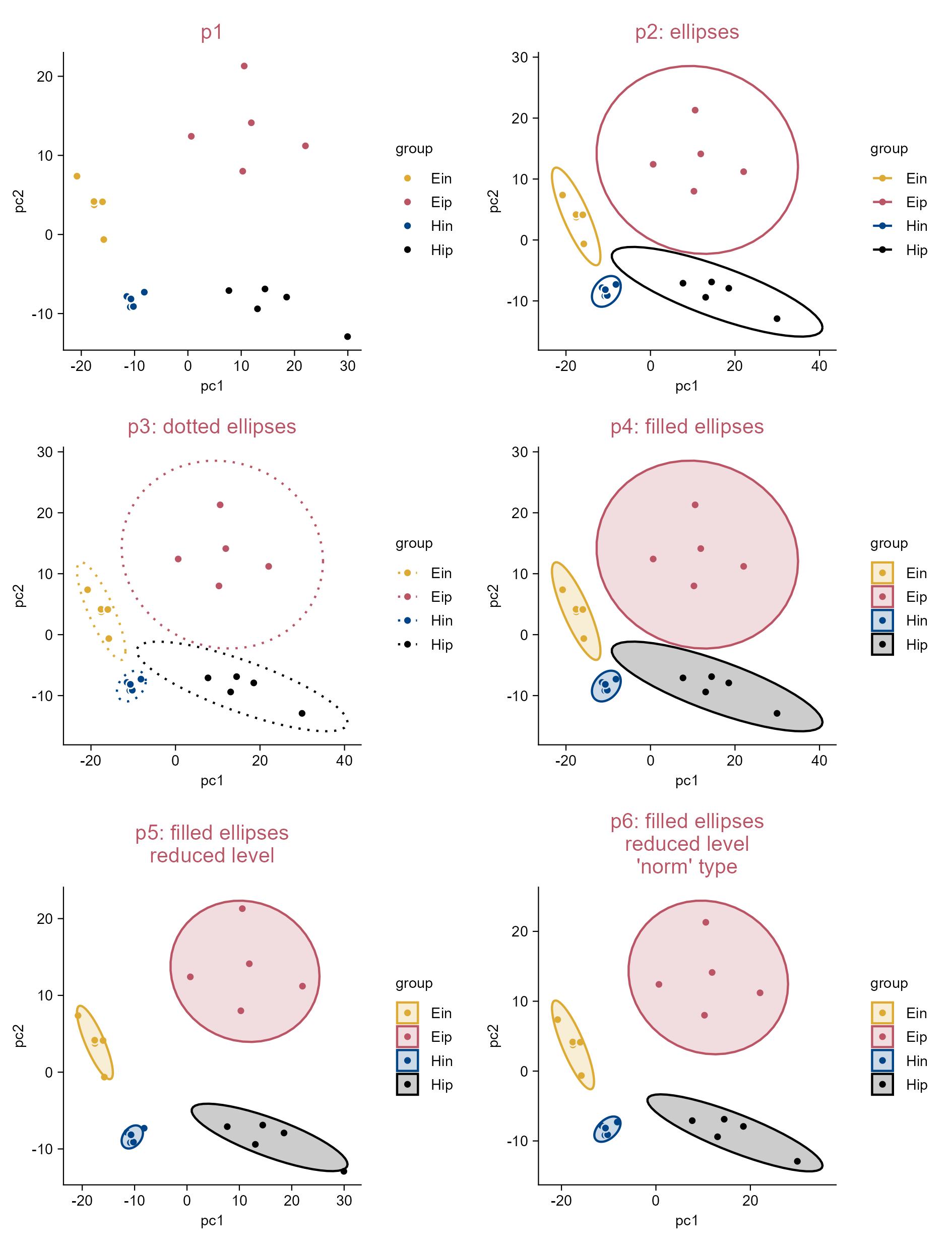
Add data ellipses.

3.24 Add mean and summary statistics to raw data points (e.g. dot plot)

library(tidyplots)

# View top 10 rows of the column used
climate |> 
  dplyr::select(month, max_temperature) |> 
  dplyr::slice_head(n = 10)
# A tibble: 10 × 2
   month max_temperature
   <chr>           <dbl>
 1 01              -1.49
 2 02               3.37
 3 03               5.05
 4 04               8.34
 5 05              16.2 
 6 06              18.2 
 7 07              20.5 
 8 08              18.2 
 9 09              18.3 
10 10              14.2 
# Plot
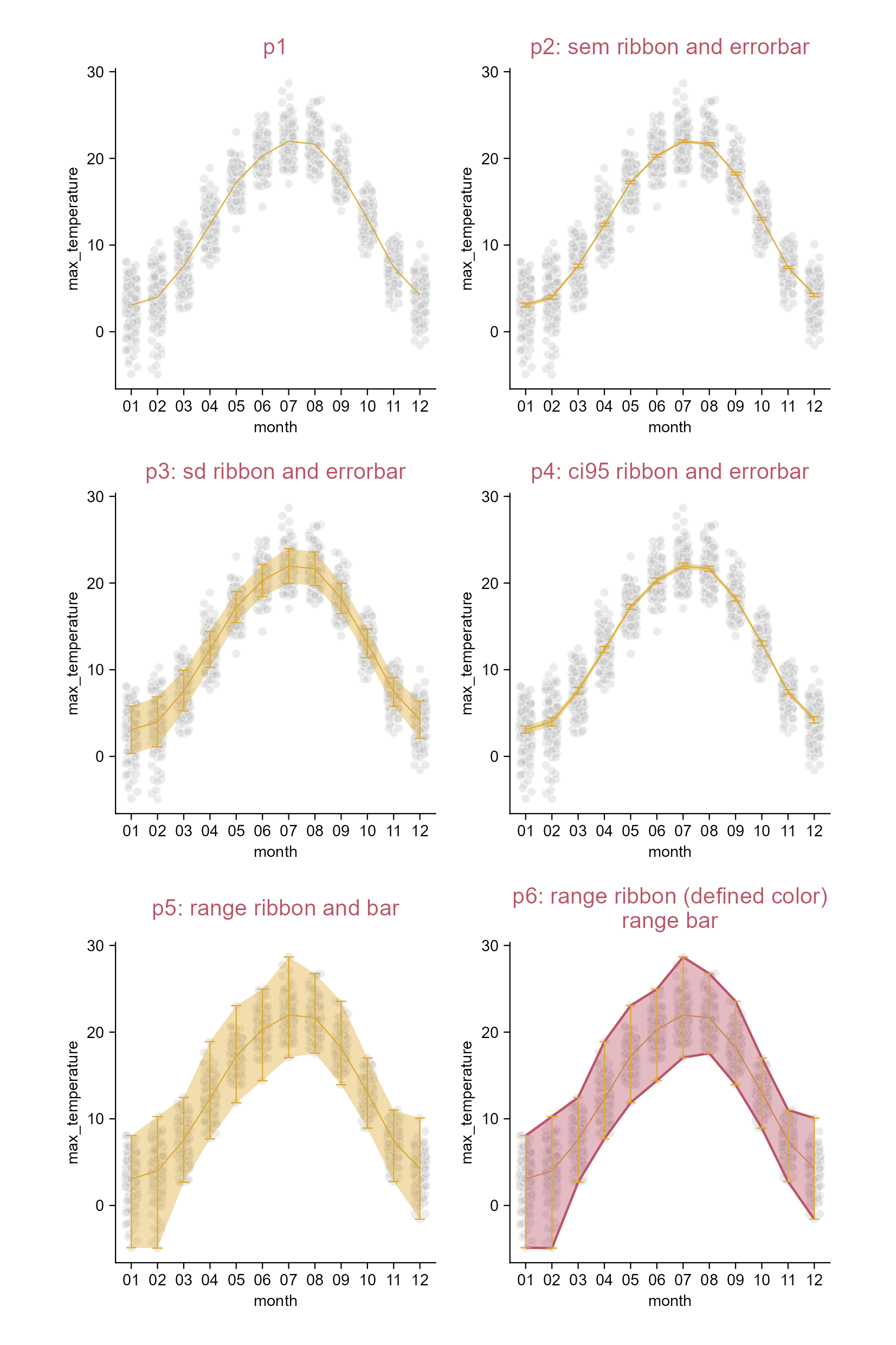
p1 <- climate |> 
  tidyplot(x = month, y = max_temperature) |> 
  add_data_points_beeswarm(alpha = 0.3, color = "#bbbbbb", white_border = TRUE) |> 
  add_mean_line() |> 
  add_title(title = "p1")

p2 <- p1 |> 
  adjust_title(title = "p2: sem ribbon and errorbar") |> 
  add_sem_ribbon() |> 
  add_sem_errorbar()

p3 <- p1 |> 
  adjust_title(title = "p3: sd ribbon and errorbar") |> 
  add_sd_ribbon() |> 
  add_sd_errorbar()

p4 <- p1 |> 
  adjust_title(title = "p4: ci95 ribbon and errorbar") |> 
  add_ci95_ribbon() |> 
  add_ci95_errorbar()

p5 <- p1 |> 
  adjust_title(title = "p5: range ribbon and bar") |> 
  add_range_ribbon() |> 
  add_range_errorbar()

p6 <- p1 |> 
  adjust_title(title = paste(
    "p6: range ribbon (defined color)", 
    "range bar", 
    sep = "\n")) |> 
  add_range_ribbon(color = "#bb5566", fill = "#bb5566") |> 
  add_range_errorbar()

Add mean and summary statistics.

3.25 Add mean and summary statistics to grouped raw data points (e.g. dot plot)

library(tidyplots)

# View top 10 rows of the columns used
time_course |> 
  dplyr::select(day, score, treatment) |> 
  dplyr::slice_head(n = 10)
# A tibble: 10 × 3
     day score treatment
   <dbl> <dbl> <chr>    
 1     0     0 untreated
 2     0     0 untreated
 3     0     0 untreated
 4     0     0 untreated
 5     0     0 untreated
 6     0     0 untreated
 7     0     0 untreated
 8     0     0 untreated
 9     0     0 untreated
10     0     0 untreated
# Plot
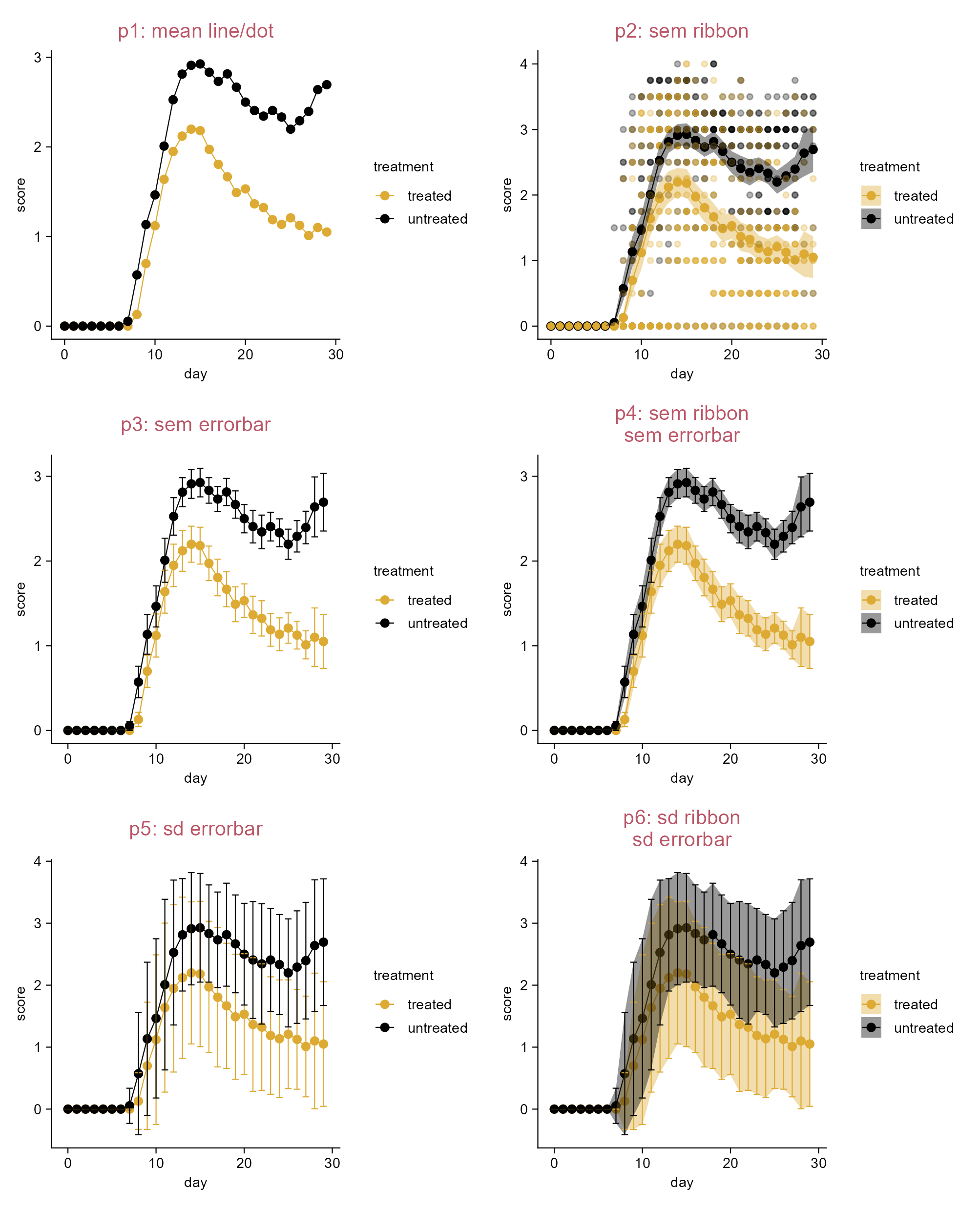
p1 <- time_course |> 
  tidyplot(
    x = day, 
    y = score, 
    color = treatment) |> 
  add_mean_line() |> 
  add_mean_dot(size = 1.5) |> 
  add_title(title = "p1: mean line/dot")

p2 <- p1 |> 
  adjust_title(title = "p2: sem ribbon") |> 
  add_data_points(alpha = 0.3) |> 
  add_sem_ribbon()  

p3 <- p1 |> 
  adjust_title(title = "p3: sem errorbar") |> 
  add_sem_errorbar(width = 1.5)

p4 <- p1 |> 
  adjust_title(title = paste("p4: sem ribbon", "sem errorbar", sep = "\n")) |> 
  add_sem_ribbon() |> 
  add_sem_errorbar(width = 1.5)

p5 <- p1 |> 
  adjust_title(title = "p5: sd errorbar") |> 
  add_sd_errorbar(width = 1.5)

p6 <- p1 |> 
  adjust_title(title = paste("p6: sd ribbon", "sd errorbar", sep = "\n")) |> 
  add_sd_ribbon() |> 
  add_sd_errorbar(width = 1.5)

Add mean and summary statistics (grouped data points).